MarCloud
Talk to a specialist

Book a call with MarCloud's Founder to discuss:

  • Integrating HubSpot and Salesforce

  • Auditing CRM data and segmenting data

  • Underperforming workflows and automations

  • Reducing license costs and inefficiencies

  • Revenue attribution modelling and proving ROI

  • AI readiness, Agent POC's, and Claude integration

Within 30 minutes, you'll know the best next step for your business.

eBook cover with title HubSpot Workflow Troubleshooting Playbook
Free ResourceView eBook

Common HubSpot problems include workflows failing to enrol contacts, incorrect reports, missing form submissions, duplicate records, lead scores not updating, and Salesforce sync errors. Some have fairly simple causes, while others point to a deeper issue with the way your HubSpot portal and connected systems have been configured.

For marketing teams, these problems can become frustrating very quickly because the effects impact more than a single feature. A HubSpot workflow that fails to enrol a contact can mean a lead receives no follow-up, an incorrect lifecycle stage can affect funnel reporting, and missing source data can make a successful campaign appear less effective than it was.

When you’re responsible for demonstrating marketing ROI to senior leadership, it’s not ideal to have to caveat every dashboard with, “the numbers are mostly right, except for…”. Unreliable reports make it hard to build confidence in marketing performance and secure future investment.

After spending a lot of time working inside HubSpot portals of varying levels of complexity, we tend to see the same technical problems appear again and again. The individual circumstances may be different, but the symptoms and underlying causes are familiar.

So, I’ve brought together 50 common HubSpot technical problems, along with the symptoms you are likely to notice, typical root causes to check, and when to seek expert support from a HubSpot Partner.

This guide should help you understand what might be happening and whether you are dealing with a fairly contained problem or something that warrants deeper technical investigation.

How to use this HubSpot technical troubleshooting guide

You can read this guide from start to finish, although I suspect most people will arrive here because one particular part of HubSpot has decided not to behave as expected. In which case, use the anchor menu above to jump to the challenge you’re facing.

Each problem follows the same structure:

Symptoms describe what you are likely to notice inside HubSpot or in your wider marketing activity.

Common root causes highlight the configuration, data, or integration issues that could be causing the symptom.

Does this need deeper investigation? gives you a sense of whether the issue is usually isolated or whether there may be something more complex going on underneath.

HubSpot itself now provides dedicated troubleshooting tools and documentation across workflows, forms, data quality and integrations, which is useful when the issue is contained to a particular feature. The harder problems arise when several parts of the platform are interacting with one another, and in these cases, you’re looking at more than a simple fix.

With that in mind, let’s start with one of the areas we are asked about most often.

HubSpot workflow and automation problems

Workflows can control everything from lead nurturing and lifecycle stages to internal notifications, task creation and Salesforce updates, so a small error in the workflow logic can have a much wider effect.

HubSpot provides workflow history, enrolment information and automation issue reporting to help identify errors, although there is a difference between a workflow failing and a workflow running exactly as configured when the configuration itself doesn’t match the intended marketing process.

1. Why aren't my HubSpot workflows enrolling contacts?

A contact can appear to meet the criteria for a workflow while still failing to enrol, which is particularly confusing when other contacts seem to be moving through it without an issue.

Symptoms

  • Contacts that look eligible never enter the workflow.

  • Expected emails, property changes, notifications or other actions don't happen.

  • Some apparently similar contacts enrol while others don't.

Common root causes

  • The contact doesn’t meet all the enrolment criteria.

  • AND/OR logic is filtering contacts differently from expected.

  • The contact has already completed the workflow and re-enrolment is not enabled.

  • The relevant property or activity had a different value at the point HubSpot evaluated the contact.

  • An exclusion or unenrolment setting applies to the record.

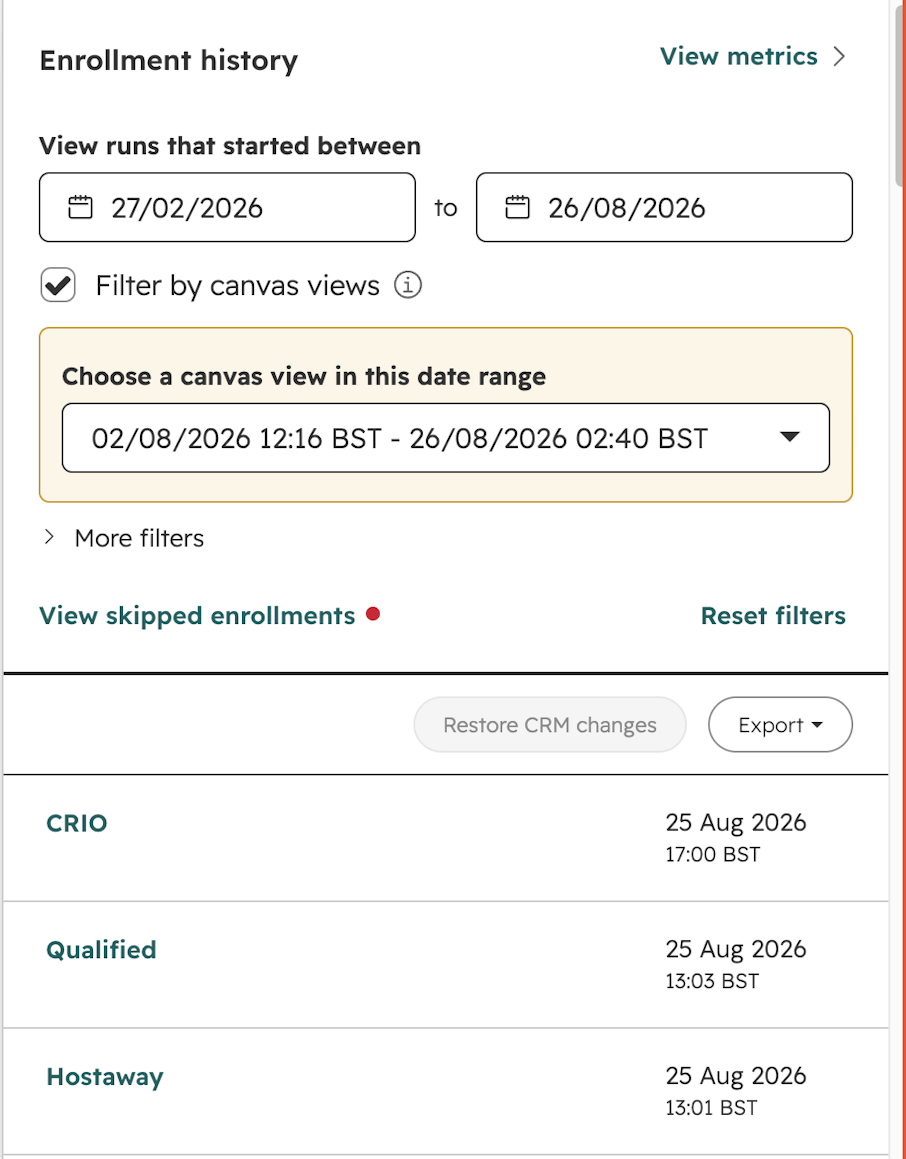
HubSpot now provides a specific workflow enrolment history view because enrolment can depend on the exact state of a record when the criteria are evaluated.

Screenshot of HubSpot enrollment history

Does this need deeper investigation? Usually straightforward when one trigger is involved, although workflows with several criteria, branches, or connected systems may need closer investigation.

2. Why are the wrong contacts enrolling in my HubSpot workflow?

The opposite happening can be just as problematic, particularly if contacts start receiving communications they were never supposed to receive!

Symptoms

  • Contacts enter a workflow even though they don’t appear to fit the criteria.

  • Internal teams receive unexpected alerts or tasks.

  • Contacts receive emails or updates intended for another stage of the customer journey.

Common root causes

  • Enrolment criteria are broader than intended.

  • OR logic allows a contact to qualify through a condition you were not expecting.

  • Another workflow or integration has changed a property used by the enrolment criteria.

  • Segment membership is being used as a trigger, and the segment itself contains unexpected records.

  • Historical data meets the literal criteria even though it doesn’t reflect the current marketing intent.

Does this need deeper investigation? Usually straightforward for a simple workflow, but repeated cases across several workflows can point to broader data or automation governance issues.

3. Why aren't contacts re-enrolling in my HubSpot workflow?

A workflow may run perfectly the first time and then seem to stop working when the same contact meets the conditions again.

Symptoms

  • A contact enrolled previously but will not enter the workflow a second time.

  • Repeat form submissions or property changes don’t trigger the expected automation.

  • New contacts work correctly while older contacts don't.

Common root causes

  • Re-enrolment hasn’t been enabled.

  • The specific condition you expect to trigger re-enrolment has not been selected.

  • The contact hasn’t met the re-enrolment criteria again.

  • The trigger being used doesn’t support re-enrolment in the way expected.

  • Another property or workflow is affecting whether the record remains eligible.

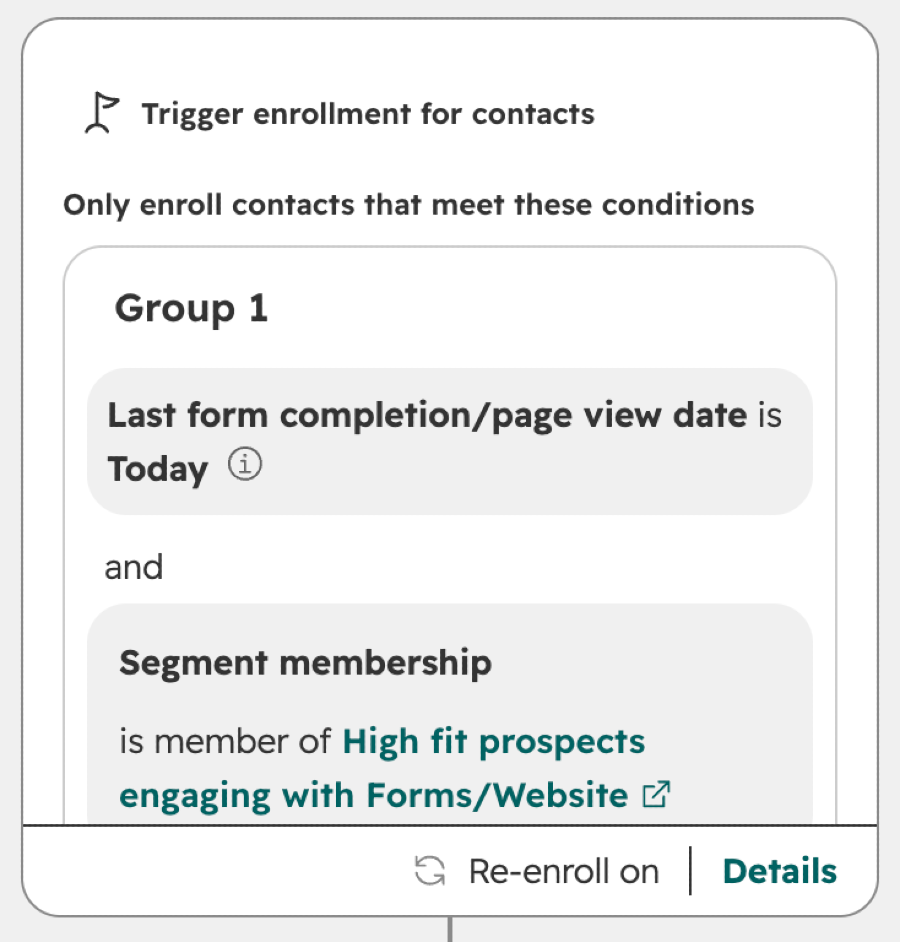
HubSpot treats initial enrolment and re-enrolment separately, and some enrolment conditions can’t be used for re-enrolment.

Screenshot of HubSpot workflow trigger enrollment

Does this need deeper investigation? Usually straightforward unless the workflow depends on several changing properties or external events.

4. Why are HubSpot workflow actions not running?

Sometimes the contact enters the workflow correctly, but the problem appears later in the automation.

Symptoms

  • A record successfully enrols, but one or more actions don’t happen.

  • Some actions complete while others show errors or appear to be skipped.

  • A workflow works for most contacts but repeatedly fails at the same stage for others.

Common root causes

  • The action can't process the value supplied to it.

  • The record no longer meets the conditions required by a branch or action.

  • Required data is missing.

  • An external application involved in the action is unavailable or rejecting the request.

  • The workflow is trying to update a property or record in a way HubSpot can't complete.

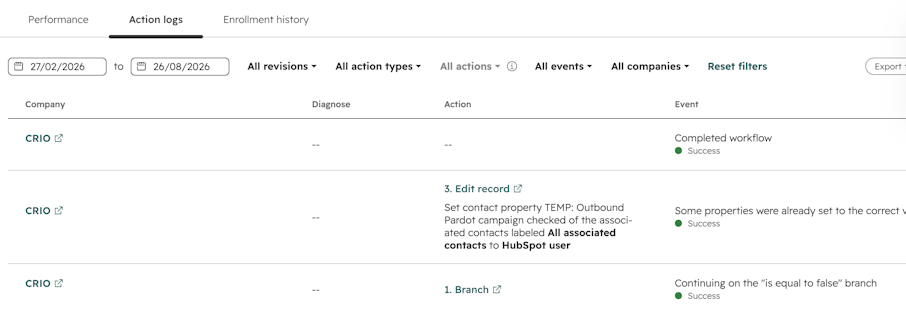
HubSpot groups workflow-related errors within its automation issues reporting, which is useful because an enrolment problem and an action problem can look very similar.

Does this need deeper investigation? May require expert investigation, particularly when the failed action involves an integration or custom code.

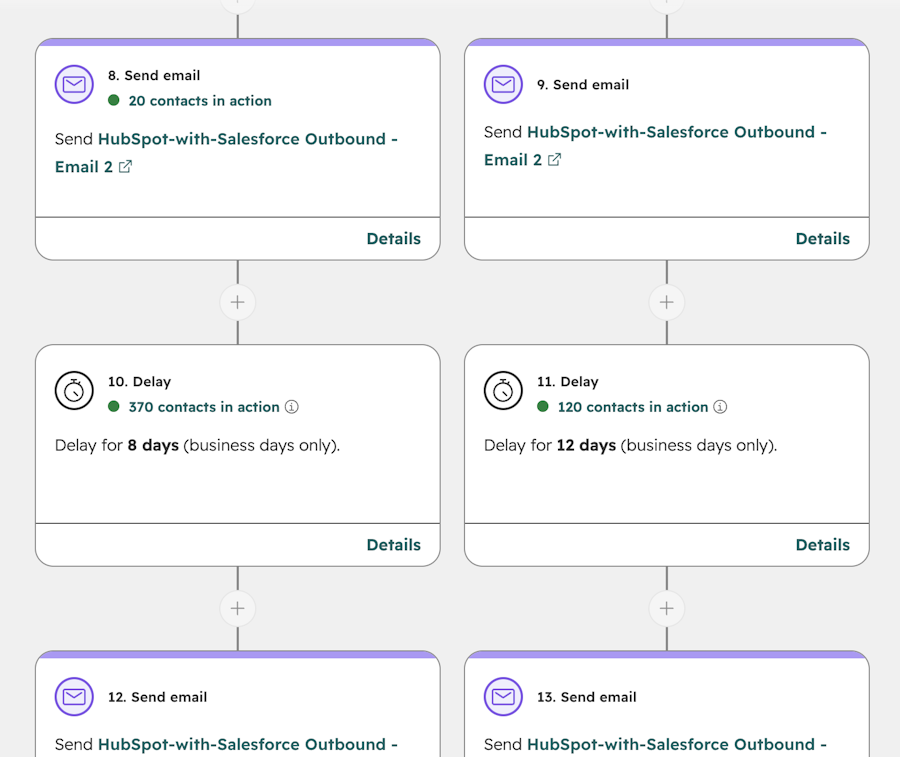
Screenshot of HubSpot action logs

HubSpot Workflow Troubleshooting Playbook

A practical diagnostic process for finding out why a record didn't enter a HubSpot workflow, why it didn't complete as expected, or why the result was wrong.

  • Step-by-step troubleshooting
  • Common workflow issues
  • When to bring in a specialist
  • Preventing enrolment issues
  • Decision tree flowchart
  • Solve your workflow issues
View eBook
eBook cover with title HubSpot Workflow Troubleshooting Playbook

5. Why is my HubSpot workflow delayed or stuck?

When a workflow is responsible for responding to a new lead, handing someone to sales, or delivering campaign follow-up, you can’t afford to waste time.

Symptoms

  • Workflow actions happen significantly later than expected.

  • Records appear to remain at one stage for a long time.

  • Leads reach sales after the point at which the marketing team expected them to.

Common root causes

  • A delay has been configured within the workflow.

  • Workflow timing settings restrict when actions can run.

  • Date-based or event-based conditions haven’t yet been met.

  • An external application or integration is processing information more slowly than expected.

  • The record is waiting for a condition elsewhere in the workflow.

By default, HubSpot workflow actions run when an enrolled record reaches them, while additional timing settings can restrict when those actions execute.

Does this need deeper investigation? Usually straightforward if the delay is consistent, although intermittent delays involving external systems may need deeper investigation.

6. Why aren't workflow emails sending in HubSpot?

A contact can move through a workflow successfully and still never receive the marketing email set inside it.

Symptoms

  • The workflow history suggests the contact reached the email action.

  • Some contacts receive the email while others don't.

  • The email appears as not sent rather than delivered or bounced.

Common root causes

  • The recipient is not eligible to receive the email.

  • The contact is not currently a marketing contact where that status is required.

  • The contact has unsubscribed from the relevant subscription type.

  • A previous hard bounce or invalid email address prevents sending.

  • Suppression or email eligibility rules apply.

HubSpot separates a marketing email that was never sent from one that was sent and then bounced in reporting, so the two symptoms point to different types of problems.

Does this need deeper investigation? Usually straightforward for individual contacts. Repeated send failures across large groups need investigating more closely.

7. Why is my HubSpot workflow updating the wrong property value?

This is often discovered later, when a sales rep or marketer notices that CRM records no longer reflect what the team expected or saw elsewhere.

Symptoms

  • A property suddenly contains an unexpected value.

  • Correct data changes after a contact passes through a workflow.

  • A report or segment becomes inaccurate because one property has changed.

Common root causes

  • The workflow action is configured with the wrong value.

  • A branch is directing records to an unexpected action.

  • Several workflows are updating the same property.

  • An integration is also allowed to write to the property.

  • A manual update is being overwritten by automation.

Does this need deeper investigation? Usually manageable when one workflow owns the property, but it can become complex when several systems can update the same field.

8. Why are contacts going down the wrong workflow branch?

Branches are useful for personalising automation, although they depend completely on the information available when the contact reaches them.

Symptoms

  • Contacts receive the wrong email sequence.

  • Leads are routed to the wrong team or owner.

  • A contact appears in a branch that does not reflect their current information.

Common root causes

  • Branch criteria don't match the intended business rule.

  • A property changed before or after the contact reached the branch.

  • Missing information sends the record into a default route.

  • Several conditions overlap.

  • Associated company or deal data is different from the contact data you’re looking at.

Does this need deeper investigation? Usually straightforward for a single branch, although complex workflow trees can make the source of the problem harder to identify.

Screenshot of HubSpot branch logic

9. Why are contacts unexpectedly leaving or being excluded from a workflow?

A contact disappearing from a workflow can be easy to miss because the obvious symptom is usually that something expected later never happened, but nobody noticed.

Symptoms

  • Contacts complete only part of a workflow.

  • A nurturing journey stops unexpectedly.

  • Records that originally qualified are no longer active in the workflow.

Common root causes

  • Configured unenrolment criteria have been met.

  • An exclusion or suppression rule applies.

  • The contact has entered another state that intentionally removes them.

  • A property used by the workflow changed.

  • Another automation has altered the record before the next action.

Does this need deeper investigation? Usually straightforward once workflow history is reviewed, although unexpected property changes may point elsewhere.

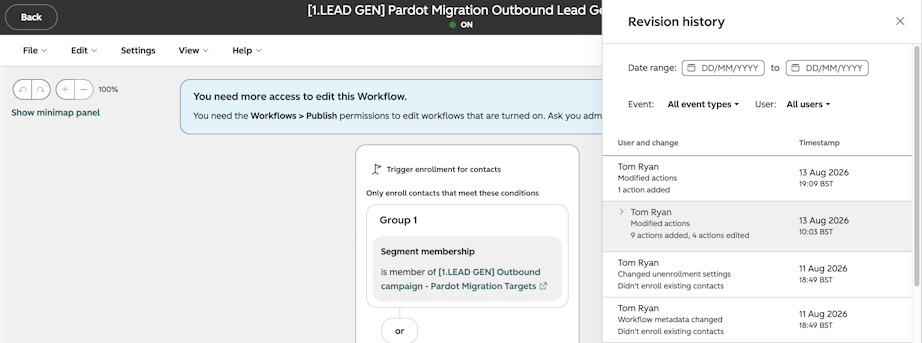
Screenshot of HubSpot workflow revision history

10. Why are my HubSpot workflows conflicting with each other?

As a HubSpot portal matures, the number of workflows tends to grow, and it becomes increasingly important to understand which automation is responsible for which data.

Symptoms

  • Property values repeatedly change or appear to change back.

  • Lifecycle stages, lead status, or ownership become inconsistent.

  • One workflow appears to undo the work of another.

  • A change fixes one process but creates an unexpected problem elsewhere.

Common root causes

  • Several workflows update the same property.

  • Old workflows remain active after a new process has been introduced.

  • HubSpot and an integrated system both control the same information.

  • There is no clear ownership for key CRM fields.

  • Workflows were created independently by different teams without considering existing automation.

Does this need deeper investigation? Often, yes. Once several automations are competing to control the same data, reviewing a single workflow won’t give the full picture.

In larger portals, this is one of the points where HubSpot technical troubleshooting becomes more about understanding the overall system and not one automation at a time.

Feeling stuck? Get specialist HubSpot support to fix workflow issues.

HubSpot Workflow Troubleshooting Playbook

A practical diagnostic process for finding out why a record didn't enter a HubSpot workflow, why it didn't complete as expected, or why the result was wrong.

  • Step-by-step troubleshooting
  • Common workflow issues
  • When to bring in a specialist
  • Preventing enrolment issues
  • Decision tree flowchart
  • Solve your workflow issues
View eBook
eBook cover with title HubSpot Workflow Troubleshooting Playbook

HubSpot CRM and data problems

Automation can only work with the information available to it, and often this comes down to data problems. A workflow might seem broken, a report might look wrong, or a lead score might appear inconsistent when the real problem started with your CRM data.

HubSpot's data quality tools now make it easier for marketers to review duplicates, property issues, and data consistency, which reflects how closely data quality is tied to the rest of the platform.

11. Why are duplicate contacts appearing in HubSpot?

Duplicate HubSpot contacts can split activity history, create inaccurate reporting and make integrations harder to manage.

Symptoms

  • The same person appears more than once in the CRM.

  • Form, email, or sales activity is spread across separate records.

  • Different teams appear to be working with different versions of the same contact.

Common root causes

  • The contact has used different email addresses.

  • Records were imported without a reliable unique identifier.

  • An integration or API has created a separate record.

  • Existing duplicates were introduced before the current deduplication process.

  • Connected platforms use different matching rules.

HubSpot automatically uses email addresses when deduplicating contact records created through common CRM processes, while Record IDs and unique-value properties can also be used in certain import scenarios.

Does this need deeper investigation? Individual duplicates are usually manageable. Frequent duplication, particularly across integrations, definitely needs closer investigation.

Read next: How to Manage Duplicates in HubSpot (& Prevent Them)

12. Why are duplicate companies appearing in HubSpot?

Company duplication is most visible when reporting at account level or trying to associate contacts and deals correctly.

Symptoms

  • Several company records represent the same organisation.

  • Contacts and deals are divided between company records.

  • Account-based reports show duplicate organisations.

Common root causes

  • Company domains differ or are missing.

  • Imports created separate company records.

  • Automatic company creation and association behave differently from the business's account structure.

  • Subsidiaries, regional domains, or alternative domains are being treated as separate companies.

  • An integration creates accounts using a different identifier.

HubSpot generally uses the company domain name when automatically deduplicating companies, which means the quality and consistency of that field matters the most.

Does this need deeper investigation? Usually manageable unless the organisation has a complex company hierarchy or Salesforce integration and account structure.

13. Why are HubSpot properties being overwritten?

A property changing unexpectedly is one of those annoying problems that can make you question everything in the system, particularly when you're certain the value was correct previously.

Symptoms

  • A property is correct and then changes later.

  • Manual changes don't remain in place.

  • Information regularly alternates between two values.

Common root causes

  • A workflow is updating the property.

  • An integration is syncing a different value into HubSpot.

  • An import has overwritten existing information.

  • Several systems are allowed to control the same field.

  • Another user or team is editing the record.

Does this need deeper investigation? May require investigation. Property history can narrow the source down, but repeated overwriting across connected systems can be an architecture issue.

14. Why aren't lifecycle stages changing in HubSpot?

Lifecycle stage is often used as the basis for funnel reporting, lead handover and automation, so incorrect stages can skew much more than the individual contact record.

Symptoms

  • MQLs remain recorded as Leads.

  • Customers still appear in earlier funnel stages.

  • Funnel reports don't reflect the process your marketing and sales teams recognise.

  • Workflows relying on lifecycle stage fail to trigger as expected.

Common root causes

  • The automation responsible for changing the lifecycle stage is not running.

  • The business process and the HubSpot lifecycle stage model don't align.

  • Associated company, deal, or sales activity is not updating the expected record.

  • Another workflow or integration controls the lifecycle stage.

  • Automatic lifecycle stage settings don't reflect your intended process.

HubSpot allows lifecycle stages to be updated through settings, workflows, and manual changes, which also means several different processes can potentially influence the field.

Does this need deeper investigation? May require investigation, particularly if the lifecycle stage is central to your reporting model.

15. Why won't a HubSpot lifecycle stage move backwards?

This often happens when a business wants to recycle a lead or return an incorrectly classified record to an earlier stage. HubSpot tools can only move the default Lifecycle stage forward. To move it backwards, the current value must first be cleared manually or through a workflow; then the earlier stage can be applied.

Symptoms

  • A workflow intended to move a record backwards doesn’t work.

  • A contact remains at a later lifecycle stage.

  • Recycled leads continue to appear further down the funnel.

Common root causes

  • The lifecycle stage needs to be cleared before an earlier value can be applied in certain workflow scenarios.

  • Another workflow or integration is restoring the later stage.

  • The marketing and sales process has been designed around a different interpretation of lifecycle progression.

Does this need deeper investigation? Usually straightforward unless several automations or systems are involved.

16. Why is the wrong contact owner being assigned?

Incorrect ownership can affect follow-up speed, internal accountability, and any reporting grouped by sales representative or team.

Symptoms

  • New leads are sent to the wrong salesperson.

  • Ownership changes after the contact has already been assigned.

  • Salesforce and HubSpot display different owners.

Common root causes

  • Lead rotation or assignment criteria are incorrect.

  • Several workflows control ownership.

  • Salesforce ownership mappings overwrite HubSpot.

  • Territory or regional data used for assignment is missing or incorrect.

  • A fallback rule is handling contacts that don't match the expected criteria.

Does this need deeper investigation? Usually manageable when there is a single assignment workflow, although multi-region or Salesforce-connected processes can be more involved.

17. Why aren't HubSpot properties updating?

When a property doesn’t update, the issue may sit with the property itself or with the process that is supposed to supply its value.

Symptoms

  • A workflow runs, but the field remains unchanged.

  • Imported or integrated data does not appear.

  • A calculated value seems out of date.

Common root causes

  • The property type doesn’t accept the value being supplied.

  • The property is calculated or otherwise controlled by HubSpot.

  • Required source data is missing.

  • An integration mapping is incorrect.

  • Another process replaces the value shortly afterwards.

Does this need deeper investigation? Usually straightforward for individual properties, although repeated failures across several mapped fields suggest a wider data issue.

18. Why are contact, company and deal associations missing?

Associations are important because HubSpot often needs to understand how a contact, company, and deal relate before it can report accurately across them.

Symptoms

  • A contact exists but has no associated company or deal.

  • Revenue can't be connected cleanly to marketing activity.

  • Automation based on associated objects does not work as expected.

Common root causes

  • Records were imported without the relevant association information.

  • The integration that created the record does not create the required association.

  • Company identification information is incomplete.

  • Custom record-creation processes don't include the relationship.

  • The association exists in another system but has never been passed to HubSpot.

Does this need deeper investigation? May require investigation, particularly when missing associations are widespread or affect attribution reporting.

19. Why isn't my HubSpot list or segment updating?

HubSpot now refers to lists as segments, although plenty of users will understandably continue searching for “HubSpot list not updating” for some time.

Symptoms

  • New contacts that appear to meet the filters are missing.

  • Contacts remain in a group even though their information has changed.

  • A workflow or email audience contains an unexpected number of records.

Common root causes

  • The segment is static rather than active.

  • One or more filters are excluding the record.

  • AND/OR logic differs from what was intended.

  • The underlying property has not been updated.

  • An associated-object filter is evaluating a different record than expected.

Active segments automatically change membership as records meet or stop meeting the criteria, whereas static segments represent the qualifying records at the time the segment was saved unless records are manually added or removed.

Does this need deeper investigation? Usually straightforward unless the segment depends on complex associated-object or behavioural filters.

20. Why is my HubSpot import failing or creating unexpected records?

Imports are often where historic CRM problems enter a new portal, because a spreadsheet doesn’t contain the identifiers or formatting HubSpot needs.

Symptoms

  • Some rows fail to import.

  • New records appear where existing records should have been updated.

  • Property values are missing or rejected.

  • Associations are incomplete after an import.

Common root causes

  • Property values don't match the required format.

  • A unique identifier is missing or incorrect.

  • Column mappings are wrong.

  • Required properties are empty.

  • Existing records can't be matched reliably.

Does this need deeper investigation? Usually straightforward for a small import, although migration-related imports involving several objects and historic data can become complex quickly and typically require a HubSpot Partner.

Speak with MarCloud about your CRM and data problems.

HubSpot forms, tracking and conversion problems

When something goes wrong with forms, the cause may sit within HubSpot or on the page where the form is embedded, which is why form troubleshooting is not always as simple as opening the form editor and checking whether it looks correct.

21. Why aren't HubSpot forms creating contacts?

A successful-looking form submission doesn’t always result in the CRM record the marketing team expects.

Symptoms

  • A visitor receives the confirmation experience, but no new contact appears.

  • Form submission totals and newly created contacts don't match.

  • Some submissions create contacts while others don't.

Common root causes

  • The form doesn’t contain the information required to create a contact under the account's current settings.

  • The submission is being associated with an existing contact.

  • Cookie-based identification links the activity with another record.

  • A custom form or integration sends data differently from a standard HubSpot form.

  • The account's form submission settings affect contact creation.

By default, the form must use HubSpot’s default Email property to create a new contact. Alternatively, the account setting allowing submissions without email addresses can be enabled.

Does this need deeper investigation? Usually straightforward unless a custom form, API, or external website process is involved.

22. Why are HubSpot form submissions missing?

Missing submissions are particularly concerning when forms are attached to paid campaigns or high-intent conversion pages.

Symptoms

  • A user says they submitted a form, but the submission can't be found.

  • Website conversion figures and HubSpot submission numbers differ.

  • A form works on one page but not another.

Common root causes

  • The form is embedded incorrectly.

  • A JavaScript or website issue prevents the submission from being captured.

  • The problem relates to the page rather than the form itself.

  • A third-party consent or security tool affects the form.

  • A custom implementation handles the submission outside the standard HubSpot process.

Does this need deeper investigation? May require investigation because the issue can sit outside HubSpot.

23. Why aren't HubSpot hidden fields populating?

HubSpot hidden fields are often used to capture campaign, routing, or contextual information without asking the visitor to enter it manually.

Symptoms

  • The form submits successfully, but the hidden property is empty.

  • A campaign or source value expected from the form never reaches the CRM.

  • Downstream workflows fail because the hidden field is missing.

Common root causes

  • The field has not been configured with the expected value.

  • The relevant URL or page information is not available to the form.

  • The wrong HubSpot property is mapped.

  • A custom script changes the form behaviour.

  • The field value is being overwritten after submission.

Does this need deeper investigation? Usually straightforward for HubSpot-hosted forms, but externally embedded or heavily customised forms may need technical investigation.

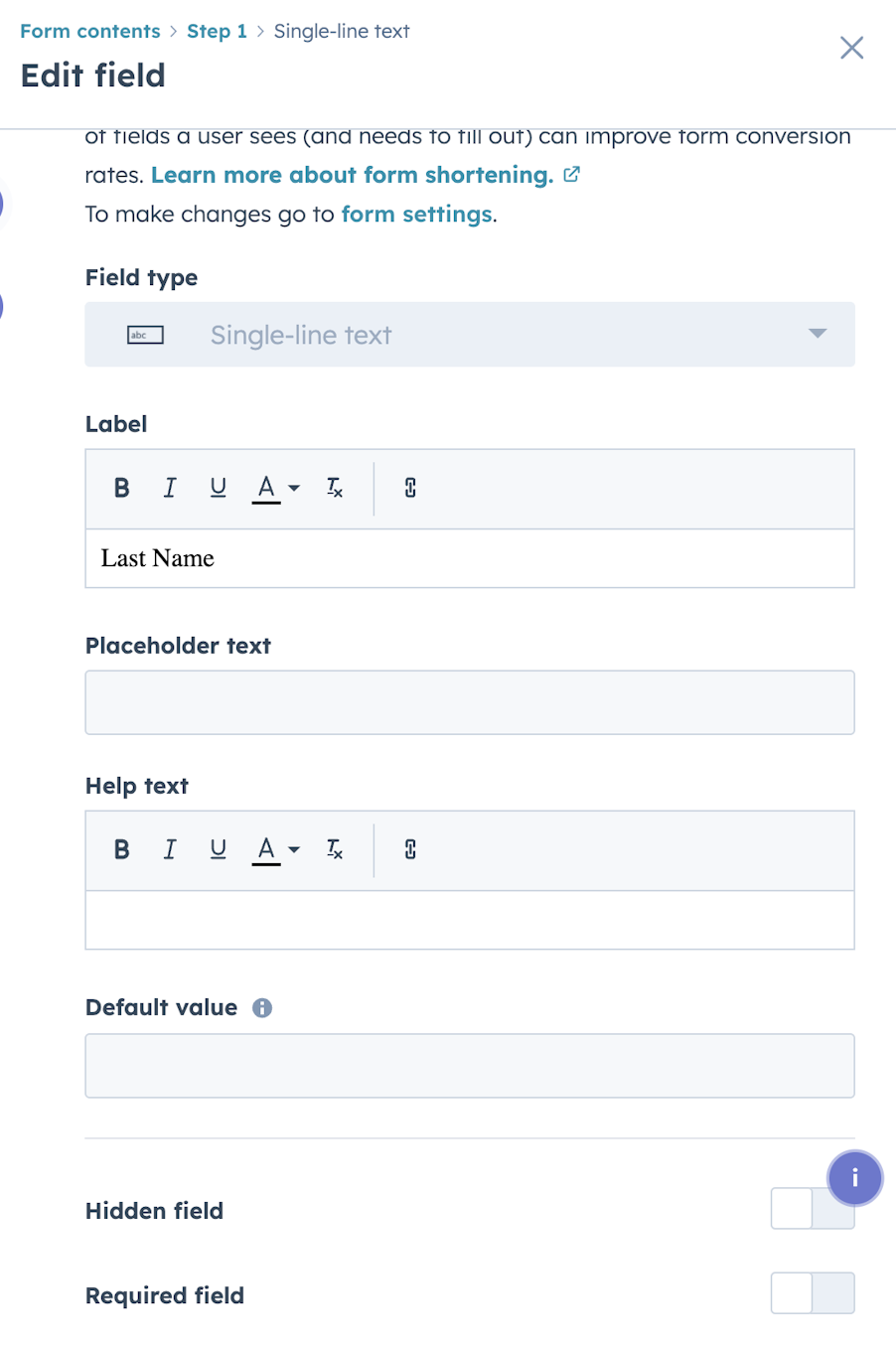
Screenshot of HubSpot form hidden field setting

24. Why aren't UTM parameters appearing in HubSpot?

UTM parameters help marketers understand which campaign, ad, or link generated a visit, so missing values can quickly affect reporting and attribution.

Symptoms

  • A contact converts, but campaign parameters are missing.

  • Paid or email traffic appears under an unexpected source.

  • Attribution reports contain fewer campaign interactions than expected.

Common root causes

  • The original link did not contain the expected parameters.

  • Redirects removed or changed the query parameters.

  • Tracking was unavailable during the relevant session.

  • A third-party tool created the contact without passing the browsing context.

  • The contact converted through a different session from the one carrying the campaign parameters.

Does this need deeper investigation? Usually manageable for an isolated campaign, although widespread missing UTM data suggests a tracking or campaign-governance problem.

25. Why is HubSpot showing the wrong Original Source?

Original Source can get confusing because it reflects HubSpot's attribution rules rather than necessarily matching the channel label a marketer would choose manually.

Symptoms

  • A known paid or email lead appears as Direct or Offline.

  • Contacts from the same campaign have different Original Source values.

  • Source reporting does not line up with other campaign reports.

Common root causes

  • HubSpot could not associate the contact with a tracked digital session.

  • Tracking information was missing when the visitor converted.

  • UTM or referral data was unavailable.

  • The contact was created through an import, API, integration, or another offline process.

  • A form submission occurred on a page without complete tracking information.

HubSpot describes Offline Sources as a catch-all where it can't attribute activity to a tracked digital session or identifiable online interaction.

Does this need deeper investigation? Usually straightforward for a small number of contacts, while recurring attribution gaps warrant a wider tracking review.

26. Why is a HubSpot form creating duplicate contacts?

Duplicate records can be particularly confusing because HubSpot normally uses email addresses to identify contacts.

Symptoms

  • Repeated form submissions appear against separate records.

  • One person has multiple contact records with different email addresses.

  • The form seems to create a new record even though the individual already exists.

Common root causes

  • The individual submitted different email addresses.

  • An external form or integration is handling identification differently.

  • Existing duplicates were already present.

  • Cookie-based identification and email-based identification don't line up as expected.

  • Custom contact-creation settings change how submissions are associated.

HubSpot ordinarily uses email addresses to deduplicate contacts, while form submissions without email addresses can rely on cookie-based identification depending on account settings.

Does this need deeper investigation? Usually straightforward unless duplicate creation is coming from several systems.
27. Why isn't automation triggering after a form submission?

The form may be functioning perfectly while the workflow that should respond to it does nothing.

Symptoms

  • The submission appears in HubSpot, but the follow-up email is not sent.

  • The contact does not enter the expected workflow.

  • A lead is created, but no internal notification or assignment follows.

Common root causes

  • The workflow trigger references the wrong form.

  • Additional enrolment criteria are not met.

  • Re-enrolment is required for repeat submitters but has not been configured.

  • The contact is excluded from the workflow.

  • The form updates a property differently from what the workflow expects.

Does this need deeper investigation? Usually straightforward unless multiple forms, workflows, and integrations contribute to the process.

28. Why aren't non-HubSpot forms being captured?

HubSpot can capture submissions from some externally built forms, but the method depends on the structure of the page and form.

Symptoms

  • The form works on the website, but no submission appears in HubSpot.

  • Some external forms are captured while others are ignored.

  • A website update causes previously tracked forms to disappear from HubSpot.

Common root causes

  • The HubSpot tracking code is not present.

  • The form structure is not compatible with HubSpot's non-HubSpot form capture.

  • The form sits inside an iframe.

  • JavaScript changes the normal submission event.

  • The form is loaded onto the page in a way HubSpot can't detect.

HubSpot notes that non-HubSpot form capture depends on its tracking code and the way the form itself is constructed.

Does this need deeper investigation? May require technical investigation when custom JavaScript, a website framework or third-party form software is involved.

29. Why isn't HubSpot tracking website activity?

Website tracking underpins source data, page-view activity and several forms of behavioural automation, so gaps here can surface across a surprisingly large number of reports and workflows.

Symptoms

  • Visits or page views are missing.

  • Known contacts show little or no website activity.

  • Traffic reporting falls unexpectedly after a site change.

Common root causes

  • The HubSpot tracking code is missing from some or all pages.

  • An externally hosted domain has not been configured correctly.

  • An ad blocker, consent setup, or browser behaviour prevents tracking.

  • Multiple tracking codes or an incorrect account code have been implemented.

  • A single-page application or customised website requires additional tracking configuration.

HubSpot confirms that pages without its tracking code can't send standard traffic, page-view, visitor-activity or site-event information back to HubSpot.

Does this need deeper investigation? Often, yes, if the problem began after a website, consent-management, or tag-management change.

30. Why isn't HubSpot associating website activity with contacts?

You may be able to see overall website traffic while individual contact records still appear to have incomplete browsing histories.

Symptoms

  • A known contact visits pages that don't appear on their timeline.

  • Form activity exists, but earlier browsing history is missing.

  • Different sessions appear disconnected from the same person.

Common root causes

  • HubSpot can't connect the visitor's browser cookie with the contact.

  • Cookie consent prevents tracking.

  • The visitor changes device, browser, or cookie state.

  • An API or server-side process creates the contact without the usual browser context.

  • Tracking was not available during the earlier visit.

Does this need deeper investigation? Usually expected at an individual level, although systematic gaps may indicate a tracking or consent configuration issue.

Run a HubSpot audit to uncover hidden issues in your portal.

HubSpot reporting and attribution problems

This is where technical problems become obvious to senior stakeholders because reporting brings all of your data, automation and CRM processes into straightforward numbers.

A dashboard can be configured correctly and still provide misleading results if the information underneath it is incomplete, inconsistent, or based on a different definition from the one the business is using.

For more detail on this area, we have a separate guide to Why your HubSpot reporting doesn't add up (& how to fix it).

31. Why are my HubSpot reports wrong?

This is a broad question, but it’s usually how the issue first crops up.

Symptoms

  • Dashboard figures don't match what the marketing team expects.

  • A number changes significantly after a seemingly unrelated CRM update.

  • Senior stakeholders ask why HubSpot and finance are reporting different results.

Common root causes

  • The underlying CRM data is incomplete or inaccurate.

  • The report uses the wrong object, property, or date field.

  • Filters exclude records you expected to include.

  • Associations between contacts, companies and deals are incomplete.

  • Lifecycle stages or campaign attribution have been configured inconsistently.

Does this need deeper investigation? May require investigation. If several reports are wrong in different ways, the reporting layer may simply be exposing a broader data problem.

32. Why do two HubSpot reports show different numbers?

Two reports with similar names can legitimately count different things, which is why comparing the headline figure alone can be misleading.

Symptoms

  • Two dashboards show different totals for what appears to be the same metric.

  • A segment count does not match a report.

  • Marketing and sales teams use different HubSpot reports for the same KPI.

Common root causes

  • The reports use different data sources.

  • Different date properties or date ranges are applied.

  • One report counts records while another counts activities or interactions.

  • Filters differ slightly.

  • Attribution models or association rules differ.

Does this need deeper investigation? Usually straightforward once the report definitions are understood, but conflicting company-wide KPI reports justify a more thorough review.

33. Why doesn't HubSpot match our spreadsheet or CRM figures?

This is especially common when HubSpot is used alongside Salesforce, finance software, or manually maintained reporting.

Symptoms

  • HubSpot reports one pipeline value while another system reports a different figure.

  • Marketing's lead totals differ from a monthly spreadsheet.

  • Closed revenue in HubSpot does not match finance.

Common root causes

  • Systems use different date definitions.

  • The reports include different record types or statuses.

  • Data sync is incomplete.

  • One source contains manual adjustments that another does not.

  • The business has never agreed on a single definition for the metric.

Does this need deeper investigation? Often, yes, because the issue is as much about data definitions and system ownership as it is about the report itself.

34. Why is HubSpot campaign ROI wrong?

When HubSpot campaign ROI looks wrong, rebuilding the dashboard may not change anything if the required costs, interactions, and revenue relationships are incomplete.

Symptoms

  • A campaign known to have generated pipeline shows little or no ROI.

  • Revenue appears against one campaign but not another.

  • Campaign performance looks significantly weaker than sales outcomes suggest.

Common root causes

  • Campaign assets are not associated as expected.

  • Campaign costs are incomplete.

  • Relevant interactions were not tracked.

  • Contacts, deals, or revenue records are missing the required associations.

  • The report and the business use different definitions of campaign influence.

Does this need deeper investigation? Often, yes, particularly when campaign ROI is being used for budget decisions.

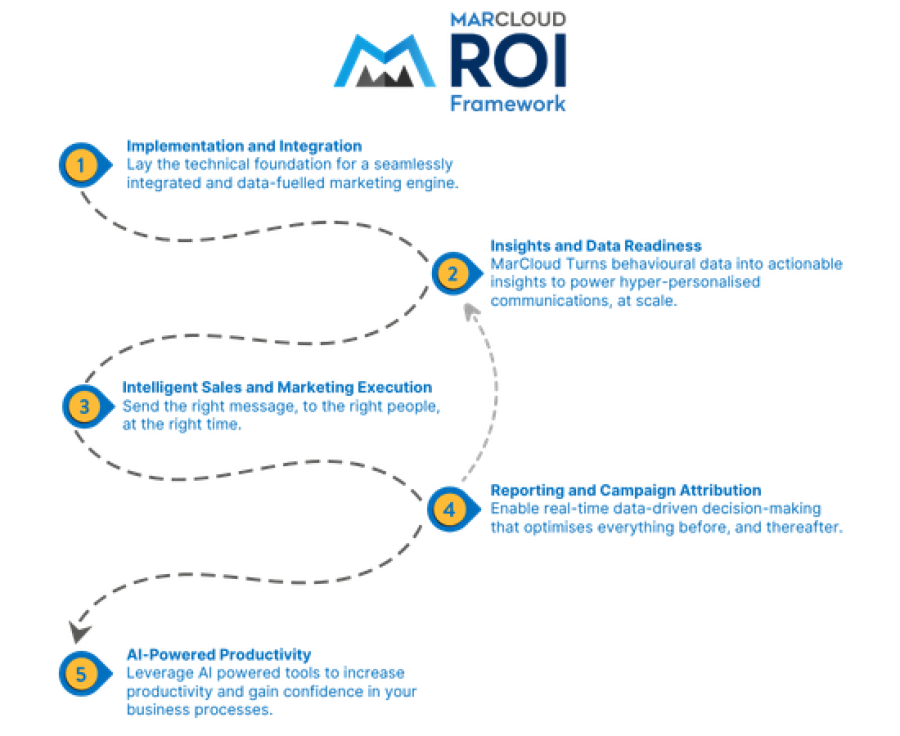
MarCloud ROI Framework

35. Why is attribution missing in HubSpot?

Attribution reporting requires HubSpot to have enough information about the customer journey to connect interactions with the outcome being measured.

Symptoms

  • Deals or revenue have no marketing attribution.

  • Known campaign touchpoints are absent.

  • Attribution reports contain substantially fewer records than expected.

Common root causes

  • Relevant interactions were never tracked.

  • Contact-to-deal associations are incomplete.

  • The necessary CRM records were created outside the system.

  • Tracking parameters or campaign associations are missing.

  • The chosen attribution report requires data that is unavailable for those records.

HubSpot offers separate contact, deal, and revenue attribution reporting, with each relying on a different conversion point and set of journey data.

Does this need deeper investigation? Often, yes, because historical attribution gaps are usually connected to how data has been collected and related over time.

36. Why is HubSpot showing too much Direct or Offline traffic?

A large Direct or Offline bucket often leads marketers to suspect the source report itself, although there are several ways tracking information can disappear before a contact reaches HubSpot.

Symptoms

  • Direct traffic grows unexpectedly.

  • Campaign leads appear under Offline Sources.

  • Email, referral, or paid activity seems underrepresented.

Common root causes

  • Referral information was unavailable.

  • Tracking parameters were missing.

  • A form was submitted on a page without HubSpot tracking.

  • Contacts were created through an import, API, or other offline route.

  • Cookie or tracking information was not passed with the conversion.

HubSpot specifically notes that Direct can include visits where referring information has been lost, while Offline Sources covers contacts it can't associate with a tracked online interaction.

Does this need deeper investigation? May require investigation if Direct or Offline traffic represents a consistently large share of important campaigns.

37. Why don't HubSpot form conversions match my reports?

A form's submission total and a contact-based report don't measure the same thing.

Symptoms

  • A form shows 200 submissions while a report shows fewer conversions.

  • Repeat submissions make campaign numbers difficult to reconcile.

  • The number of new contacts does not match total submissions.

Common root causes

  • One view counts submissions while another counts unique contacts.

  • Contacts submit the same form multiple times.

  • Different date fields or ranges are being used.

  • The report applies additional filters.

  • Existing contacts submit forms but don't count as newly created contacts.

Does this need deeper investigation? Usually straightforward once you identify exactly what each number represents.

38. Why don't HubSpot numbers match Google Ads or GA4?

This is one of the most common reporting conversations because marketers understandably expect analytics platforms to broadly agree.

Symptoms

  • HubSpot reports fewer or more sessions than GA4.

  • Paid conversions don't match Google Ads.

  • Channel performance changes depending on which platform is used.

Common root causes

  • Platforms measure users, sessions, and conversions differently.

  • Attribution models differ.

  • Tracking codes are not present on the same pages.

  • Cookie consent affects the platforms differently.

  • Conversion windows or channel definitions are different.

HubSpot Analytics and Google Analytics can differ when the respective tracking codes are installed across different sets of pages, alongside wider differences in how the systems process data.

Does this need deeper investigation? Some difference is normal. Large or sudden discrepancies are worth investigating.

The important point with all of these reporting problems is that the report is often the place where you notice the issue rather than the place where the issue started. If you repeatedly rebuild dashboards without checking the data and processes feeding them, you can spend a lot of time rearranging reports without fixing the underlying problem.

Want an expert review of your HubSpot portal? Book a call.

HubSpot lead scoring and email problems

HubSpot lead scoring and email automation both rely heavily on contact data and behaviour, so issues here frequently connect back to earlier problems with tracking, properties, or workflow logic.

39. Why isn't my HubSpot lead score updating?

When a score doesn’t change after an activity that should apparently affect it, the first question is whether the event actually meets the criteria used by that particular score.

Symptoms

  • A contact completes an important action, but their score does not change.

  • Engagement appears on the contact record but not in the expected score.

  • Some records update while apparently similar records don't.

Common root causes

  • The event or property does not meet the scoring criteria exactly.

  • The score uses a different property or event from the one being reviewed.

  • Required source activity has not been captured.

  • Time, frequency, or association conditions affect the scoring rule.

  • The score has reached a configured limit.

HubSpot's current lead-scoring model calculates scores from property and event criteria grouped within the score, with optional limits and additional conditions affecting how points are awarded.

Does this need deeper investigation? Usually straightforward unless scores depend on several objects, associated records, or complex behavioural criteria.

40. Why is my HubSpot lead score wrong?

A score can be technically correct according to the rules and still feel inaccurate from a marketing or sales perspective.

Symptoms

  • Low-intent contacts receive unexpectedly high scores.

  • High-value leads remain below the sales threshold.

  • Sales teams stop trusting the score.

Common root causes

  • Weightings no longer reflect current buyer behaviour.

  • Several criteria award points for similar activities.

  • Property data is inaccurate.

  • Event-frequency rules have an unexpected effect.

  • The scoring model doesn’t match the business’s current definition of a qualified lead.

Does this need deeper investigation? Usually yes if sales and marketing have lost confidence in the model, because the problem may sit with the design of the scoring framework rather than a single technical rule.

41. Why isn't a contact becoming an MQL when their score changes?

Lead scoring often feeds another process, usually a workflow responsible for changing lifecycle stage, notifying sales, or creating a lead.

Symptoms

  • The score crosses the expected threshold, but lifecycle stage remains unchanged.

  • Sales receives no notification.

  • The contact appears qualified in one report but not another.

Common root causes

  • The workflow is triggered by a different score property.

  • The enrolment threshold is configured differently from expected.

  • Re-enrolment is required.

  • Another lifecycle-stage rule overrides the change.

  • Additional qualification criteria have not been met.

Does this need deeper investigation? Usually straightforward unless several scoring and lifecycle processes overlap.

42. Why isn't HubSpot sending my marketing email?

This can apply to one contact or a much larger part of an audience, so understanding the scale of the issue is important.

Symptoms

  • HubSpot marks recipients as not sent.

  • Expected contacts never receive the campaign.

  • The eligible audience is smaller than anticipated.

Common root causes

  • Subscription or consent status prevents sending.

  • A contact has previously hard bounced.

  • The email address is invalid.

  • Marketing contact eligibility applies.

  • HubSpot prevents the send because of another recipient-level issue.

HubSpot treats “not sent” differently from a bounce because in the former case the email never leaves HubSpot for that recipient.

Does this need deeper investigation? Usually straightforward at contact level, although widespread sending issues may indicate a broader data, consent or deliverability problem.

43. Why is HubSpot sending my email to fewer contacts than expected?

A segment containing 20,000 contacts does not automatically mean 20,000 people will be eligible to receive a marketing email.

Symptoms

  • The recipient count drops significantly before sending.

  • A large number of contacts are excluded.

  • Email reach falls even though CRM contact volume has increased.

Common root causes

  • Contacts are unsubscribed.

  • Some records don't have valid email addresses.

  • Previous bounces affect eligibility.

  • Contacts are not eligible for marketing sends.

  • Suppression rules or exclusions apply.

Does this need deeper investigation? Usually straightforward, although a recurring gap between database size and reachable audience is worth reviewing from a data-quality and consent perspective.

44. Why are HubSpot personalisation tokens blank or incorrect?

Personalisation relies entirely on the information HubSpot can access when the content is generated.

Symptoms

  • An email shows a space where a name or company should appear.

  • The wrong company or owner information appears.

  • Different contacts receive inconsistent personalisation.

Common root causes

  • The underlying CRM property is empty.

  • The wrong object's property has been selected.

  • The required association is missing.

  • A fallback value has not been set.

  • The stored CRM value itself is inaccurate.

Does this need deeper investigation? Usually straightforward unless personalisation depends on custom objects, complex associations or data from another system.

45. Why did HubSpot stop an email send?

A send can be interrupted when HubSpot identifies a problem that could affect sending health.

Symptoms

  • A campaign stops partway through sending.

  • HubSpot displays a sending warning or suspension.

  • A large portion of the audience never receives the email.

Common root causes

  • Bounce rates or recipient quality create a sending-health concern.

  • Spam complaints or engagement patterns trigger restrictions.

  • Authentication or domain configuration creates a problem.

  • The contact database contains a high proportion of poor-quality addresses.

  • HubSpot's sending policies prevent further delivery.

An individual email send may be stopped because of high hard-bounce, spam-report, or unsubscribe rates, phishing, or abusive content. An account-level suspension affects all marketing emails and is normally triggered by repeated deliverability problems or suspected fraudulent activity. Missing email authentication can affect delivery, but it is not normally a direct cause of HubSpot stopping or suspending a send.

Does this need deeper investigation? Often, yes, particularly when the issue affects account-level sending rather than a small number of individual contacts.

Our HubSpot consultants examine your lead scoring and email deliverability. Book a call.

HubSpot Workflow Troubleshooting Playbook

A practical diagnostic process for finding out why a record didn't enter a HubSpot workflow, why it didn't complete as expected, or why the result was wrong.

  • Step-by-step troubleshooting
  • Common workflow issues
  • When to bring in a specialist
  • Preventing enrolment issues
  • Decision tree flowchart
  • Solve your workflow issues
View eBook
eBook cover with title HubSpot Workflow Troubleshooting Playbook

HubSpot integration and Salesforce sync problems

Integrations introduce another layer to HubSpot technical troubleshooting because the symptom you see in HubSpot may have been caused by a rule, validation, or data structure in another platform.

Salesforce is the obvious example. HubSpot's native Salesforce integration provides two-way contact syncing and a dedicated Sync Health area, but mappings, required fields, permissions, and API usage can still prevent particular records from syncing.

We cover this subject in more depth in our guide to 7 common HubSpot Salesforce integration issues.

46. Why aren't contacts syncing between HubSpot and another platform?

When most records sync correctly, it is easy to assume the integration must be working and overlook the handful that are failing.

Symptoms

  • A record exists in HubSpot but not in the connected system.

  • Property values remain different across platforms.

  • Some contacts update normally while others stay unchanged.

Common root causes

  • Sync filters exclude the record.

  • The record doesn’t meet eligibility requirements.

  • Required information is missing.

  • A field mapping can't accept the supplied value.

  • The integration has logged a record-level error.

Does this need deeper investigation? May require investigation, particularly if you can't identify a consistent difference between successful and unsuccessful records.

47. Why isn't HubSpot syncing with Salesforce?

This can range from a single contact failing to sync to a much broader integration problem.

Symptoms

  • Leads created by marketing never appear in Salesforce.

  • Salesforce changes are not reflected in HubSpot.

  • The integration reports sync errors or affected records.

  • Sales and marketing are working with different versions of the same data.

Common root causes

  • Inclusion or sync criteria exclude the record.

  • A Salesforce validation rule rejects the change.

  • A required field has no acceptable value.

  • Integration-user permissions are insufficient.

  • API limits, mappings, or record-level errors prevent the sync.

HubSpot provides a dedicated Sync Health area for Salesforce where current sync errors and API usage can be reviewed, but there are several different causes that can sit behind a general “Salesforce isn't syncing” complaint.

Does this need deeper investigation? Often, yes, when errors recur across several objects or business processes.

Pardot and HubSpot integration with Salesforce

48. Why are HubSpot and Salesforce fields showing different values?

Two-way sync does not automatically mean both platforms can update every field equally.

Symptoms

  • HubSpot shows one lifecycle, owner, or status value while Salesforce shows another.

  • A value changes shortly after somebody edits it.

  • One system repeatedly overwrites the other.

Common root causes

  • Field mappings use an unexpected sync direction.

  • Property and field types don't align.

  • Salesforce and HubSpot automation both update the field.

  • Conflict behaviour gives one system priority.

  • The mapped fields don't represent the same business definitions.

HubSpot's Salesforce integration allows mappings between HubSpot properties and Salesforce fields, while sync errors and warnings can appear when those mappings can't operate as configured.

Does this need deeper investigation? Often, yes, because the long-term solution is agreeing which system should own the information and configuring it correctly.

49. Why is the HubSpot Salesforce integration creating HubSpot duplicates?

HubSpot and Salesforce don't use identical approaches to identifying and deduplicating people, which can become noticeable once records move between the platforms. When multiple Salesforce leads or contacts share an email address, HubSpot normally deduplicates by email, but the records may repeatedly overwrite the same HubSpot contact. Duplicate HubSpot contacts are more likely where different email addresses or identifiers are used.

Symptoms

  • One person has multiple Salesforce Lead or Contact records.

  • Duplicate HubSpot contacts appear around the same time as Salesforce sync activity.

  • Sales activity and marketing activity become split between records.

Common root causes

  • Matching and deduplication rules differ between HubSpot and Salesforce.

  • Multiple Salesforce records already share the same identifying information.

  • Different email addresses are used.

  • Imports or manual record creation bypass the normal process.

  • Integration mappings or identifiers can't confidently match the existing record.

HubSpot has dedicated guidance for duplicate Salesforce leads and contacts syncing with HubSpot, which shows how common this problem can be once the two CRM data models interact.

Does this need deeper investigation? Often, yes. Cleaning up the duplicates without understanding why they were created can result in the same problem returning.

50. Why am I getting HubSpot integration or sync errors?

A sync-error count is useful, but it is only the symptom; the important part is understanding what those affected records have in common.

Symptoms

  • Individual records fail while others sync.

  • The integration dashboard shows recurring errors.

  • Data becomes increasingly inconsistent between systems.

  • Marketing processes work until they depend on information from another platform.

Common root causes

  • Required values are missing.

  • A value is invalid for the destination field.

  • User or integration permissions are insufficient.

  • Property mappings are incompatible.

  • API limits or external platform restrictions apply.

  • Custom code or middleware is failing.

  • Record ownership, validation rules, or object configuration prevent the update.

For the Salesforce connector, HubSpot surfaces sync errors by type and identifies the affected records, while API usage can also be monitored from the integration's Sync Health area.

Does this need deeper investigation? Frequently. When the integration sits between marketing automation and the CRM used by sales, repeated errors can affect lead handover, reporting, and revenue attribution at the same time.

Resolve integration and sync issues once and for all when you work with MarCloud.

The symptom isn't always where the problem starts

One of the recurring themes across all 50 of these problems is that the place where you notice the issue and the place where it began are often different.

A report can be wrong because a deal association is missing. A lifecycle-stage workflow can fail because an integration overwrote a property. A lead score can appear inaccurate because the website activity it relies upon was never tracked.

When we investigate HubSpot technical problems, there are broadly five layers to check:

1. Data

This is the information entering and living inside HubSpot.

If contact properties are incomplete, duplicated, or inconsistent, every process that relies upon them inherits the same problem. You may only notice it once a workflow, segment, or report uses that information.

2. Configuration

The information may be correct, while the way HubSpot has been configured does not reflect the intended business process.

This can affect lifecycle stages, scoring, property types, forms, reporting, segments and many other areas.

3. Automation

The data and configuration may both be sound, but workflows can still update the wrong information, enrol the wrong records or interact with one another in unexpected ways.

This becomes more common as a portal grows and new workflows are added over several years.

4. Integration

HubSpot can behave correctly in isolation while information breaks as it enters or leaves another system.

Salesforce is a common example, although the same principle applies to webinar platforms, data tools, custom applications, and almost any system that creates or updates HubSpot records.

5. Architecture

This is where individual components seem right when viewed separately, but the way they interact creates the problem.

You might have perfectly logical workflows in HubSpot, perfectly logical automation in Salesforce, and perfectly logical integration mappings, but collectively they update the same fields in unexpected ways.

These problems are generally harder to diagnose because there may be no obvious error message. The system is doing what it has been configured to do; the difficulty is that several configurations don't work well together.

When does a HubSpot problem need deeper investigation

The good news is, not every HubSpot problem needs to be a major technical project. Sometimes a workflow simply has the wrong enrolment condition or somebody selected a static segment when they intended to create an active one. An easy fix.

There are, however, a few signs that the problem is likely to need a more structured investigation:

  • The problem affects some records, but not others, and there is no obvious pattern.

  • You can reproduce the symptom but can't identify a consistent trigger.

  • Fixing one workflow causes a different issue elsewhere.

  • Several workflows or integrations update the same property.

  • HubSpot and Salesforce repeatedly overwrite one another.

  • Reports remain inconsistent after their filters and definitions have been checked.

  • Historical records behave differently from newly created records.

  • Custom code, APIs, or middleware are involved.

  • Nobody is completely sure which system or workflow owns a particular field.

  • The HubSpot portal has passed through several teams, partners, migrations, or implementations.

When these are the case, looking at each symptom separately is inefficient because you are repeatedly seeing different effects of the same mysterious underlying problem.

A structured HubSpot audit or Salesforce audit can help trace the issues through the portal, understand which systems are involved, and narrow down where the failure begins.

Stop troubleshooting HubSpot, start fixing

Marketing teams should be able to focus most of their time on planning campaigns, understanding customers and improving performance, rather than spending an afternoon working out why three contacts went down the wrong workflow branch.

Some technical troubleshooting will always be part of using a platform as flexible as HubSpot, particularly as your automation, integrations and reporting become more sophisticated. But recognise whether you are looking at a simple configuration issue, a problem with the underlying data, or something that needs a deeper technical investigation.

To help you troubleshoot and fix one of the most common HubSpot problems, we’ve created the HubSpot Workflow Enrolment Troubleshooting Playbook.

It’s a step-by-step process for finding out exactly why a contact that should have enrolled in a HubSpot workflow didn't, based on the investigation order MarCloud consultants use. 

It answers the question: ‘When I see this symptom, what do I check first, what does that result tell me, and where do I go next?’

Inside you’ll find:

  • A workflow enrolment diagnostic flow chart.

  • The order in which to investigate the most common causes.

  • What to check in the enrolment criteria and record history.

  • How to assess previous enrolment and re-enrolment behaviour.

  • How exclusions, suppression rules and timing can affect eligibility.

  • Common edge cases that can make a contact appear eligible when it was not eligible at the point HubSpot evaluated it.

  • How to identify when the real problem sits upstream in your forms, properties, or integrations.

  • When to stop investigating the individual workflow and look at the wider HubSpot setup.

Use the playbook when you need to work through a workflow enrolment issue in a clear, logical order.

Visit the HubSpot Workflow Enrolment Troubleshooting Playbook now.

Tom Ryan headshot

Tom Ryan

Founder & CEO of MarCloud, Tom has been on both sides of the fence, client-side and agency, working with Salesforce platforms for the best part of a decade. He's a Salesforce Marketing Champion and certified consultant who loves to co-host webinars and pen original guides and articles. A regular contributor to online business and marketing publications, he's passionate about marketing automation and, along with the team, is rapidly making MarCloud the go-to place for Marketing Cloud and Salesforce expertise. He unapologetically uses the terms Pardot, Account Engagement and MCAE interchangeably.

More by Tom Ryan

Featured resource

eBook cover with title HubSpot Workflow Troubleshooting Playbook

HubSpot Workflow Troubleshooting Playbook

A practical diagnostic process for finding out why a record didn't enter a HubSpot workflow, why it didn't complete as expected, or why the result was wrong.

View eBook
View all resources

More recent posts

View all articles
Illustrated characters holding a MarCloud banner

Get expert Salesforce & HubSpot automation tips, straight to your inbox.

MarCloud is a team of certified Pardot, HubSpot, Marketing Cloud, and Salesforce specialists. We help businesses to unlock the potential of marketing automation. Join 2,000+ professionals who receive actionable insights to boost their automation performance.

Sign up to the newsletter

HubSpot Workflow Troubleshooting Playbook

A practical diagnostic process for finding out why a record didn't enter a HubSpot workflow, why it didn't complete as expected, or why the result was wrong.

View eBook