MarCloudSpeak with a specialist

How Teams Overcomplicate HubSpot Custom Properties

There are two ways most HubSpot users handle custom properties. The first is avoiding them entirely because the platform already feels complicated. The second is going in without a plan and creating sixty fields with inconsistent names, several of which duplicate each other and most of which are never reliably populated. Whether you fall into the avoidant or abundant approach, both can leave you with a problematic HubSpot account.

Coloured background with text MarCloud's ROI Audit for HubSpot
Free ResourceGet started free

HubSpot custom properties are one of the features that make HubSpot so flexible. They are how you translate your specific business model, ICP, and lead qualification criteria into the platform's data structure, as opposed to simply running with HubSpot’s out-of-the-box fields.

But custom properties require some upfront thinking, and the consequences of skipping are automations that enrol the wrong contacts, reports that cannot be used the way you need them, and in budget conversations where your data doesn’t show return on investment.

This post covers what HubSpot custom properties are, the two most common ways teams get them wrong, how to approach them strategically, and how MarCloud builds this work into every HubSpot implementation, migration, and ongoing support engagement.

What are HubSpot custom properties?

HubSpot comes with a substantial set of default properties across contact, company, deal, and ticket records. These are fields like email address, lifecycle stage, lead source, and close date that cover the basics well enough for general purposes. 

The challenge is that "general purposes" and "your purposes" are different. Default properties were built to work for every HubSpot customer; custom properties are how you make the platform work for yours.

Default vs. custom properties in HubSpot

A custom property is a field you create to capture data that HubSpot does not have a default field for, i.e. attributes specific to your business, your market, or how you define a qualified lead. 

You might add custom properties for things like industry subsector, product tier, or whether a contact attended a webinar in the past twelve months. Whatever the data point is, if it matters to how you segment, lead score, or report on your audience, it almost certainly needs to be a structured property rather than a note in the contact record or a column in a spreadsheet running alongside the CRM.

Which objects support custom properties?

Custom properties can be created on contact, company, deal, and ticket records, and on custom objects for Enterprise subscribers. The object type determines where the property appears in records, whether it can be used in specific workflow conditions, and what it can filter in reports. One of the more common oversights is creating a property on the contact record when it belongs on the company, or vice versa, which limits its usefulness and tends to require workarounds further down the line.

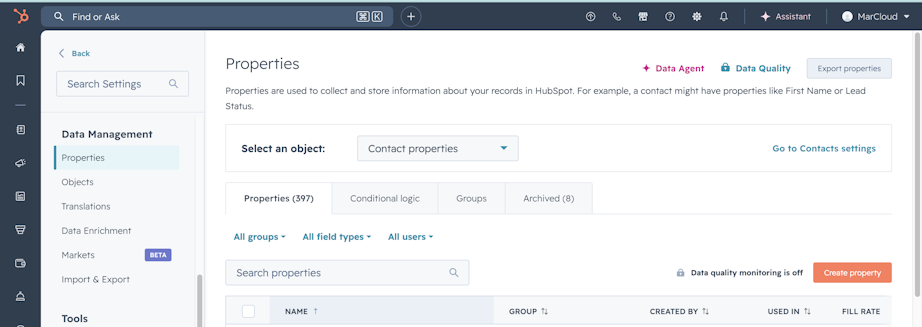
Screenshot of HubSpot Properties settings

How teams typically get HubSpot custom properties wrong

Avoiding custom properties out of caution

The instinct to leave custom properties alone is understandable. HubSpot has a lot of settings, and the consequences of making changes are not always immediately obvious. There is a reasonable concern about creating something difficult to undo. 

So instead of building the property structure the platform needs, teams work around its absence, tracking important lead data in spreadsheets alongside HubSpot, shoehorning information into mismatched default fields, or accepting that their segmentation will always be slightly approximate.

However, avoiding custom properties means you’ll have a database capturing generic data rather than the specific signals that tell you whether a lead is genuinely qualified, where it came from, or what it is most likely to respond to.

Creating custom properties without a plan

On the flip side, rather than avoiding custom properties, some teams create them freely by adding fields as and when the need seems to arise, without checking whether a similar property already exists, without agreeing on a naming convention, and without considering what field type will keep the data usable downstream.

HubSpot does not enforce property governance by default. Anyone with sufficient permissions can create a custom property, and in a busy team, this can lead to a hundred and fifty properties after eighteen months, a significant proportion of which are sparsely populated, inconsistently named, or quiet duplicates of one another. 

Free-text fields proliferate because they are faster to create, and then list filters break because the same value has been entered as "Professional Services", "professional services", and "Prof. Services", depending on who completed the form.

Both failure modes indicate the same issues. No plan connects the data you need to capture to the outcomes you need to produce.

Why HubSpot custom properties matter for reporting ROI

The way your HubSpot properties are structured has a direct bearing on what you can segment, what you can automate, and what you can attribute, which in turn determines how clearly you can show marketing's contribution to revenue.

Segmentation is only as good as the data behind it

HubSpot lists, smart content, and workflow enrollment all rely on properties to filter contacts into meaningful groups. If the fields that define your ICP, buying stage, or product interest are incomplete, inconsistently populated, or absent, your segments are based on guesswork. 

For example, a lead scoring model that depends on industry classification and intent signals can only work if those fields are reliably captured. We need the right properties, in the right format, with clear expectations around how they are filled in and when.

The link between custom properties and attributable ROI

If you can’t report on campaign performance by industry, by product interest, or by deal type because the relevant fields don’t exist in HubSpot, or exist but are inconsistently populated, your ROI reporting will suffer. You can show that leads came in, but you cannot show which segment responded, which campaign drove the highest-value opportunities, or how activity maps to revenue at the level of detail that informs investment decisions.

Without custom properties, HubSpot records what happened; with them, it can tell you why it happened and for whom, which supports meaningful C-suite conversations.

It’s also worth mentioning property limits: HubSpot's free tier caps users at ten custom properties per object, and while paid tiers extend this considerably, the limit reinforces the case for planning rather than creating on the fly.

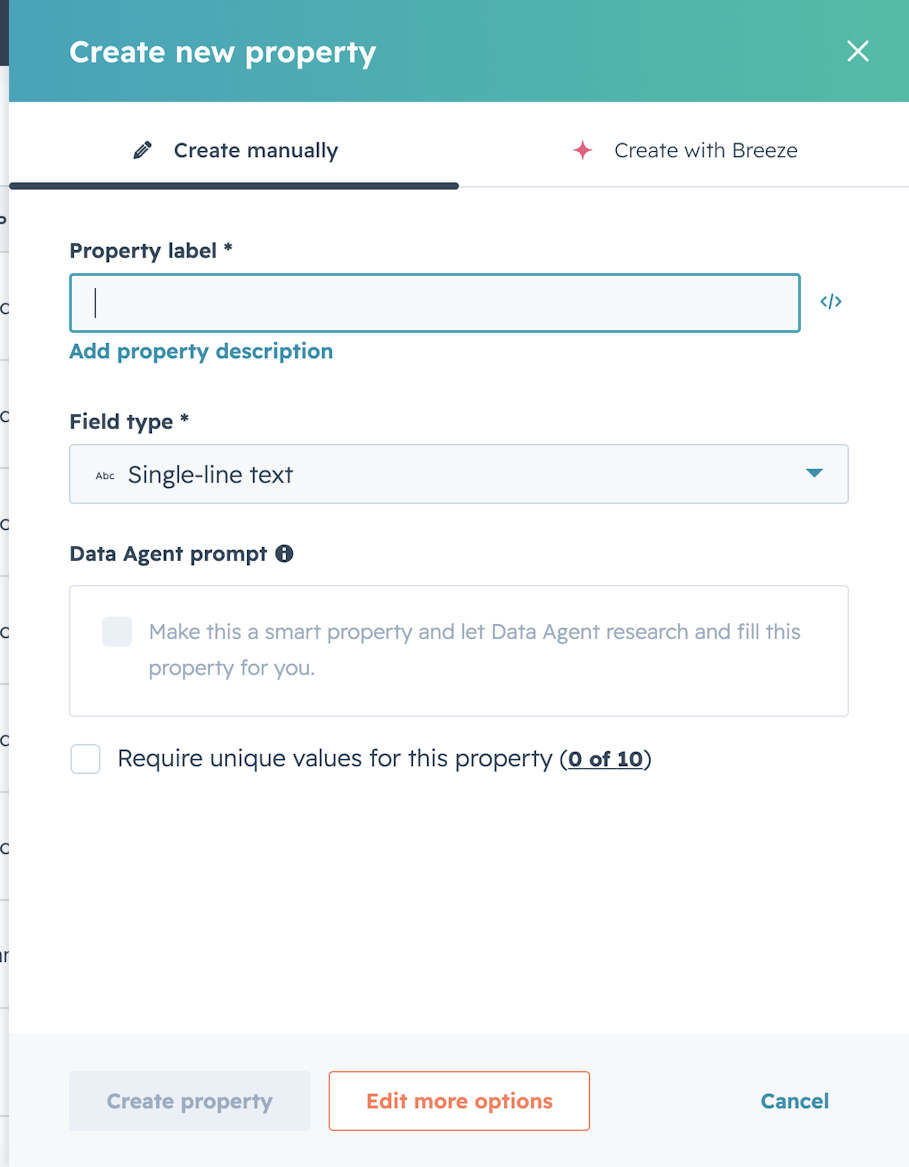
Screenshot of Create new property in HubSpot

How to approach HubSpot custom properties

Start with the questions you need to answer

Map the reports and segments you need first, then work backwards to the properties required to produce them. 

If you need to report on conversion rate by industry sector, you need a reliable, structured industry property populated at or before the point of a contact becoming a lead. 

If you need to segment by product interest for campaign targeting, you need a property for that (most likely a dropdown or checkbox, not a free-text field) and a point in the lead journey where that information is captured consistently.

The question for each prospective property is: what decision will this field enable? If the answer is unclear, the property probably doesn’t need to exist yet.

Check what already exists before creating anything new

HubSpot's default property library is large, and it’s worth auditing existing properties (both default and custom) before adding new ones. Duplication is one of the most common and most problematic property problems, because two fields capturing the same information means the data is split between them, and neither is complete enough to be reliable in a filter or report.

Choose the right field type

Field type is a data quality decision. If a property will be used in list criteria, workflow conditions, or reports, it shouldn’t be a free-text field. Dropdowns, checkboxes, and date pickers constrain inputs to structured values that can be reliably filtered and reported on; open text responses cannot. 

The general rule is to use free-text fields only for genuinely open-ended information, such as notes, context, qualitative observations, and structured field types for anything that will be used to sort, filter, or segment contacts.

Naming conventions and property groups

A consistent naming convention makes properties findable, prevents duplication, and makes it considerably easier to bring a new team member into an account without having to explain the entire history of why "MQL Type (Legacy)" exists alongside "MQL Classification". 

Have conventions and apply them consistently. Some teams use department prefixes, others use object prefixes, and others use a descriptive structure that mirrors their internal language.

Property groups serve a related purpose: they determine how properties are organised on contact records and in the properties settings panel. Grouping by department, lifecycle stage, or functional use makes the record view more useful for the people working in it day-to-day, and reduces the chance of important fields being overlooked or duplicated.

Free ROI Audit for HubSpot

Get a branded audit report covering data quality, automation health, pipeline performance, and ROI readiness, structured around the MarCloud ROI Framework.

  • Instant HubSpot audit
  • Branded audit report
  • Executive summary
  • Data quality
  • Priority actions
  • Proven ROI Framework
  • Salesforce analysis
  • AI readiness
HubSpot ROI Audit
Coloured background with text MarCloud's ROI Audit for HubSpot

What a HubSpot audit reveals

When MarCloud conducts a HubSpot audit, the properties layer is one of the areas reviewed, because its condition affects the reliability of almost everything else in the platform. We often see the same types of issues cropping up:

  • Unused or sparsely populated properties — often created for a campaign or integration that is no longer running, which adds clutter to every contact record and creates confusion about which fields are still active

  • Free-text fields where structured inputs belong — the most common single source of dirty data, and frequently the reason list membership is unreliable or workflow enrollment is inconsistent

  • Properties on the wrong object — particularly industry sector or employee count sitting on the contact record rather than the company, which means the data cannot be used for account-level reporting, and duplicates inconsistently across records

  • Missing properties for key segments — the absence of fields that the team is effectively working around, usually by filtering on something approximate or maintaining manual lists that should be dynamic

  • No consistent naming convention — making the property list difficult to search, hard to audit, and impractical to hand over cleanly when team membership changes

The output of a HubSpot audit (either run by our team or instantly online with our HubSpot ROI Audit tool) is a prioritised plan for what to fix, what to build, and what governance to put in place going forward, with the explicit goal of making the platform more useful for the reporting and campaign activity the team is already trying to do.

Maintaining good property governance over time

With new team members joining and new integrations being added, a well-structured set of properties will drift back towards the same problems over time without a process for maintaining them. Here are some measures to stop this from happening:

  • Limit who can create properties. Restricting property creation to account owners or an agreed RevOps function prevents ad hoc additions from building up between reviews.

  • Document each property. A simple internal record of what each field captures, what values are acceptable, and which team uses it reduces inconsistency as people join or leave, and is particularly valuable when onboarding new users who did not build the original setup.

  • Review quarterly. HubSpot's property usage data shows which fields are actively being populated, which makes it straightforward to identify candidates for consolidation or removal regularly, rather than in a reactive clean-up.

  • Audit integration syncs carefully. New tools connecting to HubSpot often create their own properties automatically; reviewing and deciding which to keep is worth doing at the point of integration.

This is the kind of work that MarCloud can build into ongoing HubSpot support as part of how the platform is maintained, so it continues to serve the team's needs as the business changes.

Frequently asked questions

What are HubSpot custom properties? 

Custom properties are fields you create in HubSpot to capture data that the platform's default fields do not cover. They can be built on contact, company, deal, and ticket records, and are used to tailor HubSpot's data structure to your specific business model, lead qualification approach, and reporting requirements.

How many custom properties can I create in HubSpot? 

The number depends on your subscription tier. HubSpot's free plan allows up to ten custom properties per object; paid tiers increase this limit considerably, with a technical maximum of 1,000 properties per object type. Most governance problems emerge well before teams approach the technical cap, so the challenge tends to be too many poorly planned properties rather than hitting a hard ceiling.

What is the difference between contact properties and company properties in HubSpot? 

Contact properties store information about individual people; company properties store information about organisations. The distinction matters because a property sits on a specific record type, which determines where it appears in HubSpot, what workflows it can be used in, and how it functions in reports. Attributes like industry sector and company size typically belong on the company record, because they describe the Account rather than the individual, and placing them on the contact record leads to duplication and inconsistency across associated contacts.

How do I know if I need custom properties in HubSpot? 

If your team is tracking important lead or customer data in spreadsheets alongside HubSpot, your campaign segmentation relies on approximations rather than accurate, structured classifications, or your reports can’t be broken down by the business attributes that matter most in leadership conversations, the properties layer is worth reviewing.

Can I delete HubSpot custom properties? 

Yes, but with an important caveat: deleting a custom property also removes all the data stored within it across every record in the database. It is generally safer to archive or stop using a property than to delete it outright, particularly if it has been populated across a meaningful number of contacts. Where deletion is genuinely necessary, exporting or reassigning the data first is advisable.

Run an instant HubSpot ROI audit

Marketers who invest a modest amount of upfront thinking in what they need to capture and why will find it easier to run campaigns with the segments they need to reach and prove ROI. 

On the other hand, teams that skip strategic thinking about HubSpot custom properties will likely find themselves working around the platform, which is a frustrating position when the software is supposed to be making things easier. 

Ready to see what's holding your portal back? Your first HubSpot ROI audit is free.

Tom Ryan headshot

Tom Ryan

Founder & CEO of MarCloud, Tom has been on both sides of the fence, client-side and agency, working with Salesforce platforms for the best part of a decade. He's a Salesforce Marketing Champion and certified consultant who loves to co-host webinars and pen original guides and articles. A regular contributor to online business and marketing publications, he's passionate about marketing automation and, along with the team, is rapidly making MarCloud the go-to place for Marketing Cloud and Salesforce expertise. He unapologetically uses the terms Pardot, Account Engagement and MCAE interchangeably.

More by Tom Ryan

Featured resource

Coloured background with text MarCloud's ROI Audit for HubSpot

HubSpot ROI Audit

Get a branded audit report covering data quality, automation health, pipeline performance, and ROI readiness, structured around the MarCloud ROI Framework.

Get started free
View all resources

More recent posts

View all articles
Illustrated characters holding a MarCloud banner

Get expert Salesforce & HubSpot automation tips, straight to your inbox.

MarCloud is a team of certified Pardot, Marketing Cloud, and Salesforce specialists. We help businesses to unlock the potential of marketing automation. Join 2,000+ professionals who receive actionable insights to boost their automation performance.

Sign up to the newsletter

Free ROI Audit for HubSpot

Get a branded audit report covering data quality, automation health, pipeline performance, and ROI readiness, structured around the MarCloud ROI Framework.

Get started free