MarCloudSpeak with a specialist

HubSpot Lifecycle Stages: Are You Setting Them Up Wrong?

When MarCloud audits a HubSpot portal, lifecycle stages are one of the things we look at. Pretty frequently, they’re either misconfigured or not being used at all. Setting HubSpot up correctly requires a conversation between marketing, sales, and revenue operations teams because any gap in alignment will cause issues in HubSpot. In this case, it’s lifecycle stages that reflect internal assumptions rather than true buyer behaviour, and damage reporting.

Coloured background with text MarCloud's ROI Audit for HubSpot
Free ResourceGet started free

Problems with HubSpot lifecycle stages aren’t always obvious when you’re working inside the platform. You could have lifecycle stages configured, contacts moving through them, and the dashboard showing numbers, but are those numbers accurately showing pipeline? Could you walk into a sales meeting armed with your reports and feeling completely confident?

Most of the time, the answer is no.

When lifecycle stages are defined without cross-team input, updated inconsistently, or misaligned with the real sales process, they damage lead scoring, automation, attribution, and every funnel report that marketers rely on to justify budget.

This post covers what HubSpot lifecycle stages are used for, what misconfiguration looks like, why this is a collaboration problem before it's a HubSpot problem, and how to get the setup right, including how things get more complex when HubSpot is integrated with Salesforce CRM.

What are HubSpot lifecycle stages?

HubSpot lifecycle stages are a native CRM property that tracks where a contact or company sits in their relationship with your business, from first interaction through to closed customer, post-sale retention, and referral. They're designed to answer one question clearly for every team: what stage is this contact at, and what should happen next?

The most important thing to remember is that lifecycle stages track buyer milestones. By this, I mean a clear and meaningful change in a contact's relationship with your business. 

A contact should only advance to the next stage when something has changed about their intent or status. Advancing them because a rep sent an email, or because a meeting was booked, is not a reason to progress lifecycle stages and can cause issues later on.

HubSpot's eight default lifecycle stages

HubSpot provides eight stages out of the box, each representing a distinct point in the customer journey:

  • Subscriber — opted into communications; no confirmed buying intent

  • Lead — took a meaningful action such as a content download or webinar registration; intent hasn't been verified

  • Marketing Qualified Lead (MQL) — marketing has confirmed readiness for sales against agreed criteria; this is a marketing decision

  • Sales Qualified Lead (SQL) — sales has verified ICP fit and active buying intent; this is a sales decision

  • Opportunity — a formal deal record exists with a value attached, and an active commercial conversation is underway

  • Customer — closed won

  • Evangelist — an active referrer or case study participant

  • Other — non-buyers only (vendors, partners, press contacts); not a catch-all for contacts that haven't been classified yet!

HubSpot lifecycle stages are progressive-only, meaning contacts can only advance, not go backwards. This is a deliberate design feature, but it's also why getting the definitions right before contacts start moving matters so much.

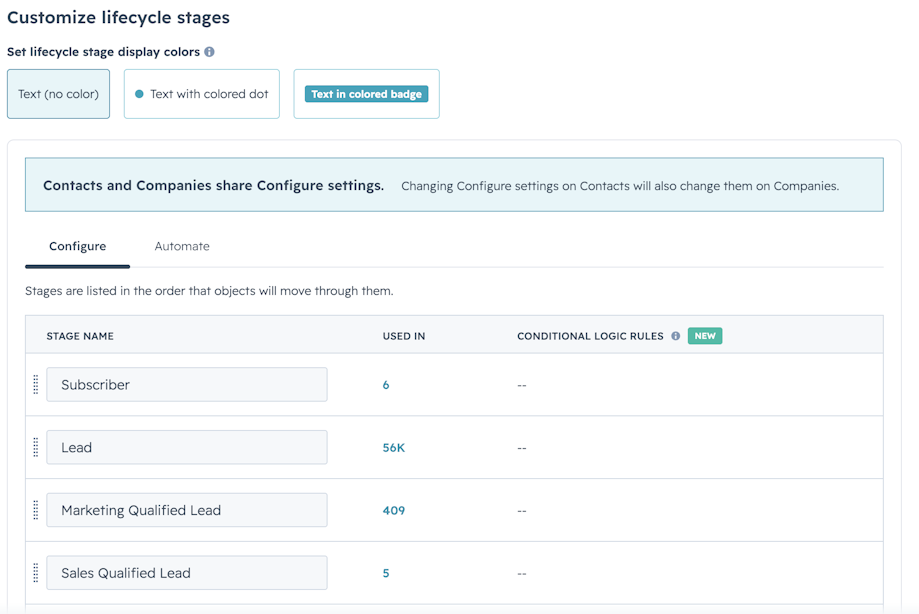
Beyond the default stages, you can create and customise lifecycle stages under Settings > Data Management > Objects > Contacts > Lifecycle stage.

Lifecycle stage vs lead status

A common error in portals we review is the misuse of lifecycle stage and lead status. They're different properties with different purposes, and using them interchangeably produces incorrect funnel data that's very difficult to diagnose or fix after the fact.

Lifecycle stage describes where a contact is in the overall customer journey. It's used by marketing, sales, and customer service, and it should only update when a genuine relationship milestone has been reached. 

Lead status is an operational property used by sales reps to track day-to-day activity and lead routing within the SQL stage, such as who's been contacted, who's in progress, and who's gone cold. When reps update the lifecycle stage to reflect their own outreach activity rather than the contact's actual progress, SQL numbers climb while close rates fall, and the pipeline report becomes skewed.

Screenshot of HubSpot Data settings customize lifecycle stage

How to spot misconfigured HubSpot lifecycle stages

One of the main signs you have a lifecycle issue is when your HubSpot report doesn't quite add up. For example, your pipeline report may look healthy, but it isn't converting, or marketing attribution data is different to what you’d expect to see.

Stages defined by one team, resented by the other

A typical scenario is that Marketing defines MQLs based on behavioural signals that make sense from a campaign perspective, while Sales inherits a definition they weren't involved in and don't trust because so few progress to SQLs. The lead handoff has broken down, and both teams blame each other. 

The real problem is that the true definition of an MQL was never agreed on. This conversation should have happened before the contacts were given lifecycle stages.

The "forever SQL" problem

Let’s say a prospect books a discovery call and gets moved to SQL. The call happens, but there's no confirmed budget, no clear timeline, and no real evidence of a near-term purchase decision. The lifecycle stage stays at SQL because HubSpot won't allow backward movement, and there's no agreed-upon process for what to do with a contact who was advanced too early. 

Over time, the SQL bucket fills with contacts at widely varying levels of genuine intent, and the SQL-to-Opportunity conversion rate becomes meaningless as a diagnostic because it's drawing from a pool that doesn't reflect actual qualification.

The post-sale gap

Once a lead becomes a Customer, there should be a post-sale workflow, a structured path to expansion or renewal, and a way to distinguish a satisfied customer who's ready to buy again from one who's disengaging. If your HubSpot account is missing these, you’re not progressing through all of the lifecycle stages. 

In SaaS businesses, renewals and expansion deals can represent 40 per cent or more of total revenue, but if the CRM has no lifecycle logic after Customer, that revenue is essentially unmanaged.

When Salesforce is also in the picture

For businesses running HubSpot alongside Salesforce (a setup MarCloud works with regularly), lifecycle stage alignment is considerably more complex. 

The two platforms use different data models: Salesforce separates people into Leads and Contacts with their own status fields, while HubSpot treats everyone as a contact and uses lifecycle stages to describe their journey. If your integration isn't properly configured, lifecycle stage updates made in HubSpot may not reflect accurately in Salesforce, and vice versa, which means marketing and sales teams are getting different information.

Resolving these kinds of issues is possible; you just need a bit of deliberate planning around which system holds the source of truth for each field, which direction data should flow, and how HubSpot lifecycle stages map to Salesforce Lead status and Opportunity stage fields in a way that both teams can interpret consistently.

Why this is a collaboration problem, not a HubSpot problem

In the majority of cases where MarCloud encounters misconfigured lifecycle stages, the underlying issue is the absence of a documented, agreed-upon definition of what each stage means; one that marketing, sales, and RevOps have all contributed to and signed off on.

Start with a shared definition document. All you need is one page, co-authored by marketing, sales, and RevOps, reviewed quarterly, specifying the exact criteria for each stage, who owns each transition, and what gets updated in HubSpot (and in Salesforce, where relevant) when a contact moves.

Free ROI Audit for HubSpot

Get a branded audit report covering data quality, automation health, pipeline performance, and ROI readiness, structured around the MarCloud ROI Framework.

  • Instant HubSpot audit
  • Branded audit report
  • Executive summary
  • Data quality
  • Priority actions
  • Proven ROI Framework
  • Salesforce analysis
  • AI readiness
HubSpot ROI Audit
Coloured background with text MarCloud's ROI Audit for HubSpot

How to set up HubSpot lifecycle stages correctly

Start with your customer journey, not HubSpot's defaults

HubSpot's eight default stages provide a framework to build from, and the first step is to map your real sales process, i.e. how contacts typically move from initial interest to a signed contract, and what events or criteria mark each stage transition. 

That journey should inform how the defaults are used and whether any custom stages are needed, rather than the platform's default structure being shoehorned into semi-working.

Define shared MQL and SQL definitions

A functional MQL definition requires three components, agreed and documented by both marketing and sales:

  • A behavioural threshold — what the contact has specifically done, not just engaged generally (for example, downloading a technical resource and visiting the pricing page within fourteen days)

  • A demographic or firmographic filter — whether the contact fits your ICP in terms of industry, company size, and job title; strong behavioural signals from a contact who doesn't fit your target profile don't add up to an MQL

  • A recency component — whether the qualifying activity is recent; a contact who met your criteria six months ago isn't an active MQL today, and treating them as one skews your handoff data

SQL should only be assigned after a sales rep has independently confirmed the BANT criteria

  • Budget (allocated and confirmed, rather than an expressed interest in pricing)

  • Authority (the decision-maker is identified and engaged)

  • Need (a specific, documented problem your product or service solves)

  • Timeline (a defined urgency or trigger event for a clear timeline). 

All four need to be actively confirmed before SQL is assigned.

Both definitions should live in a single shared document, signed off by the relevant stakeholders, with a named review date.

How to move contacts between HubSpot lifecycle stages

There are three ways contacts move through lifecycle stages in HubSpot:

  • Workflow automation — the preferred approach for scalable, consistent stage progression; enrollment is triggered by form submissions, HubSpot lead score thresholds, deal creation, or integration events from connected platforms

  • Bulk edit — useful for initial database clean-up or recalibrating a large number of contacts following a definition change; accessible via CRM → Contacts → filter → select all → Edit → Lifecycle Stage

  • Manual update on individual records — appropriate for occasional exceptions, but shouldn't be the primary mechanism for any stage that reporting or automation depends on

The earlier stages (Subscriber through MQL) should generally be managed by automation to remove inconsistency. The SQL transition should involve a sales rep actively confirming BANT criteria rather than triggering automatically, because automation can't assess whether the budget is genuinely allocated or whether the timeline is real.

Aligning your sales process with HubSpot lifecycle stages

This method works for most teams:

  • Map each HubSpot lifecycle stage to the equivalent point in your sales process, and verify that the stage reflects a genuine buyer milestone rather than an internal activity

  • Define which team owns each transition, put it in the shared document, and configure workflows to match

  • Where Salesforce is in play, go beyond standard HubSpot to Salesforce field mapping. Map HubSpot lifecycle stages to the corresponding Salesforce Lead status and Opportunity stage fields, and agree on the sync direction for each, clarifying which system leads and which follows, and what happens when there's a conflict

How to automate nurturing and report revenue by stage

Automating nurturing by lifecycle stage

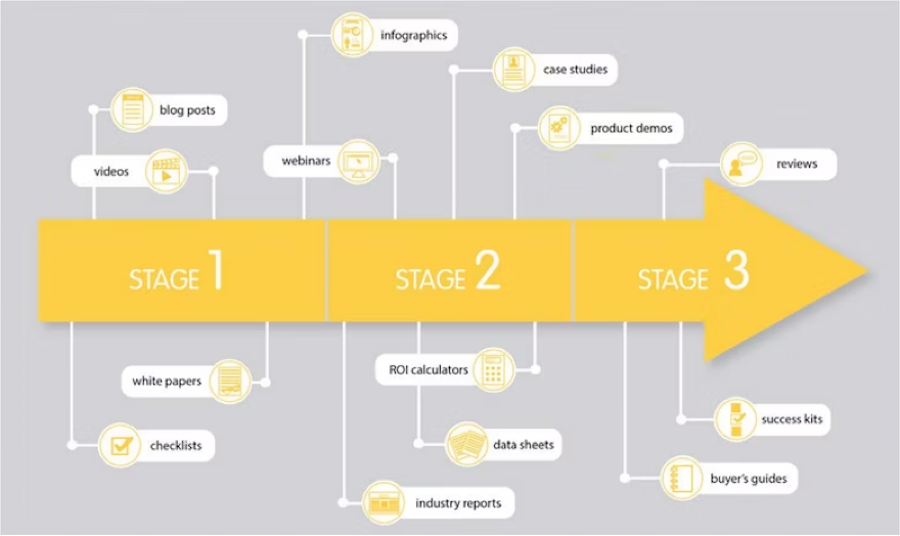
Lifecycle stages can be used as reliable enrollment criteria, but naturally, different stages warrant different content, different tone, and different levels of commercial directness:

  • Subscriber and Lead — educational content, no commercial pressure; the goal is to surface intent signals that support MQL qualification over time

  • MQL — content that addresses purchase considerations (case studies, ROI evidence, comparisons); designed to support a later sales conversation

  • SQL — sales-led communication; marketing's role here is to equip the rep with context

  • Customer — onboarding sequences, product education, and usage milestone triggers; then structured expansion workflows tied to custom stages like "Ready for Upsell" or "Retention Risk"

Diagram showing content formats by stages

For organisations where Salesforce holds the lead and contact records, it's worth confirming that lifecycle-triggered HubSpot workflows are only enrolling contacts whose journeys are managed in HubSpot. Otherwise, automation fires on contacts being actively worked on in Salesforce, which can create duplicate outreach.

How to report revenue by HubSpot lifecycle stage

A properly configured lifecycle stage setup should deliver reports you’re happy to take into a C-suite conversation:

  • Funnel conversion reporting — the percentage of Leads becoming MQLs, MQLs becoming SQLs, SQLs becoming Opportunities, and Opportunities becoming Customers; this is the best diagnostic of whether the funnel is working

  • SQL-to-Opportunity rate — a healthy B2B rate sits between 20 and 50 per cent; below 20 per cent usually means the SQL definition is too loose, and Authority or Timeline criteria are being skipped; above 50 per cent may indicate criteria are too strict and good prospects are being filtered out

  • Time in stage — HubSpot automatically generates timestamp properties for each lifecycle stage, enabling sales velocity analysis and identification of where contacts are stalling

  • Source-to-revenue attribution — with clean lifecycle data, you can trace how leads from a specific campaign or channel progressed through the funnel and what revenue they ultimately contributed

Remember, if your lifecycle stages are misconfigured, all of this reporting draws from flawed data. Fixing the definitions and automation isn't just a housekeeping exercise; it's a direct way to improve credibility and better prove marketing ROI.

Frequently asked questions

How do you move contacts between HubSpot lifecycle stages? 

Contacts can be moved via workflow automation (the best method for consistency at scale), bulk edit in the Contacts view, or manual update on an individual record. The earlier stages (Subscriber through MQL) should be managed by automation to prevent inconsistency. The SQL transition should involve a sales rep confirming BANT criteria rather than progressing automatically, because a workflow can't verify budget or timeline.

How do you align your sales process with HubSpot lifecycle stages? 

Start by mapping your actual sales process to each default HubSpot stage, then agree in writing with both marketing and sales on what criteria must be met for a contact to advance. The written definition document, covering behavioural thresholds, ICP filters, and BANT requirements for SQL, is a must-have foundation. Configure workflows to reflect those definitions, and for Salesforce-integrated portals, map HubSpot stages to the corresponding Salesforce Lead status and Opportunity stage fields with clear sync rules and conflict resolution in place.

How do you set up HubSpot lifecycle stages for leads? 

Navigate to Settings → Objects → Contacts → Lifecycle Stage tab. HubSpot's eight default stages are available immediately. Custom stages such as "Ready for Upsell" or "Retention Risk" can be added via + Add stage; HubSpot automatically creates timestamp properties for each one, including date entered, date exited, and time in stage.

How do you automate nurturing using HubSpot lifecycle stages? 

Use lifecycle stage as the enrollment criterion in HubSpot workflows, with different content tracks for different stages. Subscriber and Lead contacts receive educational content; MQL contacts receive purchase-consideration content; Customer contacts enter onboarding and then expansion workflows. The most commonly missing automation is the post-Customer sequence, structured nurturing tied to expansion and retention custom stage.

How do you report revenue by HubSpot lifecycle stage? 

In HubSpot's report builder, create a funnel report showing contacts at each lifecycle stage and the conversion rate between them. For revenue attribution, build reports that trace closed-won deals back to the source or campaign that originally drove the contact, using lifecycle stage timestamps to map the journey. The SQL-to-Opportunity conversion rate is the most useful single diagnostic for funnel health. Clean lifecycle data is the prerequisite for any of this to be meaningful, which is why the definitions and automation need to be in good shape before the reporting is trusted.

What's the difference between lifecycle stage and lead status in HubSpot?

Lifecycle stage tracks where a contact is in the overall customer journey. It's used by marketing, sales, and customer service, and should only update when a relationship milestone has been reached. Lead status is an operational property used by sales reps to track activity within the SQL stage. They shouldn't be used interchangeably; when they are, funnel reports reflect rep activity rather than pipeline progression.

Time to review your lifecycle stages

When HubSpot lifecycle stages are defined collaboratively, updated consistently, and used as the foundation for both automation and reporting, they become a shared language that marketing, sales, and leadership can all rely on. 

The configuration itself is usually straightforward; what takes more effort, and has more impact, is the cross-team conversation that needs to happen before anyone opens the settings panel.

If you'd like an independent view of how your HubSpot lifecycle stages are configured and what they might be doing to your funnel data, get in touch with MarCloud.

Tom Ryan headshot

Tom Ryan

Founder & CEO of MarCloud, Tom has been on both sides of the fence, client-side and agency, working with Salesforce platforms for the best part of a decade. He's a Salesforce Marketing Champion and certified consultant who loves to co-host webinars and pen original guides and articles. A regular contributor to online business and marketing publications, he's passionate about marketing automation and, along with the team, is rapidly making MarCloud the go-to place for Marketing Cloud and Salesforce expertise. He unapologetically uses the terms Pardot, Account Engagement and MCAE interchangeably.

More by Tom Ryan

Featured resource

Coloured background with text MarCloud's ROI Audit for HubSpot

HubSpot ROI Audit

Get a branded audit report covering data quality, automation health, pipeline performance, and ROI readiness, structured around the MarCloud ROI Framework.

Get started free
View all resources

More recent posts

View all articles
Illustrated characters holding a MarCloud banner

Get expert Salesforce & HubSpot automation tips, straight to your inbox.

MarCloud is a team of certified Pardot, Marketing Cloud, and Salesforce specialists. We help businesses to unlock the potential of marketing automation. Join 2,000+ professionals who receive actionable insights to boost their automation performance.

Sign up to the newsletter

Free ROI Audit for HubSpot

Get a branded audit report covering data quality, automation health, pipeline performance, and ROI readiness, structured around the MarCloud ROI Framework.

Get started free