MarCloudSpeak with a specialist
Coloured background with text MarCloud's ROI Audit for HubSpot
Free ResourceGet started free

Your HubSpot database is one of the most overlooked areas hampering ROI, and a bit of strategic structural work can have a huge impact on both what you pay for the platform and the quality of the data you present to your leadership team.

In short, how you manage your HubSpot database directly affects your subscription costs, your email performance, and the accuracy of the ROI figures you present to the board.

HubSpot's pricing model makes data a direct cost

HubSpot uses marketing and non-marketing contacts to help ensure you only pay for the contacts you can actually market to. The challenge is that in practice, most HubSpot databases contain a proportion of contacts who will never convert, never open an email, and in some cases cannot be emailed at all, and those contacts are still counting towards your billing tier every month.

What is the difference between marketing and non-marketing contacts?

A marketing contact is any contact HubSpot can target with your marketing tools, i.e. email campaigns, automated nurture sequences, and so on, and these count towards your contact tier, which is what determines your monthly cost. 

A non-marketing contact, by contrast, lives in your CRM for free (up to 15 million records), keeps all its history, and remains accessible to your sales team for one-to-one outreach. It simply cannot receive marketing emails.

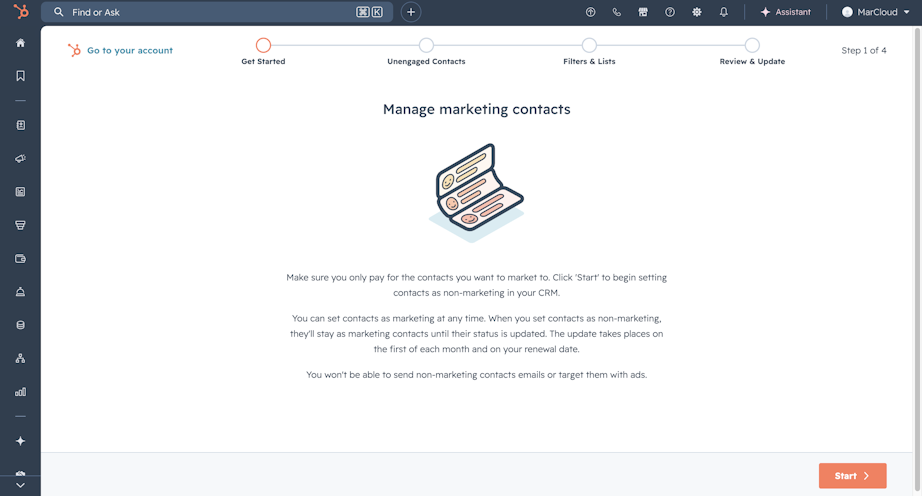
The important detail here is that HubSpot charges you based on how many contacts you can email, not how many you do email. A contact that hard bounced six months ago, or one that globally unsubscribed years before that, is still counting towards your tier limit unless you have actively reclassified it. Plus, if you make somebody a non-marketing contact, it only comes into effect from the start of the next month, so they'll still count towards your total for that month. However, if you make somebody a marketing contact, it counts immediately.

The auto-upgrade trap

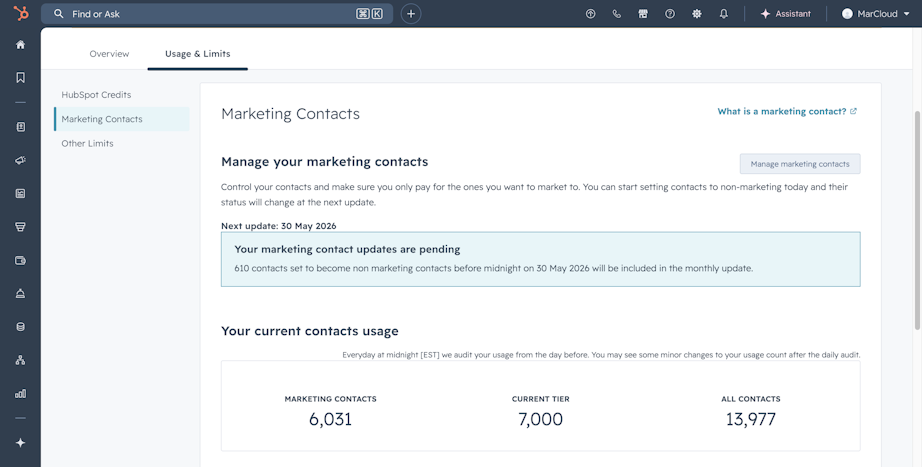
HubSpot's tier pricing works in contact-number increments, and when you exceed your current limit (even by a single contact), the platform immediately upgrades you to the next tier. Once you hit 90% of your marketing contacts, a banner will appear in the system alerting you to review your contacts, but beyond this, there is no warning and no opportunity to pause and review before the cost increases. You can, however, view your contact usage and limits in your settings at any time.

The reverse does not apply automatically. Reducing your marketing contact count does not bring costs back down mid-contract; that only happens at renewal, and only if you contact HubSpot at least five business days before the renewal date to request a downgrade. A database clean-up that happens in month six of an annual contract still prevents further tier increases, but you will not see the billing impact until the contract renews.

Screenshot of HubSpot Marketing Contacts settings

The cost of a bloated HubSpot database

Your HubSpot subscription cost is the obvious one, but a poorly maintained HubSpot database costs you in two ways. Once, in monetary terms, on your invoice, and again in your reporting.

Paying for contacts who serve no purpose

Most HubSpot databases contain a percentage of contacts with no realistic prospect of engagement. By this, I mean hard bounces that were never reclassified, or contacts who globally unsubscribed but remained in marketing status, and people who have not opened a single email in three or more years. 

Across a database of 20,000 contacts, it is not unusual to find that somewhere between 15 and 30 per cent fall into one of these categories.

HubSpot already knows these contacts cannot be usefully engaged: it automatically stops sending marketing emails to hard bounces and global unsubscribes. But it does not reclassify them as non-marketing. That step has to happen manually, or through an automation that most portals do not have configured by default.

Not only does this boost your contact limit and cause rising subscription costs, but when your database contains thousands of inactive, incorrectly classified, or duplicate contacts, your engagement metrics, such as open rates, click rates, and lifecycle stage conversion rates, are being averaged across a contact pool that includes records with no relationship to your current marketing activity. The numbers look worse than they actually are!

For a marketing manager or director who regularly presents performance data to a CFO or board, this is a problem. 

If your email open rates look poor because a third of your database has not engaged since 2022, it feeds into every report, every attribution, and every budget conversation you have. You may be running perfectly solid campaigns, but the data doesn’t reflect that.

Screenshot of Account & Billing contacts banner

Why HubSpot database bloat happens

Database bloat happens gradually, through a handful of recurring patterns that are easy to overlook in the hectic flow of marketing operations:

  • Bulk imports without filtering. Trade show lists, event attendee exports, or purchased data imported into HubSpot with marketing contact status turned on by default, even when the majority of those contacts have no realistic prospect of near-term engagement.

  • Integration syncs without guardrails. Connecting Salesforce, NetSuite, Eventbrite, or similar platforms without defining which records should sync, and in what status, often results in vendors, churned customers, internal employees, and partners all arriving in your HubSpot database as billable marketing contacts.

  • Bounces and unsubscribes left in marketing status. HubSpot suppresses these contacts from sending automatically, but they remain in marketing status and in your billing count until someone actively changes them.

  • Duplicates accumulating over time. Form submissions with slight name or email variations, records created through multiple integrations, and manual data entry errors create duplicate contacts that inflate counts, distort HubSpot reporting, and occasionally result in the same person receiving the same email twice, or even email marketing compliance issues.

Free ROI Audit for HubSpot

Get a branded audit report covering data quality, automation health, pipeline performance, and ROI readiness, structured around the MarCloud ROI Framework.

  • Instant HubSpot audit
  • Branded audit report
  • Executive summary
  • Data quality
  • Priority actions
  • Proven ROI Framework
  • Salesforce analysis
  • AI readiness
HubSpot ROI Audit
Coloured background with text MarCloud's ROI Audit for HubSpot

Why a HubSpot migration should never be a copy-paste

If your organisation is planning a move to HubSpot, you might be tempted to export everything from the existing system and import it, on the basis that you might want it later. In most cases, this creates a HubSpot database that inherits every structural problem the previous platform had, and starts the clock running on a contact tier that is considerably higher than it needs to be.

How MarCloud approaches HubSpot database migrations

MarCloud's approach to HubSpot migrations starts with a data audit before anything moves across. The question being answered is not "which contacts exist in the current system?" but "which contacts should belong in the new one?" and that helps us make decisions about which records to carry across, what their lifecycle stage and marketing status should be on arrival, and what can be safely archived or left behind, avoiding the seven sins of data migration.

This delivers a HubSpot database that’s lean, purposeful, and has a clear handle on costs. For Scott Logic, a professional services firm that worked with MarCloud on their HubSpot migration, this approach meant moving into the platform with a database structured to support the team's reporting needs from month one, rather than requiring weeks of clean-up after go-live.

Getting the database structure right from the start

Beyond which contacts carry across, how the database is built matters considerably for what you can do with it afterwards. Custom contact properties allow you to capture the specific attributes your team uses to segment, score, and report on your audience. Without these, the typical workaround involves manual effort, messier reports, and a harder time demonstrating the return on specific campaign activity.

Ongoing HubSpot database hygiene: Make it a process

A clean database will not stay clean without ongoing attention. Contacts continue to enter the system through forms, HubSpot integrations, and sales activity, and the same patterns that created bloat in the first place will continue to operate unless there are processes in place to manage them. The goal is to make database hygiene a standing part of how the platform is maintained, so you can proactively avoid a sharp increase in the invoice.

What a regular data review should cover

A monthly review of around thirty to sixty minutes is typically enough to stay on top of most common database issues:

  • Duplicate management. HubSpot's built-in tool (Data Management > Data Quality) surfaces likely duplicate records for review; Operations Hub Professional subscribers also have access to the Data Quality Command Centre, which uses AI-assisted matching and makes the process considerably faster.

  • Marketing contact status. A monthly pass to reclassify hard bounces, global unsubscribes, and contacts with no engagement in the past six to twelve months as non-marketing.

  • Import hygiene. A standing rule that new imports default to non-marketing status, with contacts only upgraded when they meet a defined qualification threshold, a specific form submission, a high-intent page visit, or an appropriate lifecycle stage change.

  • Lifecycle stage accuracy. Contacts sitting in the wrong lifecycle stage distort pipeline and attribution reporting; a regular check prevents this from compounding over time.

Let automations do the heavy lifting

We’re talking about marketing automation software here, so not all of this needs to be done manually! A small number of timesaving workflows can handle the most predictable scenarios:

  • A workflow that automatically sets a contact to non-marketing status when a hard bounce is recorded

  • A sunset workflow for contacts who have not opened an email or visited the site in a defined period, with an optional re-engagement campaign triggered first to recover any genuine leads before they are reclassified

  • A property-based workflow that flags contacts with incomplete or inconsistent data for manual review

These are not particularly complex builds. A properly set-up HubSpot portal should have them in place, and they significantly reduce the ongoing effort required to keep the database in reasonable shape.

Screenshot of Manage marketing contacts in HubSpot

How a cleaner HubSpot database strengthens reporting

A well-maintained HubSpot database affects the quality of the evidence you have available when you are making the case for continued marketing investment.

When your HubSpot database contains only contacts who have a genuine, current relationship with your marketing activity, your metrics reflect the true picture. Email engagement rates are credible benchmarks, and lifecycle stage conversion rates tell an accurate story about how leads are progressing. 

Revenue attribution, which is always the most contested figure in a board conversation, becomes more defensible purely because the underlying data is cleaner.

During my years as a Salesforce and HubSpot specialist, I’ve seen teams running well-designed campaigns, producing strong content, building effective automation sequences, and then presenting reports that can’t measure or prove ROI, because the database they draw from is too messy.

Cleaning up the HubSpot database both saves money on the platform and gives you better evidence for the budget conversations you are already having.

Frequently asked questions

What counts as a marketing contact in HubSpot?

A marketing contact is any contact who can be targeted with HubSpot marketing emails, automated workflows, or paid ad audiences. They count towards your contact billing tier. Non-marketing contacts can be stored in the CRM and contacted by sales via one-to-one email, but cannot receive marketing communications and do not count towards your billing limit.

How do I reduce my HubSpot marketing contact count? 

The most effective steps are to reclassify hard bounces, global unsubscribes, and long-term disengaged contacts as non-marketing; set the default status for new imports and integrations to non-marketing; and use automated workflows to maintain those standards on an ongoing basis.

Does HubSpot automatically lower my bill if I reduce my contact count?

No. HubSpot operates on a high-watermark billing model within each contract period, which means reductions only affect your pricing at renewal. To ensure a lower tier is applied at your next renewal, contact HubSpot at least five business days before the renewal date and request the downgrade explicitly.

How do duplicate contacts affect HubSpot reporting? 

Duplicates inflate your contact count, which affects billing, but they also distort engagement and attribution metrics by splitting a single contact's activity across multiple records. This can make conversion rates appear lower than they are and creates inaccurate lifecycle stage data. Regular duplicate management using HubSpot's built-in Data Quality tools is one of the most straightforward ways to improve reporting accuracy.

When is the best time to clean up a HubSpot database? 

The two highest-impact moments are before a migration (to avoid carrying problems into a new platform) and in the run-up to a contract renewal (so that a reduced contact count can be reflected in your next billing tier). That said, a regular monthly review is more valuable than any single clean-up project, because it prevents the issue from building up in the first place.

Reduce HubSpot database costs

Managing your HubSpot database is not a glamorous part of marketing operations. It’s generally not discussed in campaign planning sessions, and usually doesn’t become a focus until something bad happens i.e. an unexpected invoice change. 

However, the size and quality of your contact database is the infrastructure that everything else depends on: the accuracy of your reports, the reliability of your automations, and the cost of the platform itself. 

Getting it right requires a clear picture of which contacts belong in your database, how they are classified, and a process for reviewing on a regular basis. Whether you are approaching a migration, reviewing your contract ahead of renewal, or simply looking for a more accurate read on your marketing performance, the HubSpot database is a reasonable place to start.

For an audit of your HubSpot account, get started for free with our ROI audit tool.

Tom Ryan headshot

Tom Ryan

Founder & CEO of MarCloud, Tom has been on both sides of the fence, client-side and agency, working with Salesforce platforms for the best part of a decade. He's a Salesforce Marketing Champion and certified consultant who loves to co-host webinars and pen original guides and articles. A regular contributor to online business and marketing publications, he's passionate about marketing automation and, along with the team, is rapidly making MarCloud the go-to place for Marketing Cloud and Salesforce expertise. He unapologetically uses the terms Pardot, Account Engagement and MCAE interchangeably.

More by Tom Ryan

Featured resource

Coloured background with text MarCloud's ROI Audit for HubSpot

HubSpot ROI Audit

Get a branded audit report covering data quality, automation health, pipeline performance, and ROI readiness, structured around the MarCloud ROI Framework.

Get started free
View all resources

More recent posts

View all articles
Illustrated characters holding a MarCloud banner

Get expert Salesforce & HubSpot automation tips, straight to your inbox.

MarCloud is a team of certified Pardot, Marketing Cloud, and Salesforce specialists. We help businesses to unlock the potential of marketing automation. Join 2,000+ professionals who receive actionable insights to boost their automation performance.

Sign up to the newsletter

Free ROI Audit for HubSpot

Get a branded audit report covering data quality, automation health, pipeline performance, and ROI readiness, structured around the MarCloud ROI Framework.

Get started free