Copy Our HubSpot Lead Scoring Template for Sales-Ready MQLs
Adapt MarCloud’s HubSpot lead scoring template to reduce manual qualification, identify sales-ready leads, and improve the timing of sales handoffs.



7 mins

Book a call with MarCloud's Founder to discuss:
Integrating HubSpot and Salesforce
Auditing CRM data and segmenting data
Underperforming workflows and automations
Reducing license costs and inefficiencies
Revenue attribution modelling and proving ROI
AI readiness, Agent POC's, and Claude integration
Within 30 minutes, you'll know the best next step for your business.
Adapt MarCloud’s HubSpot lead scoring template to reduce manual qualification, identify sales-ready leads, and improve the timing of sales handoffs.
7 mins
If your sales team is double-checking every enquiry before deciding whether to call, HubSpot isn’t doing the automated qualification work it’s designed for.
I’ve helped clients develop lead scoring strategies across HubSpot and Salesforce, and I continue to see scoring as one of the most efficient ways to route qualified leads without someone reviewing every record.
However, a good lead scoring model needs to both identify a suitable prospect and recognise when their activity suggests a sales conversation would make sense.
I’ve brought that experience into the HubSpot lead scoring template below, using our own company scoring setup to show how the rules work together. It covers the criteria, points, timing and handoff decisions, so you can move through your own planning more quickly and test whether your model reflects how customers buy.
You can copy the tables and adapt them with sales before configuring the rules in HubSpot. As you work through them, keep the intended outcome in mind: a salesperson should understand why a lead deserves attention and what prompted the handoff.
At MarCloud, we use separate contact fit and engagement scores alongside a combined company score.
|
Score |
Object |
Type |
|
Fit Score |
Contact |
Fit |
|
Primary Scoring Model |
Contact |
Engagement |
|
Company Overall Score and Fit |
Company |
Combined |
This structure gives us different ways to examine demographic suitability and interest. For example, a company may fit the services we offer and have behaved in a way that indicates they are nearing the end of their decision-making process, or not.
For the template, I’m using the rules from our Company Overall Score and Fit model, which combines demographic and behavioural scoring. You can use HubSpot’s association settings to choose which associated contacts contribute to company engagement, so include those decisions when configuring your version.
Start with one service or product and the audience you want to reach, then replace the bracketed fields in column three with your own criteria.
The points below show MarCloud’s configuration, but your customer profile, buying journey, and sales process will determine which values you keep, scrap, or add.
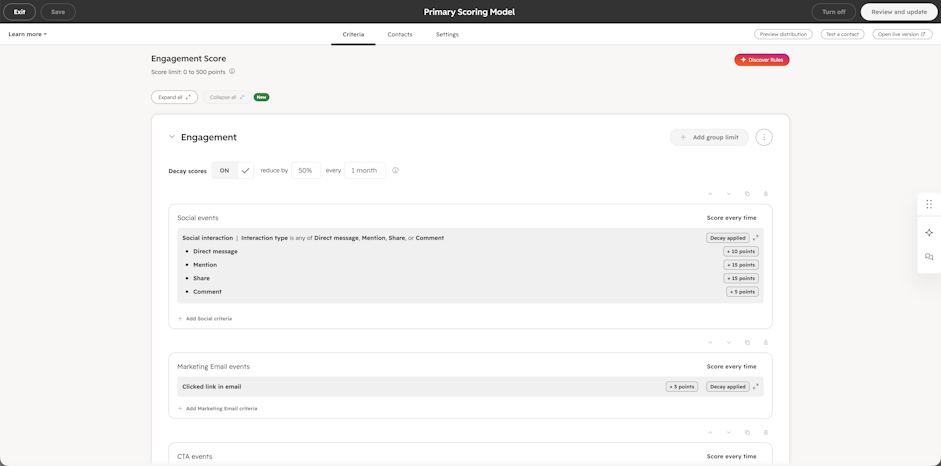
Our company model gives matching form submissions and marketing-event attendance more points than page visits and lighter interactions.
| Engagement rule | MarCloud points per matching event | Repeat setting | Your criteria |
| Form submission | +20 | Score every time | [Form submission] |
| Page visit matching a selected URL path | +3 | Score every time | [Relevant page paths] |
| Ad interaction | +1 | Score every time | [Tracked ad interactions to include] |
| Clicked link in email | +1 | Score every time | [Relevant marketing email interactions] |
| Social interaction | +1 | Score every time | [Tracked social interactions to include] |
| Attended marketing event | +20 | Score every time | [Events and attendance criteria] |
Our selected page paths include /contact-us and /marcloud-roi-framework, alongside some focus service pages. As a result, the page-visit rule gives us a view of engagement without assuming every visit indicates a purchase decision.
For your form rule, choose the relevant forms and filters based on bottom-of-the-funnel interest, because an eBook download and a request to speak obviously represent different intentions. You might have multiple form-related scores, based on the types of forms you have.
Similarly, the marketing-event rule uses attendance, so check that your event platform supplies HubSpot with that information. If not, you may need to connect or integrate via the HubSpot API.
As for the repeat setting, with “Score every time”, a qualifying action can contribute again when it recurs, which means you need to check how repeated activity interacts with any rule, group, and overall score limits.
MarCloud supports clients using HubSpot and Salesforce Marketing Cloud Next or Account Engagement (Pardot), so the technology a company uses helps establish whether our services could be relevant. We therefore include technology alongside things like employee count and industry in the company-fit criteria. You might replace technology with another qualifying criteria that isn’t simply the sector, size, or location.
| Company property and condition | MarCloud points | Your criteria |
| Web technologies includes Salesforce | +10 | [Relevant technology and weight] |
| Web technologies includes Pardot | +50 | [Relevant technology and weight] |
| Web technologies includes HubSpot | +30 | [Relevant technology and weight] |
| Number of employees is greater than 50 | +10 | [Company-size requirement] |
| Industry matches a selected value | +15 | [Target industry list] |
The MarCloud industry list includes Business Services, Financial Services, Manufacturing, Higher Education and Computer Software, among other categories. However, your list needs to reflect the businesses you can serve successfully, so review it alongside recent customers and sales feedback.
Pay attention to the conditions as well as the points. “Greater than 50” excludes a company with exactly 50 employees from that particular rule, while a company using several relevant technologies may match multiple values.
For this reason, I recommend testing combinations of criteria before deciding that a score represents a particular level of fit.
Negative scoring lets you reduce priority when a company matches criteria that weaken its suitability for your offer. Our example includes geography, domain, and technology-evidence rules, with different deductions for different conditions.
We purposefully include negative scoring that rules out competitors or geographies where we receive a high volume of contacts but don’t service due to differences in time zones or because these are hubs for Salesforce or HubSpot talent.
| Company property and condition | MarCloud points | Your criteria |
| Description contains “salesforce partner” | −500 | [Description signal and deduction] |
| Country/Region equals India or Pakistan or Ukraine or Moldova or Russia or Australia | −500 | [Geographic criteria] |
| Company domain name ends with .in or .md or .au or .com.au or .pk or .ru or .ua | −500 | [Relevant domain criteria] |
| “No evidence of Pardot or HubSpot” equals True | −25 | [Technology-status property and deduction] |
Use broad description rules with care. In theory, a suitable MarCloud prospect could use the word “salesforce partner” in an enquiry form, so inspect the records a text rule matches before deciding to use it. We have reasons for including this in negative scoring!
In addition, check how several deductions work together. A company might match both a country condition and a domain condition, which could reduce its score further than you intended.
Finally, a deduction reduces a score, whereas a hard exclusion prevents a record from entering a relevant HubSpot workflow. If a condition must prevent a sales handoff, include it in the workflow’s eligibility rules too.
Engagement needs a timing component; otherwise, sales can keep prioritising leads with activity from months ago, which no longer reflects the lead’s level of interest.
We enable score decay and reduce event points by 50% every month.
| Setting | MarCloud configuration | Your setting |
| Engagement score decay | On | [On/off] |
| Reduction | 50% | [Percentage] |
| Interval | Every 1 month | [Supported interval] |
HubSpot calculates decay for each event using its original point value, with one month equal to 30 days. Therefore, a single 20-point event contributes the following amounts as it ages:
| Event age | Points contribution |
| Initially | 20 |
| After 30 days | 10 |
| After 60 days | 0 |
This follows HubSpot’s linear decay calculation. When choosing an interval, consider how your buyers research and approve projects. A longer sales cycle may warrant different decay timing, although sales feedback should help you distinguish an active opportunity from a contact whose research has halted.
A guide for marketing leaders using HubSpot to prove ROI, secure budget, and run creative campaigns without the tech headaches.
Once the scoring criteria make sense, agree on what happens when a prospect qualifies. This is where the lead scoring model can remove routine manual work, because HubSpot can apply the agreed conditions and route the lead consistently.
Remember that a combined company score still needs context. Sales needs an appropriate contact and a reason to engage, particularly when several people from the same company have been actively engaged.
Use this table to document those decisions. The blank fields allow you to define thresholds and follow-up rules that suit your model.
| Handoff decision | Complete with sales |
| Account qualification | [Required company fit, engagement and/or combined-score values] |
| Contact selection | [Relevant buying role, individual activity and existing relationship] |
| Current readiness | [Required activity, score band or recent-engagement condition] |
| Handoff exclusions | [Ineligible records, customers, open opportunities or recycle holds] |
| Direct enquiries | [Route for consultation, demo or quote requests] |
| Sales ownership | [Existing owner or assignment rule] |
| Response target | [Time, business hours, timezone and escalation owner] |
| Notification context | [Company, contact, score breakdown, relevant activity and date, service and record link] |
| Requalification | [Review date, fresh activity and re-enrolment conditions] |
| Sales feedback | [Acceptance, rejection reason, nurture or progression] |
For sales-ready MQL identification, I recommend checking fit and engagement separately within the handoff conditions, so high activity can’t inflate the score of an unsuitable company. Use contact information to identify whom sales should approach and check that each person meets the relevant qualification criteria.
Also agree on when a returned lead can qualify again. Requiring fresh activity and observing an agreed review date can prevent repeat notifications when someone is unsuitable for follow-up.
If your sales team uses Salesforce CRM, include ownership, qualification fields, and feedback in your integration plan. Our HubSpot lead management guide explains how these decisions connect to the wider process.
Before automating your lead assignment based on your new scoring, test it.
Suppose a company uses HubSpot, has 75 employees, and belongs to one of the selected industries in MarCloud’s scoring model: those conditions contribute 30, 10, and 15 points, respectively, giving 55 positive-fit points before other matching rules or limits.
Separately, one matching form submission, three selected page visits, and one email click contribute 30 event points before decay and score limits. This equals a total score of 85 points. Based on these subtotals, should a sales handoff take place?
Next, test the situations that could change the outcome:
Compare a suitable company with recent engagement against a similar company whose activity has aged.
Check companies that match several technologies or multiple negative criteria.
Review missing and contradictory technology information.
Examine repeated low-weight activity and its effect on prioritisation.
Check how several associated contacts contribute to one company.
Test direct enquiries, existing customers, and open opportunities.
Use HubSpot’s record test and distribution preview, then review the proposed handoff queue with sales before enabling routing. Also double-check the selected URL paths, form filters, association settings, and score limits against actual records because a small configuration error will change which leads qualify.
For more help choosing and validating the criteria, see our HubSpot lead scoring best practices.
After launching your HubSpot lead scoring template, I recommend looking at both the leads that sales reps accept and the suitable prospects the model misses. Wrongly routed or missed leads can reveal useful signals that your current rules overlook.
For example, if event attendees reach sales with strong scores but little interest in a conversation, review the event criteria, timing, and weight together. Meanwhile, if repeated page visits account for a large share of engagement, examine whether those visits help identify buyers or mainly reflect ongoing content research.
Keep a short record of each change so you can connect later results with the version of the model that produced the handoff.
| Review date/version | Main issue | Supporting evidence | Proposed change | Owner/next review |
| [Date/version] | [Rejected leads, missed buyers or manual work] | [Examples, conversion and time] | [Rule, weight, decay or handoff change] | [Name/date] |
Alongside sales acceptance, measure manual qualification time, follow-up speed, MQL-to-SQL conversion, opportunity creation, and eventual revenue. Compare groups of leads from the same handoff period, and allow longer sales cycles sufficient time to run before drawing conclusions.
As a result, your HubSpot reporting can show whether the process produces leads that become closed-won revenue. You have more evidence for budget discussions, and it helps you decide which campaigns deserve further attention.
Our HubSpot reporting guidance covers the data foundations you need to prove marketing ROI.
If you need help deciding which signals should be used in HubSpot lead scoring, setting up the rules, or automating the marketing-to-sales handoff, speak with our HubSpot team. We can work through the model with you, refine it around the leads your sales team needs, and take care of the technical setup.
For a B2B sales process involving several people, both can help. Company scoring supports account prioritisation, while contact-level information helps you select the person to approach and understand their individual interest.
Typically, we recommend aiming for ‘100’ as the threshold, simply because it’s an easy reference point to work backwards from. However, you can choose any number that makes sense for your business, so long as it’s grounded in logic.
HubSpot reduces an event’s contribution to lead score as it ages. With the 50% monthly setting in our example, a 20-point event contributes 10 points after 30 days and zero after 60 days.
Yes, when deductions exceed positive contributions, the score can become negative within the configured limits. Separately, use explicit eligibility conditions for circumstances that must prevent a sales handoff.
Sometimes. Repeat interactions can help reflect continuing engagement, and the rules in our example use “Score every time”. However, review accumulation and limits so repeated low-weight actions, like blog post views, don’t produce misleading leads.
You can use the tables as a starting point, then adapt the technology, industry, geography, and activity criteria to your own business. Set thresholds, association settings, and routing with sales, then test the resulting model before relying on automatic handoffs.
Founder & CEO of MarCloud, Tom has been on both sides of the fence, client-side and agency, working with Salesforce platforms for the best part of a decade. He's a Salesforce Marketing Champion and certified consultant who loves to co-host webinars and pen original guides and articles. A regular contributor to online business and marketing publications, he's passionate about marketing automation and, along with the team, is rapidly making MarCloud the go-to place for Marketing Cloud and Salesforce expertise. He unapologetically uses the terms Pardot, Account Engagement and MCAE interchangeably.
More by Tom RyanA guide for marketing leaders using HubSpot to prove ROI, secure budget, and run creative campaigns without the tech headaches.
Download nowHubSpot provides out-of-the-box dashboards, and these are a reasonable starting point for most marketers. They give visibility into performance across channels and activities, and they help teams stay organised. What they don’t do is surface the specific metrics needed to connect marketing efforts to revenue and return on investment. This is why looking at HubSpot dashboard examples is more useful than relying on what already exists.
Tom Ryan
6 mins
If you’re using HubSpot, you probably already played around with dashboards. What you may not have is the right dashboards, and by this I mean ones designed to show immediate business impact through tangible KPIs, such as pipeline health, sales performance, and marketing contribution to revenue.
Tom Ryan
10 min
HubSpot Salesforce integration lets you keep Salesforce as your primary CRM while using HubSpot for marketing, sales, and service purposes. Set it up by first checking access, configuring the native connector, and then testing each team’s workflows, adding custom integration where out-of-the-box syncing won’t meet your requirements.
Tom Ryan
7 mins

MarCloud is a team of certified Pardot, HubSpot, Marketing Cloud, and Salesforce specialists. We help businesses to unlock the potential of marketing automation. Join 2,000+ professionals who receive actionable insights to boost their automation performance.
Sign up to the newsletterA guide for marketing leaders using HubSpot to prove ROI, secure budget, and run creative campaigns without the tech headaches.
Download now