MarCloud
Talk to a specialist

Book a call with MarCloud's Founder to discuss:

  • Integrating HubSpot and Salesforce

  • Auditing CRM data and segmenting data

  • Underperforming workflows and automations

  • Reducing license costs and inefficiencies

  • Revenue attribution modelling and proving ROI

  • AI readiness, Agent POC's, and Claude integration

Within 30 minutes, you'll know the best next step for your business.

8 Essential HubSpot Dashboard Examples for Marketers

HubSpot provides out-of-the-box dashboards, and these are a reasonable starting point for most marketers. They give visibility into performance across channels and activities, and they help teams stay organised. What they don’t do is surface the specific metrics needed to connect marketing efforts to revenue and return on investment. This is why looking at HubSpot dashboard examples is more useful than relying on what already exists.

eBook cover with title How to Measure HubSpot ROI in the AI Age
Free ResourceDownload now

HubSpot provides out-of-the-box dashboards, and these are a reasonable starting point for most marketers. They give visibility into performance across channels and activities, and they help teams stay organised. What they don’t do is surface the specific metrics needed to connect marketing efforts to revenue and return on investment. This is why looking at HubSpot dashboard examples is more useful than relying on what already exists.

Building HubSpot dashboards from scratch takes time, and it assumes a level of confidence with attribution, reports, and data structure that many teams won’t have due to either time or skill restraints. So examples created by HubSpot specialists can be a more efficient route.

As a Diamond HubSpot Solutions Partner, reporting on ROI is something we do consistently. In fact, our market-leading ROI Framework has been tested across different businesses and industries, and is designed to answer the questions that matter when budgets and performance are being reviewed.

In this article, we’re sharing our ‘must-have’ HubSpot marketing dashboards, so you can get up and running sooner, and share HubSpot reporting that supports decision-making.

What is a HubSpot dashboard?

First off, let’s be clear about dashboards versus reports. A HubSpot dashboard is a collection of reports grouped together to provide a single view of performance. Each report is a specific data visualisation, such as contacts created over time or sessions by source, while the dashboard brings those individual pieces into a format that can be reviewed quickly.

HubSpot allows you to add multiple reports to a dashboard, typically up to ten, and to create different dashboards for different purposes. Instead of having one large, catch-all view, you can create focused dashboards for marketing performance, campaign tracking, or executive reporting, each with a clear audience in mind.

HubSpot dashboards can also be shared with specific users or teams, which makes them a great way of keeping everyone aligned without needing people to navigate through reports.

Why out-of-the-box dashboards aren’t enough for attribution

HubSpot’s default dashboards focus on activity. You can see how many emails have been sent, how many sessions your blog posts have generated, and how contacts are engaging with your content. All of that is useful, but these aren’t the metrics the C-suite is interested in. They want marketing influence on revenue. They want to see ROI.

A blog post may attract a large volume of traffic, but without connecting that traffic to leads, opportunities, and closed deals, it’s difficult to assess its commercial value. Attribution is the missing layer. HubSpot does include attribution reporting, but it doesn’t come pre-configured in a way that automatically answers questions about return on investment. 

Building custom HubSpot dashboards that incorporate attribution requires decisions about lifecycle stages, deal associations, and attribution models, and those decisions have a direct impact on the numbers that are presented.

HubSpot dashboard examples for marketing teams

The following dashboards are drawn from the types of reporting structures we recommend most often. Each one serves a specific purpose, and together they provide a more complete view of marketing performance. However, they’re intended for the marketing team and come with a marketing lens. We also recommend five essential sales dashboards for leadership.

1. Marketing performance overview dashboard

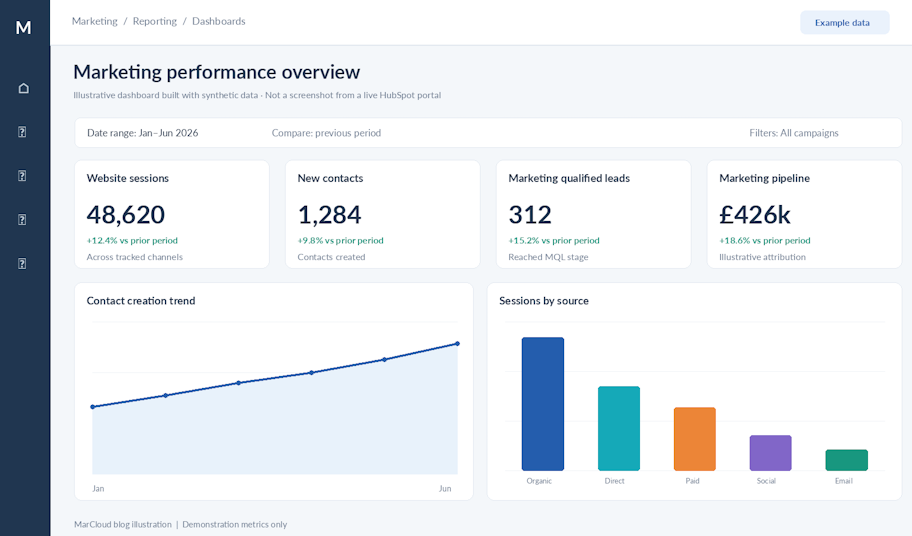
This is the dashboard teams will return to regularly. It provides a broad view of marketing activity and outcomes, and it is usually the starting point for weekly check-ins or team discussions.

marketing performance overview

Typical reports include sessions by source, new contacts created, MQL volume, email engagement metrics, and a high-level view of marketing’s contribution to pipeline. The aim is not to explore attribution in detail, but to ensure that everyone has a shared understanding of how marketing is performing overall.

Keeping this dashboard concise makes it more effective. Six to eight reports are usually enough to cover the essentials without being overwhelming.

2. Website traffic and source attribution dashboard

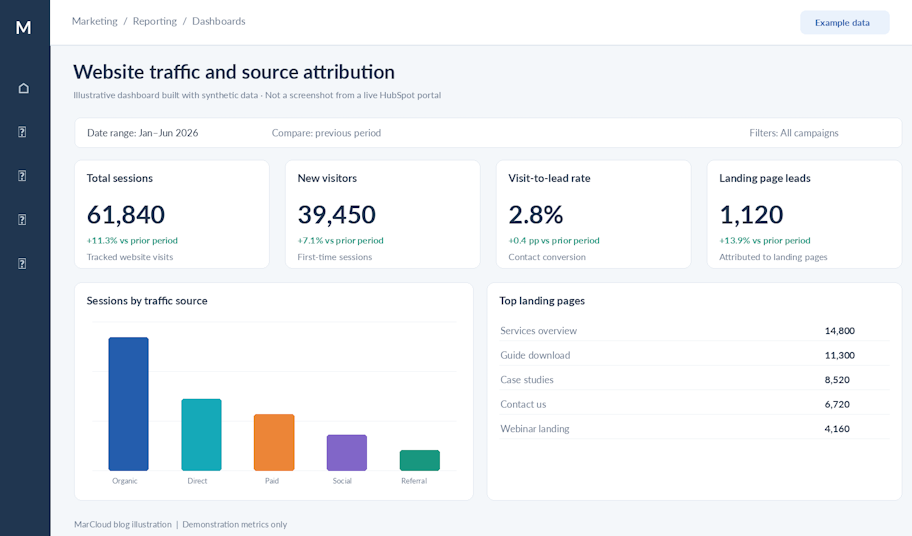
This dashboard looks more closely at where traffic is coming from and how different sources are performing. It moves beyond volume to consider quality, which is where the more useful insights tend to sit.

website traffic and source attribution

Reports often include sessions by source, bounce rate by source, new versus returning visitors, and landing pages ranked by both sessions and conversion rate. Over time, patterns begin to emerge. Some channels may consistently drive large volumes of traffic but contribute very little in terms of leads or pipeline, while others deliver more engagement.

A HubSpot marketing dashboard like this is useful when reviewing channel investment, as it provides a clearer basis for deciding where to continue, adjust, or reduce spend.

3. Lead generation and pipeline contribution dashboard

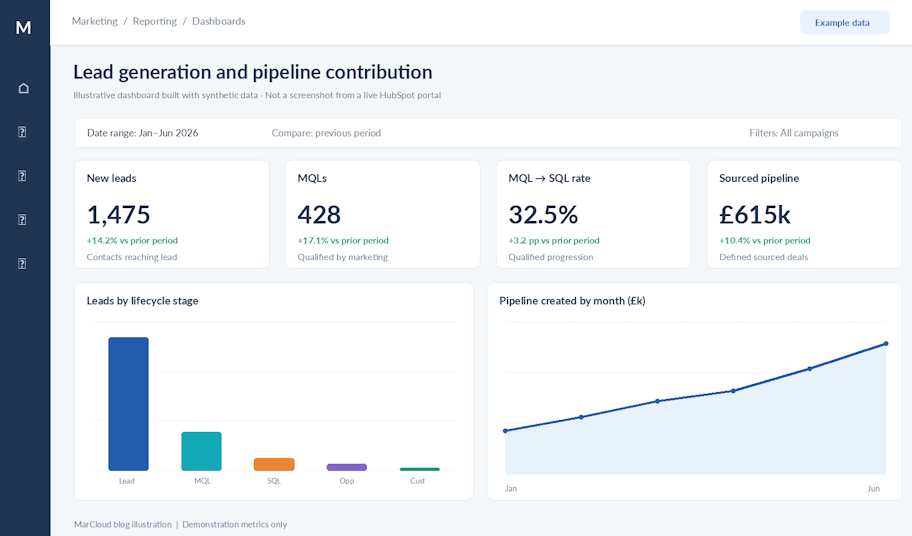
This is one of the more important dashboards when it comes to demonstrating marketing value to leadership. It focuses on how marketing activity translates into leads and, importantly, what those leads represent in pipeline terms.

lead generation and pipeline attribution

Reports typically include contacts created by source, leads by lifecycle stage, MQL-to-SQL conversion rates, and marketing’s contribution to pipeline value.

For marketing managers and directors, this type of reporting aligns more closely with the expectations of the C-suite.

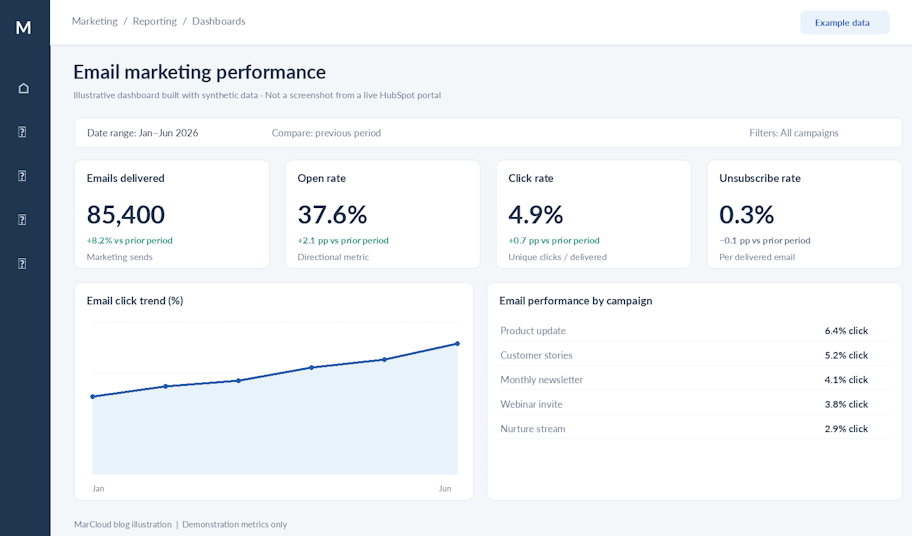
4. Email marketing performance dashboard

Email remains a central part of most marketing strategies, but its performance is not always easy to interpret beyond basic engagement metrics.

email marketing performance

This dashboard brings together reports on sends, open rates, click-to-open rates, and unsubscribe rates, but it also looks at what happens after the click. Where possible, it tracks how contacts who engage with emails move through the lifecycle, which provides a clearer sense of whether email activity is contributing to broader objectives.

HubSpot’s reporting in this area has improved, particularly when filtered by campaign or segment, which makes it easier to compare performance across different audiences and nurture flows.

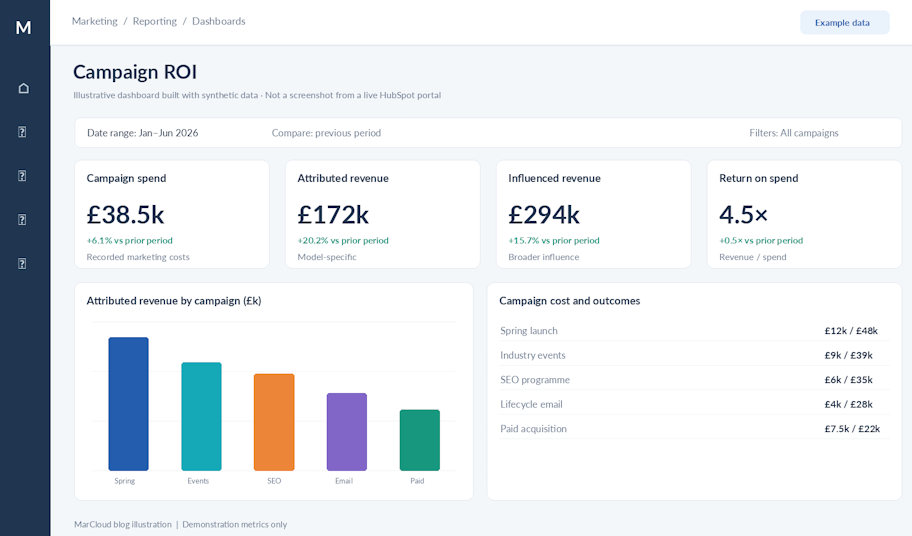
5. Campaign ROI dashboard

Campaign-level reporting is where many marketing teams expect to find clear answers, although the data is not always straightforward.

campaign ROI

This dashboard combines metrics such as contacts enrolled in campaigns, opportunities created, deals closed, and revenue influenced. HubSpot’s Campaigns tool allows assets to be grouped, which helps create a more unified view of performance across emails, landing pages, and other channels… assuming you’re using it correctly!

Note that revenue influenced and revenue attributed are not the same. Influenced revenue reflects the broader impact of a campaign across multiple touchpoints, while attributed revenue is more precise and depends on the attribution model being used. Both are useful, but they serve different purposes in reporting.

Among HubSpot dashboard examples, this is often one of the most closely examined when budgets are being reviewed.

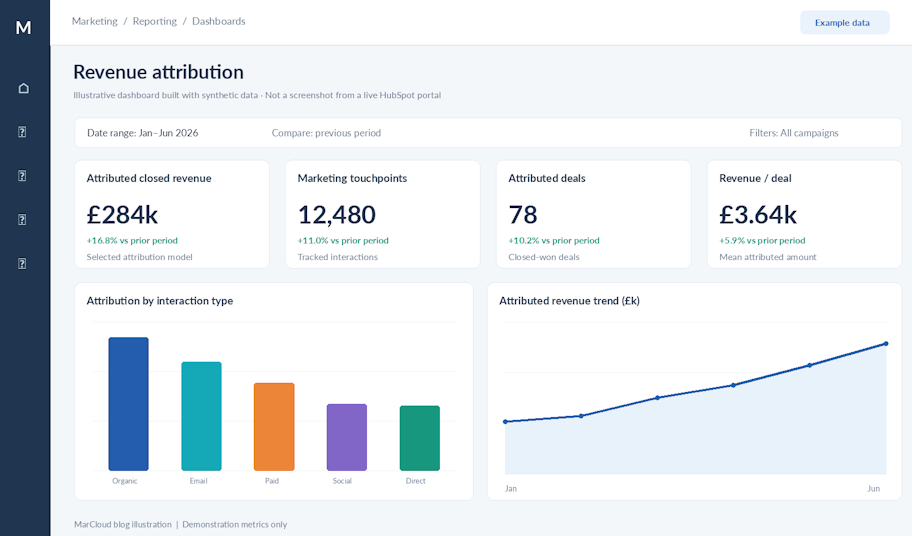
6. Revenue attribution dashboard

This is the dashboard that requires the most careful setup, and it is also the one that has the most direct link to revenue.

revenue attribution

HubSpot offers several attribution models, including first touch, last touch, linear, time decay, U-shaped, and full path. Each model distributes credit differently, which means that the same campaign can appear more or less effective depending on the model chosen.

Using more than one model can provide a more balanced view. U-shaped and full path are commonly used together, as they capture both early engagement and later-stage interactions. The key is consistency, so that results can be compared over time without the underlying methodology changing.

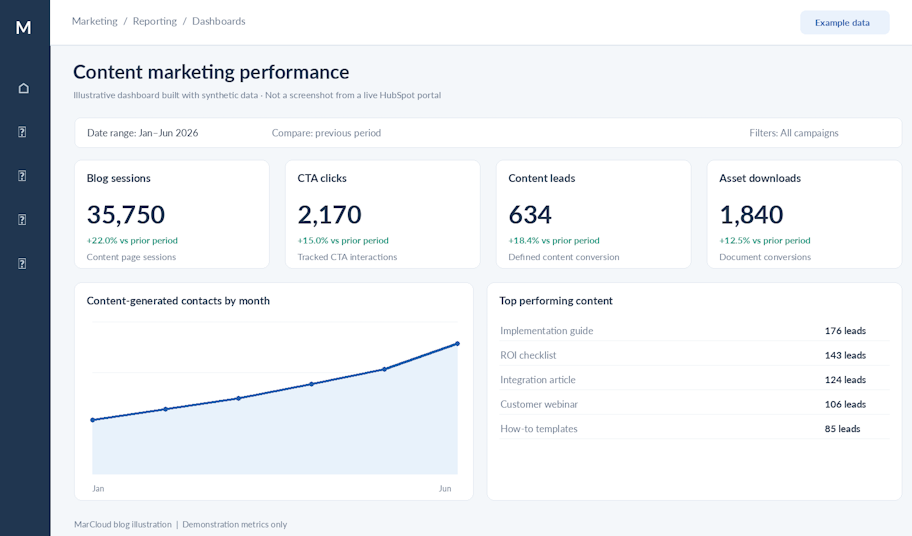
7. Content marketing performance dashboard

Content performance is typically measured in terms of traffic, but that only tells part of the story.

content marketing performance

This dashboard looks at how content contributes to engagement and conversion. Reports might include blog sessions, time on page, CTA clicks, downloads by asset, and contacts generated from content. Over time, it becomes clearer which topics and formats are contributing to pipeline. It also helps with editorial decisions and resource allocation.

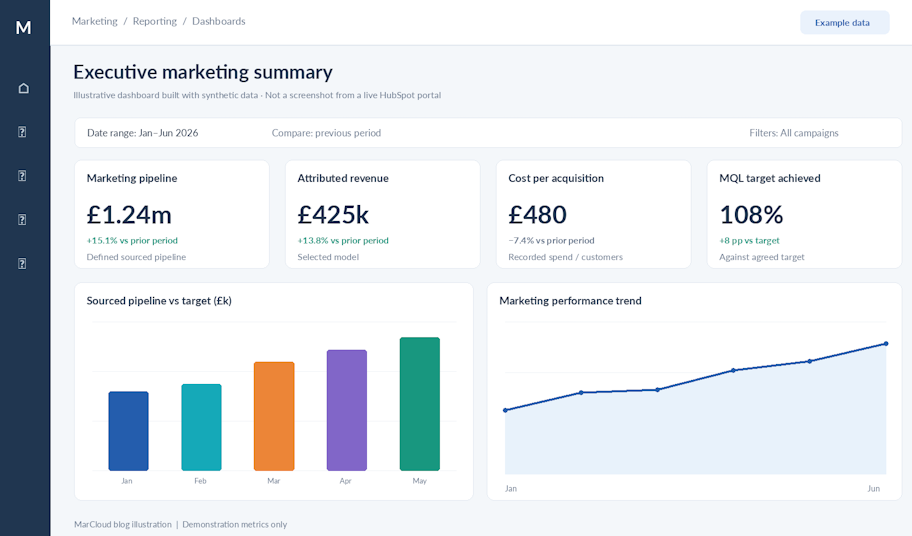
8. Executive summary dashboard

The executive dashboard is designed for a different audience. It focuses on a small number of high-value metrics that answer straightforward questions about performance.

executive marketing summary

Typical reports include pipeline generated by marketing, revenue attributed to marketing, cost per acquisition, MQL volume against target, and a forward-looking metric such as pipeline coverage.

This is often the most difficult dashboard to build, as it requires confidence in the underlying data and a clear understanding of what matters to leadership. It is also where a structured framework tends to have the greatest impact.

Key principles for building effective HubSpot dashboards

Dashboards work best when they are built with a specific audience in mind. A team-level dashboard and an executive dashboard serve different purposes, so try not to combine them.

Limiting the number of reports on each dashboard keeps reporting clear. When too many metrics are included, it’s harder to identify what is important.

Consistency is also important. Using the same date ranges across reports ensures that comparisons are meaningful, while clear naming conventions make it easier for anyone viewing the dashboard to understand what they are looking at without additional explanation.

Finally, dashboards need to be maintained. As priorities change, some reports become less relevant, and others become more important. Regular reviews will help ensure that dashboards continue to reflect current objectives and marketing operations.

If your current HubSpot dashboards feel more like a collection of metrics than a clear view of marketing impact, it may be time to run a HubSpot audit. MarCloud works with marketing teams to review, design, and build reporting that connects activity to pipeline and revenue.

For a second opinion on your current reporting or a clearer path to dashboards your leadership team can rely on, speak with a specialist.

Tom Ryan headshot

Tom Ryan

Founder & CEO of MarCloud, Tom has been on both sides of the fence, client-side and agency, working with Salesforce platforms for the best part of a decade. He's a Salesforce Marketing Champion and certified consultant who loves to co-host webinars and pen original guides and articles. A regular contributor to online business and marketing publications, he's passionate about marketing automation and, along with the team, is rapidly making MarCloud the go-to place for Marketing Cloud and Salesforce expertise. He unapologetically uses the terms Pardot, Account Engagement and MCAE interchangeably.

More by Tom Ryan

Featured resource

eBook cover with title How to Measure HubSpot ROI in the AI Age

How to Measure HubSpot ROI

A guide for marketing leaders using HubSpot to prove ROI, secure budget, and run creative campaigns without the tech headaches.

Download now
View all resources

More recent posts

View all articles
Illustrated characters holding a MarCloud banner

Get expert Salesforce & HubSpot automation tips, straight to your inbox.

MarCloud is a team of certified Pardot, HubSpot, Marketing Cloud, and Salesforce specialists. We help businesses to unlock the potential of marketing automation. Join 2,000+ professionals who receive actionable insights to boost their automation performance.

Sign up to the newsletter

How to Measure HubSpot ROI

A guide for marketing leaders using HubSpot to prove ROI, secure budget, and run creative campaigns without the tech headaches.

Download now