MarCloud
Talk to a specialist

Book a call with MarCloud's Founder to discuss:

  • Integrating HubSpot and Salesforce

  • Auditing CRM data and segmenting data

  • Underperforming workflows and automations

  • Reducing license costs and inefficiencies

  • Revenue attribution modelling and proving ROI

  • AI readiness, Agent POC's, and Claude integration

Within 30 minutes, you'll know the best next step for your business.

eBook cover with title How to Measure HubSpot ROI in the AI Age
Free ResourceDownload now

Unfortunately, the point at which many sales and marketing leaders realise there’s a gap between the sales dashboards they have and the analytics they need tends to crop up at the wrong moment: in a board meeting, a budget review, or the quarterly debrief where someone asks, "So what's actually working?"

*cue a lot of tab-switching and caveats*

It goes without saying that HubSpot is incredibly powerful for sales and marketing reporting. But its out-of-the-box dashboards are a starting point. The five HubSpot sales dashboards covered in this post are the ones that take teams from "we have reports" to "we have real insight", and from defending spend to building a credible, evidence-based case for continued marketing investment.

Each dashboard serves a purpose, but together, they form a connected picture that sales and marketing leaders can use to prove their impact and secure future buy-in.

1. Deal forecasting dashboard

What it's for: Understanding how much revenue is coming, and with confidence.

Deal forecasting dashboard

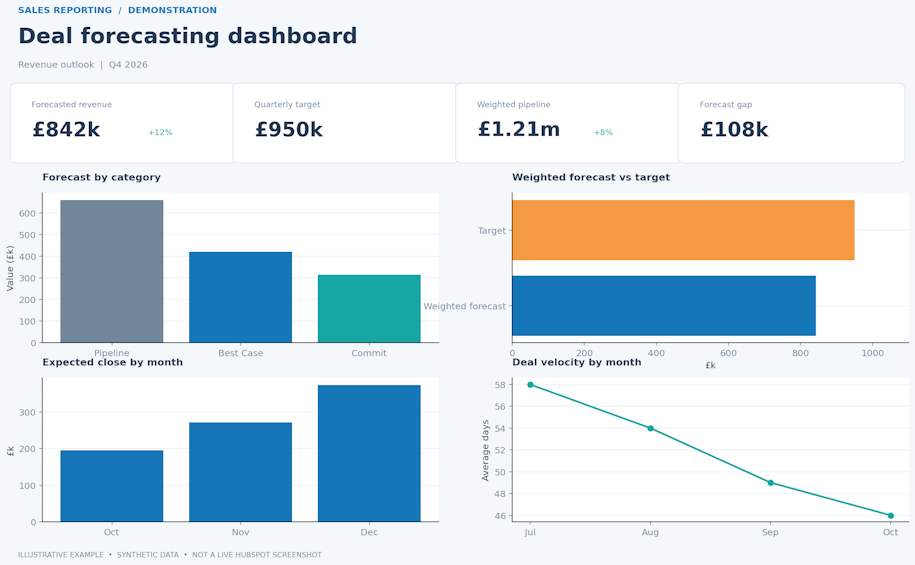
The forecasting dashboard your Chief Financial Officer will love. It answers the most important question in any revenue review: Are we going to hit our number?

It’s also useful for breaking down pipeline into forecast categories rather than treating all deals as equal. For example, ‘Commit’ deals could be those with high confidence and a clear path to closing. Whereas ‘Best Case’ includes deals that are possible but not certain. ‘Most Likely’ could be a weighted, realistic view of what will close. Meanwhile, your ‘Pipeline’ includes everything being worked on, regardless of probability.

Key things to track in this dashboard:

  • Forecast value by rep and by team, split by category

  • Weighted deal value vs. revenue target, so you can see the gap at a glance

  • Deals expected to close within the current month or quarter, with probability

  • Deal velocity: Are deals moving fast enough through the pipeline?

For marketing leaders, this dashboard can also highlight pipeline attribution. How much of the forecast originated from marketing-sourced leads versus direct sales outreach? This single comparison can be one of the most important to share when talking about the budget.

Pro tip: HubSpot's native Forecast tool in Sales Hub works well alongside custom reports. Use both together to get a true Commit/Best Case/Most Likely breakdown that reflects accurate sales judgement.

2. Deal pipeline dashboard

What it's for: Understanding whether the pipeline is healthy enough to deliver the forecast.

Deal pipeline dashboard

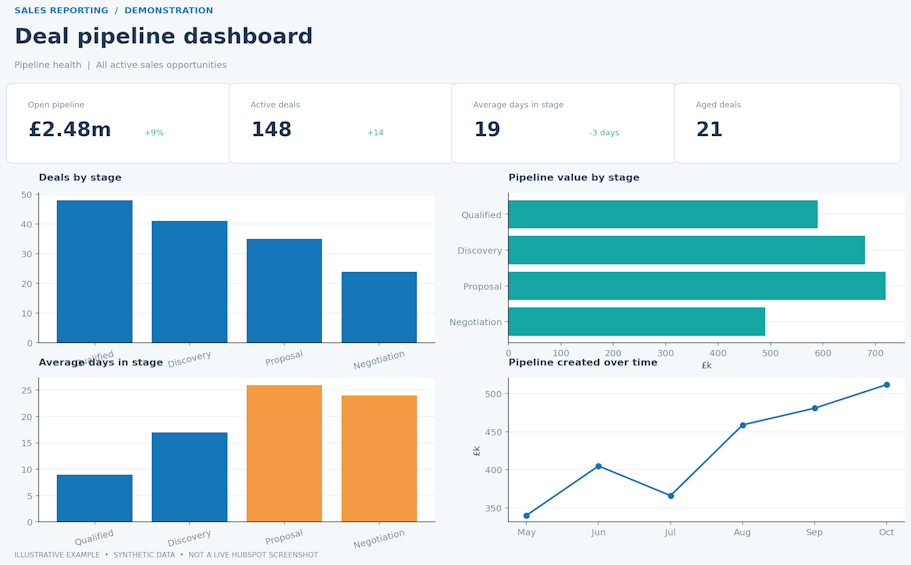
While a HubSpot forecasting dashboard tells you what revenue is coming, the pipeline dashboard tells you whether the path to get there is intact. Often, this is where bottlenecks hide, where deals get stuck, and where poor sales processes are visible.

Stage-by-stage breakdowns are a must-have, but the metric that most teams underuse is time in stage. A deal sitting in "Proposal Sent" for six weeks isn't progressing, and without visibility on that, it can sit there looking like pipeline when it’s probably a closed-lost outcome.

Key things to track in this dashboard:

  • Deals by pipeline stage, by both volume and value

  • Average time in each stage: Where are deals stalling?

  • Pipeline creation over time: Is the top of the funnel being consistently filled?

  • Deals at risk: Aged opportunities with no recent activity logged

For marketers, this dashboard can help you understand which stages marketing-sourced leads are reaching. How does their progression compare to sales-sourced deals? Are they moving faster, slower, or converting at similar rates? All of these insights can help in terms of reviewing lead quality and qualification criteria.

Pro tip: Build a Deal Stage Duration report and identify the single stage where most deals spend the longest time. That's usually where a targeted piece of sales enablement content, such as a competitive comparison, a case study, or an ROI calculator, can impact close rates.

How to Measure HubSpot ROI

A guide for marketing leaders using HubSpot to prove ROI, secure budget, and run creative campaigns without the tech headaches.

  • Common challenges
  • HubSpot ROI framework
  • Five-step process
  • Implementation
  • Marketing execution
  • Campaign attribution
HubSpot ROI eBook
eBook cover with title How to Measure HubSpot ROI in the AI Age

3. Sales activity dashboard

What it's for: Understanding whether the right accounts are getting the right level of attention.

Sales activity dashboard

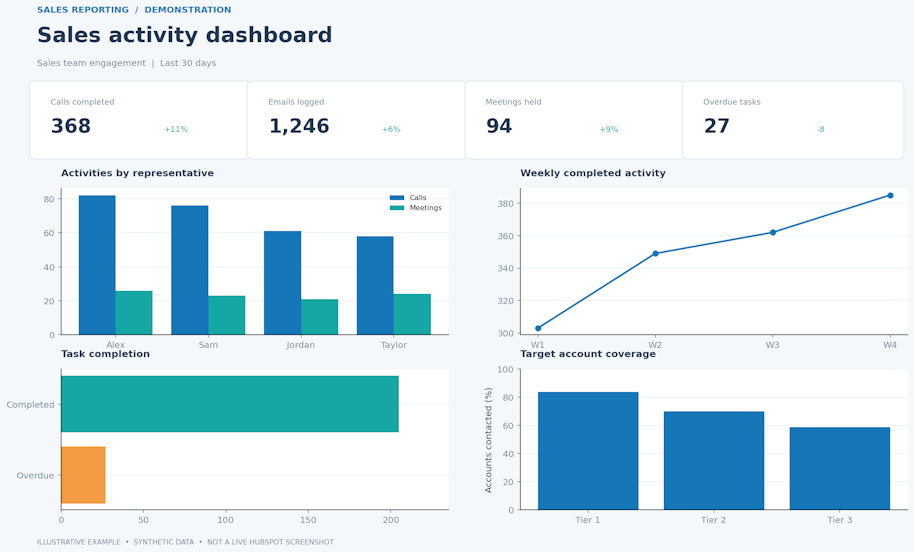
Activity dashboards have a reputation for being a bit Big Brother, or for tracking activity without output, which is why they're often either ignored or resented by sales teams. But configured well, this dashboard isn't about monitoring people. Instead, it helps leaders understand whether the effort being put in is aligned with the right deals.

The question it answers is: Are we doing enough of the right things with the right accounts?

Key things to track in this dashboard:

  • Calls, emails, meetings, and tasks completed, by rep, by team, and over time

  • Touchpoints per account: Which accounts get coverage? Which are neglected?

  • Tasks overdue versus tasks completed, compared against the target

The insight this HubSpot sales activity dashboard gives Marketing is significant because one of the most common (and least visible) ROI leaks in B2B businesses is marketing-generated leads that don't get followed up on properly. Too often, marketers run a campaign, leads come in, and then the handoff to Sales either doesn't happen cleanly or the leads sit untouched. A sales activity dashboard makes issues with HubSpot lead management obvious, which is the first step to fixing them.

Pro tip: If you're running account-based marketing campaigns, filter this dashboard by your target account list to see touchpoint density against named accounts specifically. It's the clearest way to assess whether your ABM strategy is being executed in the field.

4. Conversion rate dashboard

What it's for: Understanding what's driving deal success, and where conversions are weak.

conversion rate dashboard

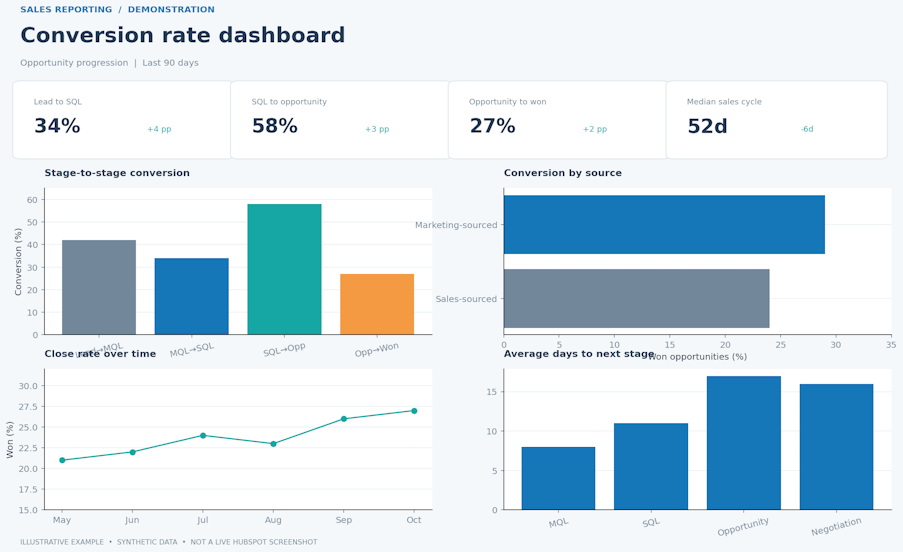
Rather than just knowing how many deals are open, this conversion rate dashboard tells you at what rate opportunities are progressing from one stage to the next, and where they're dropping off.

Usually, there's a specific stage, a specific deal size, a specific industry or source where conversion drops sharply, and without this dashboard, you're unlikely to find it until the impact shows up in missed targets.

Key things to track in this dashboard:

  • Stage-to-stage conversion rates across the full funnel

  • Conversion rates broken down by rep, team, industry, deal size, and source

  • Average time to convert at each stage

  • Close rate trend over time: Improving, declining, or seasonal?

  • Marketing-sourced vs. sales-sourced deal conversion rates side by side

The last comparison is arguably the most important one for marketing leaders with a budget conversation on the horizon. If leads that originated from marketing convert to closed deals at a comparable or better rate than those sourced directly by sales, that's a compelling piece of evidence that is proven by your HubSpot dashboard.

Pro tip: Build a funnel report in HubSpot that shows the journey from first contact to closed-won as a single visualisation. Include it in a board-level deck or executive update to show impact across the full lifecycle.

5. Deal win/loss analysis dashboard

What it's for: Understanding why deals are won and lost, and using that intelligence to improve.

Deal win/loss analysis dashboard

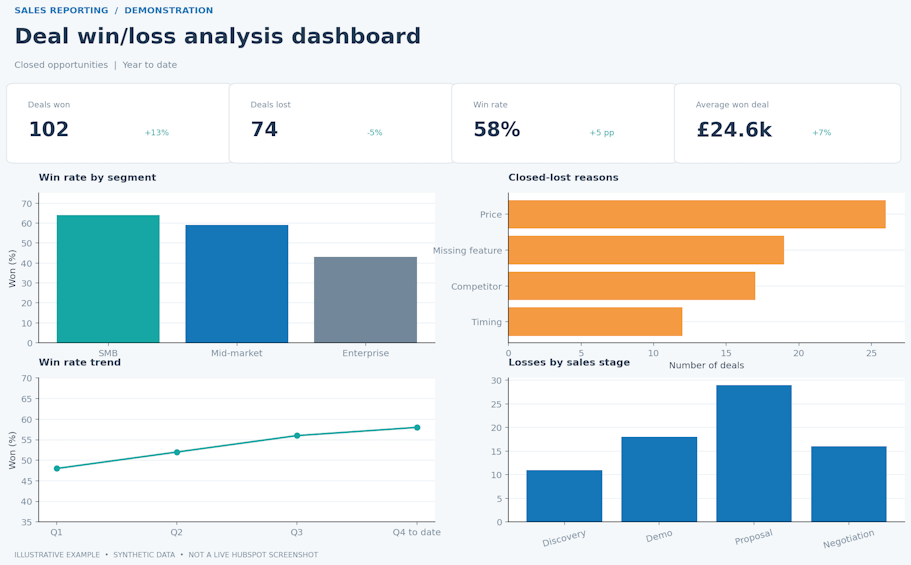
Win/loss analysis is the most underused of all HubSpot sales dashboards, which is a shame because it's also the most strategically valuable. Where other dashboards tell you what's happening in the pipeline, this one tells you why.

The question this dashboard answers is: What do our wins and losses have in common?

Key things to track in this dashboard:

  • Win rate and loss rate, broken down by rep, region, product, and deal size

  • Top closed-lost reasons, from a standardised set of dropdown options

  • Win/loss ratio trend over time: Are things improving, or is there a decline?

  • Lost deal stages

  • Competitive losses: Which competitors are appearing most frequently?

  • Won deal patterns: What do your best-fit customers tend to have in common?

For marketers, the won deal patterns are really useful. If deals that had four or more marketing touchpoints before a sales conversation close at a significantly higher rate than deals with one or none, that's an ROI story, and it's sitting in this dashboard, waiting to be presented. 

Equally, if "price" or "missing feature X" consistently appears in closed-lost reasons, marketing can either respond with targeted content, competitive messaging, or campaign positioning that addresses the objection before it reaches the sales conversation, or you have some feedback and focus areas for product development.

Pro tip: Standardise your closed-lost reasons as a required dropdown field in HubSpot. Free-text entries make this data almost impossible to analyse at scale. Agree on 8 to 12 categories with the sales team and review the data together at least once a quarter.

How these 5 dashboards work together

Each of these HubSpot sales dashboards serves a specific purpose, but their real value is in using them as a connected system rather than five separate views.

The forecasting dashboard tells you what's coming. The pipeline dashboard tells you whether the path to get there is healthy. The activity dashboard tells you whether the team is doing enough of the right things to move it forward. The conversion dashboard tells you at what rate opportunities are becoming revenue. And the win/loss dashboard tells you what's driving the outcomes you're seeing.

With this level of joined-up sales and marketing performance, leaders can approach C-suite conversations with confidence, justifying spend and guiding strategy.

This approach is also central to how the MarCloud ROI Framework guides clients. Rather than building reports around what HubSpot can show (which is a lot!), we focus on what the business needs to know and ensure the underlying data is clean, consistent, and trustworthy before it ever reaches a boardroom slide.

A note on data quality

Sales dashboards are only as reliable as the data feeding them. If you have issues with your data management or Salesforce integrations, your dashboards might be incomplete. Always start by ensuring your HubSpot database is free from duplicates, healthy, and accurate.

Next, consider how internal processes can affect what shows in your dashboards. Free-text closed-lost reasons will make win/loss analysis unusable. If teams inconsistently apply lifecycle stages, marketing attribution data can't be trusted. And a dashboard with 20 metrics will probably be overwhelming, so select only the KPIs that drive decisions.

To really hammer home the point… If your data foundations aren't solid, the dashboards that sit on top of them will be unreliable. Getting those foundations right, through consistent processes, agreed lead definitions, and a data model that reflects how the business operates, is what makes the difference between helpful and useless HubSpot dashboards.

Questions about HubSpot sales dashboards

During our work with HubSpot customers, we get asked the same kinds of questions. And we love answering them. It’s literally why we exist. Marketers shouldn’t need to be platform experts, developers, or data scientists. Your priorities are strategy, creativity, and getting ROI from your martech stack. HubSpot Partners like MarCloud can handle everything else.

What are HubSpot sales dashboards? 

HubSpot sales dashboards are customisable views within HubSpot that bring together reports, metrics, and data visualisations to help sales and marketing teams monitor performance and make decisions. They can be built using HubSpot's native report and dashboard builders or custom-coded for more complex requirements.

How many dashboards can you have in HubSpot? 

HubSpot allows up to 300 dashboards per portal, with a limit of 30 reports per dashboard. Most teams benefit from a smaller number of well-structured dashboards rather than many loosely organised ones.

What's the difference between a HubSpot report and a dashboard? 

A report is a single data visualisation, such as a chart, table, or metric. A dashboard is a collection of reports grouped around a theme or purpose, such as sales activity or deal forecasting. Reports are included within dashboards.

Can HubSpot dashboards show marketing attribution on pipeline? 

Yes! HubSpot's attribution reporting connects marketing activity to contacts, deals, and revenue. With the right configuration, you can see which campaigns, channels, and content types are influencing pipeline and closed revenue, and compare marketing-sourced deals against other sources.

What HubSpot tier do I need for advanced sales dashboards? 

Basic dashboards are available across all tiers. For advanced features like custom report builder, attribution reporting, and forecasting tools, you'll typically need Sales Hub Professional or Enterprise, depending on the specific functionality required.

Next steps

The five dashboards above give you a framework for what to build, but knowing what to build and having the time, resources, and HubSpot know-how to build it well are two different things.

A sensible starting point is to audit what you currently have, not just which dashboards exist, but whether the underlying properties, pipeline stages, and lifecycle stage definitions are set up in a way that produces data you can trust. 

From there, it's a case of prioritising which of the five dashboards (or more) would add the most immediate value given where your business is right now. For some teams, that's forecasting because the board wants more visibility on revenue. For others, it's win/loss analysis because deals are being lost and nobody can agree on why. Start with the dashboard that solves the most pressing question.

Ready to move from a collection of reports to a dashboard setup that supports ROI measurement? Get in touch with MarCloud for an account audit or support project.

Tom Ryan headshot

Tom Ryan

Founder & CEO of MarCloud, Tom has been on both sides of the fence, client-side and agency, working with Salesforce platforms for the best part of a decade. He's a Salesforce Marketing Champion and certified consultant who loves to co-host webinars and pen original guides and articles. A regular contributor to online business and marketing publications, he's passionate about marketing automation and, along with the team, is rapidly making MarCloud the go-to place for Marketing Cloud and Salesforce expertise. He unapologetically uses the terms Pardot, Account Engagement and MCAE interchangeably.

More by Tom Ryan

Featured resource

eBook cover with title How to Measure HubSpot ROI in the AI Age

How to Measure HubSpot ROI

A guide for marketing leaders using HubSpot to prove ROI, secure budget, and run creative campaigns without the tech headaches.

Download now
View all resources

More recent posts

View all articles
Illustrated characters holding a MarCloud banner

Get expert Salesforce & HubSpot automation tips, straight to your inbox.

MarCloud is a team of certified Pardot, HubSpot, Marketing Cloud, and Salesforce specialists. We help businesses to unlock the potential of marketing automation. Join 2,000+ professionals who receive actionable insights to boost their automation performance.

Sign up to the newsletter

How to Measure HubSpot ROI

A guide for marketing leaders using HubSpot to prove ROI, secure budget, and run creative campaigns without the tech headaches.

Download now