MarCloud
Talk to a specialist

Book a call with MarCloud's Founder to discuss:

  • Integrating HubSpot and Salesforce

  • Auditing CRM data and segmenting data

  • Underperforming workflows and automations

  • Reducing license costs and inefficiencies

  • Revenue attribution modelling and proving ROI

  • AI readiness, Agent POC's, and Claude integration

Within 30 minutes, you'll know the best next step for your business.

Coloured background with text MarCloud's ROI Audit for HubSpot
Free ResourceGet started free

Key takeaways

  • Keep Salesforce responsible for commercial records and agree on what each HubSpot team needs to see or update.

  • Use the native connector for supported syncing, but use custom integration for specific gaps in relationships or business logic.

  • Test record matching, associations, and customer handovers, including failed updates and retries.

  • Build HubSpot reporting around real opportunities, with cost inputs for ROI.

With many MarCloud clients migrating from Marketing Cloud to HubSpot for marketing and customer service, but retaining Salesforce as their CRM, we’re getting more requests than ever for HubSpot Salesforce integration that supports how marketing, sales, and service teams work together.

When sales reps create an opportunity in Salesforce and link the relevant contacts, the marketing team needs to know what communication remains appropriate. When the customer signs, service reps need the information to deliver what Sales promised. Rather than operating in silos or relying on email, a solid HubSpot Salesforce integration will automatically surface the right context.

So how do you set up a solid, error-free integration in the first place?

Here’s everything you need to consider, including limitations of the native HubSpot Salesforce connector and a step-by-step integration guide.

Your HubSpot Salesforce integration should connect the contact, account, opportunity, and service information your teams need, along with relevant marketing and sales activity. The records you sync will depend on the HubSpot tools you use and the connector’s support for those objects, fields, and relationships.

Team Information it needs from Salesforce Information it may contribute through HubSpot
Marketing Lead qualification outcomes, opportunity progress, and customer status Campaign engagement and source information
Sales Account context, ownership, and opportunity details Relevant calls, meetings, and sales emails
Service Customer details and commercial context Ticket progress and service status

Firstly, agree where updates should originate. 

For example, Salesforce might govern opportunity stages, deal amounts, and forecasts, while HubSpot maintains marketing engagement information. For service reps, choose where the team manages cases or tickets and which updates other teams need at which points in the customer journey.

Our HubSpot Salesforce field mapping guide explains the configuration in more detail. Its marketing-to-sales examples provide useful context, although sales activities and service records need their own assessment.

Free ROI Audit for HubSpot

Get a branded audit report covering data quality, automation health, pipeline performance, and ROI readiness, structured around the MarCloud ROI Framework.

  • Instant HubSpot audit
  • Branded audit report
  • Executive summary
  • Data quality
  • Priority actions
  • Proven ROI Framework
  • Salesforce analysis
  • AI readiness
HubSpot ROI Audit
Coloured background with text MarCloud's ROI Audit for HubSpot

Use Salesforce data in marketing, sales and service

Consider a business selling an annual service contract. Marketing generates the enquiry via HubSpot campaigns, sales reps manage the opportunity in Salesforce, and service takes responsibility after the purchase. In this case, there are many areas of overlap.

Let sales outcomes guide marketing

Once Sales starts a conversation, marketers need to understand what should happen within HubSpot to avoid alienating qualified leads or duplicating outreach. Depending on your process, HubSpot might automatically withdraw a prospect from a nurture programme, continue relevant educational content, or change marketing communication eligibility.

Similarly, a salesperson recording “revisit in six months” should give the marketing team (and HubSpot) enough information to ensure nurture touches continue during that time.

Remember that a Salesforce contact can have several open opportunities. If one closes as lost while another remains active, a HubSpot workflow reacting to the latest update could send an inappropriate re-engagement email. 

For automatic lifecycle updates, Salesforce contacts must link to opportunities through contact roles. Check company-level lifecycle settings too, because they can update other contacts at the same company. Automatic updates move lifecycle stages forward, so closed-lost follow-up needs separate rules.

Your HubSpot Salesforce integration needs to consider these types of ‘what if’ use cases and have already pre-empted the right action.

Our HubSpot Salesforce sync guide covers selective sync and lead assignment using a Marketing Hub example.

Give sales useful interaction context

Salespeople need to understand what a prospect has already shown interest in without searching through several systems before a call.

Where your team uses HubSpot marketing and sales tools, review which interactions should be sent into Salesforce, for instance, HubSpot’s out-of-the-box activity sync supports tasks, sales emails, calls, and meetings, subject to configuration. 

However, you should still check direction, ownership, and associations for each activity type. Marketing email interactions and form submissions use one-way timeline sync to create Salesforce tasks; the newer activity sync supports two-way syncing for the listed sales activities. Emails recorded only through Salesforce Einstein Activity Capture don’t sync to HubSpot.

Also, decide which system creates follow-up tasks. If both create a reminder after the same meeting, the salesperson has extra administration, and you run the risk of duplicates.

My general advice is to keep opportunity management within the agreed Salesforce CRM process, with selected HubSpot interactions supplying marketing and/or service context.

Give service the context behind the sale

For our annual contract example, the service team needs the relevant contacts, purchased service, agreed commitments, and responsible account manager to meet onboarding and renewal targets.

Define what starts onboarding and how the receiving team confirms acceptance. A closed-won opportunity will usually initiate a handover, although you may require another condition, such as contract approval, before work begins.

HubSpot supports two-way syncing between Salesforce cases and HubSpot tickets, with configurable fields, associations, and pipeline mappings. Check conversations, attachments, and entitlements separately and don’t assume the full service history transfers.

The information should also travel back to the teams that need it. For example, an unresolved service issue could flag a renewal conversation for review or pause an upsell campaign. You need an agreed signal and action, with an owner responsible for resolving it.

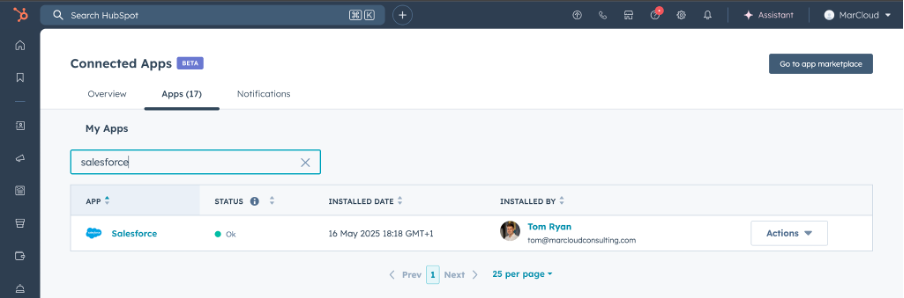
Screenshot of Connected HubSpot Apps featuring Salesforce

Does the native connector meet your requirements?

The native connector can handle supported contact, company, opportunity, activity, and case/ticket syncing, including compatible custom fields. The current deal sync supports configurable matching and selective syncing, but you can't switch back to the standard version once enabled.

If your requirements involve complex relationships, calculations across several records, or actions in other systems, assess whether native automation can support them before choosing middleware or custom development. 

To see whether the connector by itself is enough, first assess each requirement against the available functionality.

Sync requirement Starting point
Contacts, companies, opportunities, and compatible fields Native configuration
Sales activities or cases and tickets Check supported types, directions and associations
A summary taken from several opportunities Assess aggregation and custom logic
Contract or onboarding data in another system Assess additional integrations
Actions dependent on several records and platforms Assess API integration or middleware

Tip: Check your account’s deal sync version: the updated option adds configurable matching, pipeline mappings, and association syncing, but enabling it prevents reverting to the standard version. Its matching rules do not clean existing duplicates.

For more complex requirements, custom integration can provide more control. 

Perhaps you need to:

  • Translate product codes for service routing across teams or even countries.

  • Start customer onboarding only after Salesforce records a won opportunity, the contract system confirms signature, and the finance system confirms payment.

  • Pause nurture for contacts with an active Salesforce opportunity for one product while continuing communications about unrelated products.

  • Ensure HubSpot service tickets show warranty eligibility based on the customer’s Salesforce asset record, installation date, and service contract.

  • Show a parent company’s renewal risk by combining opportunities and support cases across its Salesforce subsidiary accounts with overdue invoices from Finance.

API integration is a better option when the native configuration and workflows can’t handle a requirement without creating an awkward setup to maintain. It gives you more control over data movement and sequencing, within the platforms’ API limits and permissions.

Whichever approach you choose, define what happens when a step fails. If an onboarding request succeeds but its confirmation fails, a retry should recognise the existing request and update it rather than create another.

Also, test the delay between a Salesforce update and the resulting HubSpot action. If a campaign runs before an updated customer status arrives, it could send the wrong message despite the underlying rule being correct. Agree on how delayed or failed updates should affect actions that depend on them.

Important note: If you use native and custom integrations together, decide which one controls each field and action so they don’t overwrite updates or repeat tasks. 

Our HubSpot API integration guide explains the wider planning considerations, using marketing-led examples.

Step-by-step HubSpot Salesforce integration setup

Once you’ve agreed on the requirements, use this sequence for a native setup.

  1. Check subscriptions and access: The native connector requires an eligible HubSpot Professional or Enterprise subscription; the free CRM alone is insufficient. Check Salesforce permissions, API capacity, and licences for the individual HubSpot features you need.

  2. Prepare test records and clean duplicates. Include new and existing contacts, lead conversions, several opportunities, and service records. Remember that contacts and opportunities use different matching rules, and existing duplicates need to be cleaned up separately. HubSpot matches Salesforce leads and contacts by email, so resolve duplicate Salesforce records before syncing. Check required Salesforce fields, validation rules, and existing Flows against these test records.

  3. Install the Salesforce app in HubSpot. Open Marketplace, find Salesforce, choose the appropriate environment, and sign in as the intended Salesforce user.

  4. Set creation and sync rules. Decide whether HubSpot contacts should create Salesforce leads or contacts, then review which records should sync in each direction. HubSpot inclusion segments (HubSpot to Salesforce) and Salesforce-to-HubSpot (Salesforce to HubSpot) selective sync control different directions.

  5. Configure objects and mappings. Define which system owns key fields like opportunity amount, stage, and currency to prevent conflicting updates. Then set up the required fields, activities, and case/ticket syncing. Check update rules and blank values, using our mapping guide for detailed instructions. Existing Salesforce cases may need a separate import rather than assuming they'll automatically sync.

  6. Build the required actions. Configure the HubSpot workflows, Salesforce Flows, or notifications that carry out the agreed processes.

  7. Test the results. Check sales outcomes, opportunity updates, and service events. Repeat submissions and retry failed actions to check for duplicate records or tasks.

  8. Import existing data gradually. Import or resync approved records in batches, monitor Sync Health and API usage, and give someone responsibility for resolving errors.

Our integration issues guide covers diagnosis and duplicate-related problems.

What can you report on?

Which reports you can build depends on the records and associations you sync, the dates you capture, and the reporting features included in your subscription.

For marketing and sales leaders, a key reason to connect HubSpot with Salesforce is to understand which enquiries become opportunities and customers, and demonstrate ROI. You may also want to see where enquiries stop progressing, whether won opportunities have reached onboarding, or which customers approaching renewal have unresolved service issues.

Your integration needs the right record relationships to answer those questions and enable you to build reliable HubSpot reports. 

  • Start with the Salesforce opportunity, its amount and associated contacts, then check how it connects to the relevant marketing activity and service records.

  • Agree dates, currencies, and reporting definitions before building the reports. Marketing-sourced revenue and marketing-influenced revenue describe different things, and the people reviewing the figures need to understand which you mean.

I’d follow a sample enquiry through qualification, a won opportunity, and the service handover, checking the records at each stage.

Again, a custom HubSpot Salesforce integration can ensure your reporting pulls accurate information in the format you need for reporting.

At MarCloud, we work across HubSpot and Salesforce, including CRM configuration, Salesforce Flows, and integration repairs. If you still have teams chasing information between systems, we can review the journey with you and then integrate as needed.

Talk to MarCloud’s Founder, Tom Ryan, for a chat about your challenges.

Frequently asked questions

Can I connect free HubSpot CRM to Salesforce?

The native Salesforce connector requires an eligible HubSpot Professional or Enterprise subscription, so free HubSpot CRM alone is insufficient. You also need the appropriate Salesforce access and permissions, plus licences for the HubSpot features your teams intend to use.

Will the integration automatically stop marketing emails when sales opens an opportunity?

You need to configure that behaviour separately. The integration can supply opportunity information, while HubSpot workflows determine whether a contact should leave nurture, receive supporting content or continue another programme, taking account of other opportunities and communication preferences.

Does Salesforce case syncing transfer the complete customer service history?

The native connector supports two-way syncing between Salesforce cases and HubSpot tickets, but you should assess conversations, attachments, and entitlements separately. Matching case and ticket records does not establish that every part of the customer’s service history transfers.

Tom Ryan headshot

Tom Ryan

Founder & CEO of MarCloud, Tom has been on both sides of the fence, client-side and agency, working with Salesforce platforms for the best part of a decade. He's a Salesforce Marketing Champion and certified consultant who loves to co-host webinars and pen original guides and articles. A regular contributor to online business and marketing publications, he's passionate about marketing automation and, along with the team, is rapidly making MarCloud the go-to place for Marketing Cloud and Salesforce expertise. He unapologetically uses the terms Pardot, Account Engagement and MCAE interchangeably.

More by Tom Ryan

Featured resource

Coloured background with text MarCloud's ROI Audit for HubSpot

HubSpot ROI Audit

Get a branded audit report covering data quality, automation health, pipeline performance, and ROI readiness, structured around the MarCloud ROI Framework.

Get started free
View all resources

More recent posts

View all articles
Illustrated characters holding a MarCloud banner

Get expert Salesforce & HubSpot automation tips, straight to your inbox.

MarCloud is a team of certified Pardot, HubSpot, Marketing Cloud, and Salesforce specialists. We help businesses to unlock the potential of marketing automation. Join 2,000+ professionals who receive actionable insights to boost their automation performance.

Sign up to the newsletter

Free ROI Audit for HubSpot

Get a branded audit report covering data quality, automation health, pipeline performance, and ROI readiness, structured around the MarCloud ROI Framework.

Get started free