Integrating your SaaS platform with Salesforce and Pardot
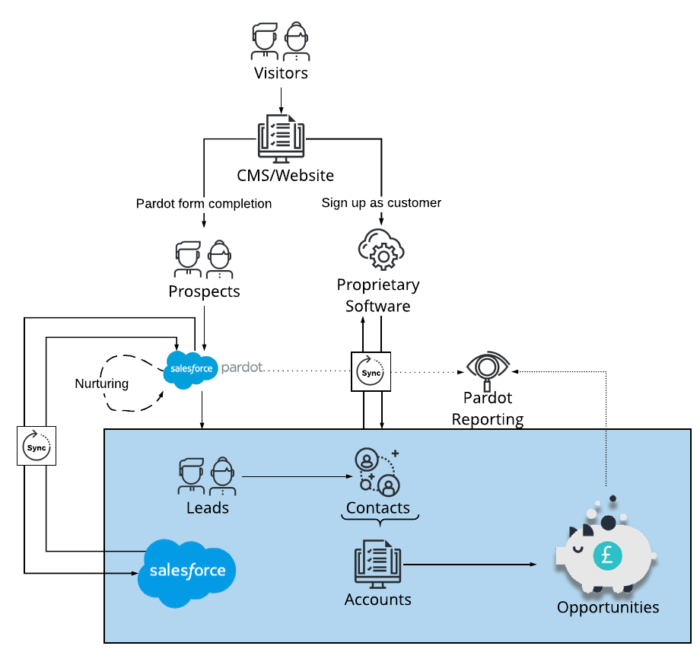
Take a look at how your SaaS platform can integrate with Salesforce and Pardot with this free systems architecture diagram designed by Macram. The illustration visualises the SaaS platform, Salesforce, Pardot systems architecture and more.
This blog was written before Pardot was renamed to Marketing Cloud Account Engagement. You can read more about the name change and what it means here.
The above illustration visualises the SaaS platform, Salesforce and Pardot systems architecture, including how prospects are nurtured, the bi-synchronous flow of data across systems and ROI reporting.
The benefits of taking this integrated approach:
Seamless communication between systems
Live data from customers who update their profile within their online account
Customer activities are logged in real-time across the whole infrastructure
Select data you would like to feed back into your proprietary software
Prospects and customers will only trigger automation relevant to their current stage in the buyer's cycle
Reporting is accurate and in real-time
Removes any need to export & upload between systems
Share
Tom Ryan
Founder & CEO of MarCloud, Tom has been on both sides of the fence, client-side and agency, working with Salesforce platforms for the best part of a decade. He's a Salesforce Marketing Champion and certified consultant who loves to co-host webinars and pen original guides and articles. A regular contributor to online business and marketing publications, he's passionate about marketing automation and, along with the team, is rapidly making MarCloud the go-to place for Marketing Cloud and Salesforce expertise. He unapologetically uses the terms Pardot, Account Engagement and MCAE interchangeably.
With the eBook ‘A Guide to Salesforce Marketing Tools’ in your arsenal, you’ll have a go-to, comprehensive, expert guide to understanding and selecting your perfect Salesforce marketing platform(s), be it Marketing Cloud Account Engagement (Pardot) or Engagement, and the products available to each.
In almost every HubSpot audit we run, we uncover duplicate contacts or companies. Most of the time, teams aren’t even aware there’s an issue. The database has grown alongside new sales reps, new integrations, new forms, and somewhere along the way, a contact was created twice. Or a company record was duplicated because the domain was formatted slightly differently. Once you know duplicates exist, how do you go about managing them?
Email compliance is one of the biggest risks marketing teams face. Whether you’re using HubSpot or Salesforce tools, it’s crucial to know the data rules in Europe, the UK, and North America. I’ll be the first to admit, this usually means concentrating hard on a blog that reads like legislation, so I’ll do my best to keep it straightforward. To be clear, this isn’t legal advice!
To implement HubSpot form tracking properly, you need more than a form on a page. Accurate attribution depends on UTMs, cookies, fields, lifecycle logic, and (where relevant) Google Tag Manager and cross-domain tracking. There’s no denying that HubSpot handles form creation and submission capture well out of the box, but reliable campaign-to-revenue reporting only happens after these are in place.
Get expert Salesforce & HubSpot automation tips, straight to your inbox.
MarCloud is a team of certified Pardot, Marketing Cloud, and Salesforce specialists. We help businesses to unlock the potential of marketing automation.
Join 2,000+ professionals who receive actionable insights to boost their automation performance.
With the eBook ‘A Guide to Salesforce Marketing Tools’ in your arsenal, you’ll have a go-to, comprehensive, expert guide to understanding and selecting your perfect Salesforce marketing platform(s).