What is Email Studio?
Email Studio is a core feature of Salesforce Marketing Cloud Engagement designed for building and delivering personalised email campaigns. It provides marketers with tools to design emails, manage subscriber lists, segment audiences, and monitor engagement metrics such as opens and clicks. The platform supports both simple newsletters and complex automated campaigns, allowing organisations to send promotional, transactional, and triggered messages as part of their broader marketing strategy.


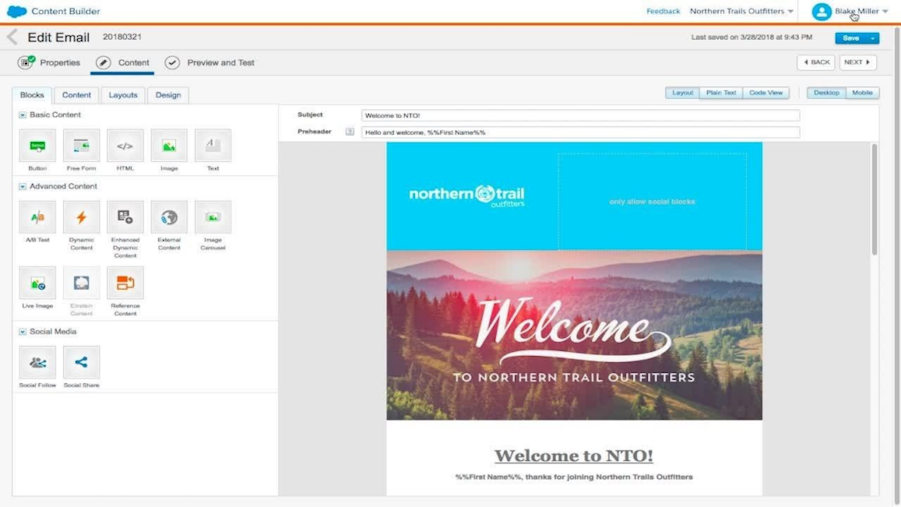
Email Studio in context
Email marketing remains one of the most widely used channels for communicating with customers, particularly for newsletters, product updates, promotions, and lifecycle messaging.
Within Salesforce Marketing Cloud Engagement, Email Studio is the dedicated place for designing and sending email campaigns. Marketers use it to create email templates, manage subscriber data, and track performance metrics from each campaign.
Because Email Studio connects with other Marketing Cloud tools such as Journey Builder and Automation Studio, it often forms part of a wider marketing workflow. For instance, an email may be created in Email Studio, triggered within a Journey Builder lifecycle campaign, and supported by segmentation processes managed through Automation Studio.
This combination allows email communication to operate as part of a coordinated marketing ecosystem rather than as a standalone channel.
Why Email Studio?
Email continues to play a central role in digital marketing because it provides a direct communication channel between organisations and their audiences at a low cost. Email Studio supports this by helping marketing teams:
design personalised email campaigns for different audience segments
manage subscriber lists and engagement preferences
track campaign performance and engagement metrics
integrate email communications with broader marketing journeys
deliver both promotional and transactional messages
These capabilities make it easier to maintain consistent communication with customers while measuring the effectiveness of each campaign.
How it works
Email Studio combines email design tools with audience segmentation and campaign management features.
Typical workflows include:
Email creation – Marketers design emails using templates or drag-and-drop content blocks
Audience segmentation – Subscriber lists are filtered based on attributes or behaviour
Campaign setup – Marketers schedule sends or configure triggered messages
Delivery management – The platform manages send timing, deliverability, and compliance
Engagement tracking – Metrics such as opens, clicks, and conversions are recorded
Performance optimisation – Results are analysed to improve future campaigns
These steps allow teams to run large-scale email programmes while maintaining detailed insight into audience engagement.
Comparisons
Email Studio vs Journey Builder
Email Studio is for designing and sending email campaigns.
Journey Builder manages multi-channel customer journeys, which may include email messages created in Email Studio.
Email Studio vs Automation Studio
Email Studio handles email content creation and campaign execution.
Automation Studio manages data processing and backend marketing workflows that support campaign preparation.
Email Studio vs traditional email marketing tools
Traditional email marketing platforms often operate independently of customer data systems.
Email Studio integrates with Salesforce CRM and Marketing Cloud tools, allowing email communication to be informed by broader customer data.
FAQs
What is Email Studio used for?
Email Studio allows marketers to create, personalise, and send email campaigns while tracking engagement and performance metrics.
Is Email Studio part of Salesforce Marketing Cloud?
Yes. Email Studio is one of the core channel tools within Salesforce Marketing Cloud Engagement.
Can Email Studio personalise email content?
Yes. Marketers can use dynamic content and segmentation to tailor messages to different audiences.
How does Email Studio track campaign performance?
The platform records engagement metrics such as opens, clicks, and conversions, allowing marketers to evaluate campaign effectiveness.
Who typically uses Email Studio?
Marketing teams responsible for email campaigns, newsletters, lifecycle messaging, and promotional communications.
Capabilities & More information
Capabilities of Salesforce
Common use cases include:
- Drag-and-drop email builder
- Tools to create personalised emails
- Audience segmentation
- A/B testing
- Analytics tools
- Automation features
- Integration with Salesforce CRM
- Dynamic content
Learn more about Salesforce
Resources and further reading...