What is Automation Studio?
Automation Studio is a workflow automation tool within Salesforce Marketing Cloud Engagement used to manage background marketing operations. It allows teams to schedule tasks such as data imports, segmentation updates, email sends, and reporting processes so these activities run automatically. Unlike Journey Builder, which focuses on customer-facing journeys, Automation Studio typically handles data preparation and operational marketing workflows that support campaigns behind the scenes.


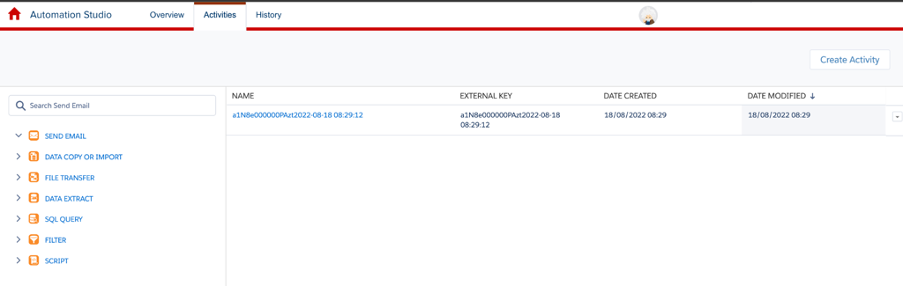
Automation Studio in context
Marketing teams often rely on large datasets to manage campaigns, audiences, and reporting. Preparing that data manually can be time-consuming, particularly when tasks need to be repeated on a regular schedule.
Automation Studio helps address this by allowing marketers to create automated workflows that run at defined intervals. These workflows can import data from external systems, update audience segments, trigger email sends, and perform other operational tasks that support marketing activity.
For example, a business might schedule a daily automation that imports customer data from another platform, updates audience segments based on recent interactions, and prepares lists for upcoming campaigns.
By automating these processes, teams can maintain accurate marketing data while reducing manual work.
Why Automation Studio?
Operational tasks often sit behind the scenes of marketing campaigns, but they play an important role in ensuring communications reach the right audience.
Automation Studio supports marketing operations by:
automating repetitive data management tasks
ensuring audience lists remain up to date
preparing data for marketing campaigns
scheduling marketing workflows in advance
reducing manual data processing
This allows marketing teams to focus more on campaign strategy and customer experience rather than routine operational tasks.
How it works
Automation Studio workflows are built from a series of activities that run sequentially.
A typical automation might involve:
Data imports – Bringing information from external sources into Marketing Cloud
Data processing – Updating or transforming datasets using SQL queries
Audience segmentation – Preparing target audiences for campaigns
Triggered actions – Initiating email sends or campaign activities
File exports – Sharing processed data with external systems
Scheduled execution – Running the workflow automatically on a defined schedule
Because these processes run automatically, organisations can maintain consistent marketing operations without manual intervention.
Comparisons
Automation Studio vs Journey Builder
Automation Studio focuses on data management and operational marketing workflows.
Journey Builder is designed for customer journey orchestration and multi-channel messaging.
Automation Studio vs Engagement Studio
Automation Studio supports backend marketing automation and data processing.
Engagement Studio supports lead nurturing workflows within Marketing Cloud Account Engagement.
Automation Studio vs manual marketing operations
Manual campaign preparation often requires importing data, updating lists, and scheduling sends individually.
Automation Studio streamlines these steps by running them automatically according to predefined workflows.
FAQs
What is Automation Studio used for?
Automation Studio is used to automate data imports, segmentation updates, campaign preparation, and other marketing operations.
Is Automation Studio part of Marketing Cloud?
Yes. It is a feature within Salesforce Marketing Cloud Engagement.
What types of tasks can Automation Studio automate?
It can automate tasks such as importing data, running SQL queries, preparing audiences, scheduling email sends, and exporting campaign data.
How does Automation Studio differ from Journey Builder?
Journey Builder manages customer communication journeys, while Automation Studio focuses on backend processes that support campaigns.
Who typically uses Automation Studio?
Marketing operations teams and administrators are responsible for managing marketing data and campaign workflows.
Capabilities & More information
Capabilities of Salesforce
Common use cases include:
- Workflow automation
- Drag-and-drop interface
- Scheduled and triggered automation
- Real-time data synchronisation between systems
- Integration with Salesforce CRM
- Segmentation tools
- Built-in tracking and reporting
- Customisable workflows
Learn more about Salesforce
Resources and further reading...