What is Sales Cloud for Slack?
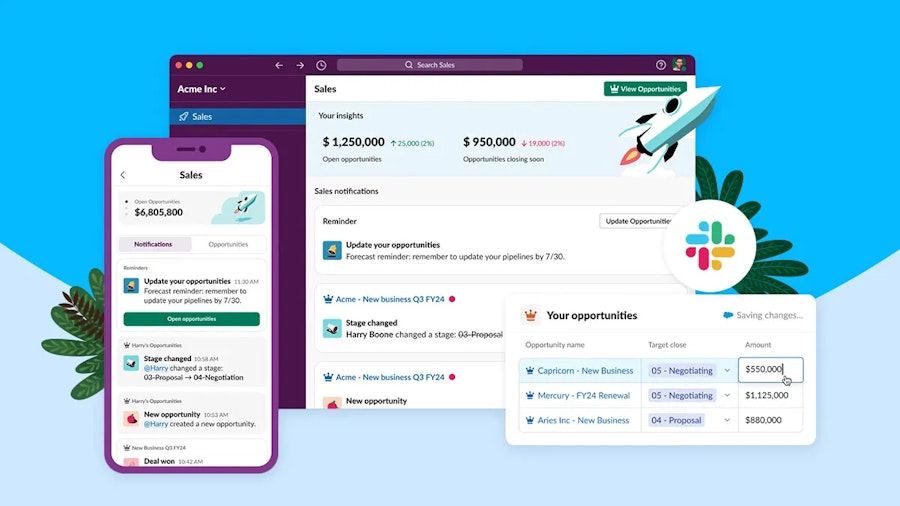
Sales Cloud for Slack is a Salesforce-supported integration that brings Sales Cloud CRM data and workflows directly into Slack, enabling sales teams to collaborate, access CRM context, and take action without switching between tools. It embeds key Sales Cloud insights and actions into Slack so that sales teams can see records, share context, and trigger CRM workflows within the same collaboration workspace. Instead of toggling between Slack and Salesforce, teams can work efficiently, with real-time CRM data, where they already communicate. This reduces friction, shortens sales cycles, and improves responsiveness.
Not to be confused with:
• Slack (as a standalone chat tool)
• Slack-First Customer 360 (broader Salesforce-wide strategy)
• Sales Cloud (CRM product)
Sales Cloud for Slack in context
Sales Cloud is Salesforce’s CRM product that centralises pipeline, accounts, opportunities, and activity management. Slack is a widely adopted collaboration platform where teams discuss deals, share updates, and coordinate next steps.
Sales Cloud for Slack marries these two workflows, bringing Salesforce data to the place where work already happens. Instead of copying and pasting links or hunting for context across tools, sales teams can:
Preview CRM records in Slack channels or DMs
Share live opportunities with teammates
Trigger Salesforce actions (like follow-ups) from Slack
Keep deal conversations tied to actual CRM data
This integration reflects a broader shift toward workflow-centric design: tools should meet users where they collaborate, not force users into rigid boundaries between systems!


Why Sales Cloud for Slack?
Sales Cloud for Slack saves time and preserves context - two things sales teams always feel short on.
In practical terms, it helps businesses:
Reduce tool switching — Less context loss between Salesforce and Slack
Improve responsiveness — Teams act faster with live CRM data
Standardise collaboration around CRM facts
Cut meeting overhead — Data is visible where decisions are made
Tie communication to records — Conversations are linked to CRM context
For sales teams juggling spreadsheets, channels, dashboards, and alerts, this brings coherence and focus back into a single context.
How Sales Cloud for Slack works
Sales Cloud for Slack uses Salesforce’s integration architecture and Slack’s extension points:
Connect — Admins enable the integration between Sales Cloud and Slack.
Subscribe channels — Select which Salesforce records or objects appear in which Slack channels.
Preview CRM data — Slack displays summaries for accounts, opportunities, etc.
Actionable items — Users can take CRM actions (create tasks, update statuses) directly from Slack posts.
Notifications and alerts — CRM triggers can push notifications into Slack based on opportunities, tasks, or custom events.
This integration uses secure APIs and OAuth-based authentication so that data shared in Slack respects Salesforce permissions and access controls.
Comparisons
Sales Cloud for Slack vs Slack
Slack itself is a general collaboration tool.
Sales Cloud for Slack brings Sales Cloud context and actions into Slack so conversations are tethered to revenue operations.
Sales Cloud for Slack vs Salesforce notifications
Traditional Salesforce alerts often arrive via email or in-app notifications.
Sales Cloud for Slack pushes context directly into the communication space teams are already using for real-time work.
FAQs
Do I need Sales Cloud to use Sales Cloud for Slack?
Yes. This integration leverages Sales Cloud CRM data, so a Sales Cloud subscription is required. Slack on its own won’t provide CRM context.
Is it secure to show CRM data in Slack?
Yes. Salesforce permissions are respected, and the integration uses secure OAuth connections so users only see data they’re authorised to access.
Can I take actions in Sales Cloud from Slack?
Depending on the setup, users can create tasks, update statuses, or trigger workflows directly from Slack using commands and buttons.
Does this work with Salesforce Mobile and Slack Mobile?
Yes. As long as the Slack integration is enabled and users are authenticated, previews and actions work across mobile devices.
Can non-Sales Cloud Salesforce users see Sales Cloud for Slack data?
Access is controlled by Salesforce permissions, so users must have appropriate CRM access to view records surfaced in Slack.
Capabilities & More information
Capabilities of Salesforce
Common use cases include:
- Live record previews — See the latest CRM context in Slack
- Triggered alerts — Notify teams when important CRM events occur
- Actionable commands — Create tasks or update opportunities from Slack
- Threaded communication — Tie Slack threads to Salesforce context
- Permission-aware sharing — Only surface CRM data users are authorised to see
- Improve operations - Reduce lag between CRM updates and team communication
Learn more about Salesforce
Resources and further reading...