What is Experience Cloud?
Salesforce Experience Cloud is Salesforce’s platform for building connected digital experiences such as customer portals, partner portals, help centres, and community forums. These experiences sit directly on top of Salesforce data, allowing organisations to securely share information, collaborate with external users, and extend CRM processes beyond internal teams. It was formerly known as Community Cloud.
Also known as:
• Experience Cloud
• Salesforce Communities
• Community Cloud (legacy name)
Not to be confused with:
Experience Cloud in context
Experience Cloud is designed to solve a common challenge: many business processes involve people who don’t work inside your Salesforce CRM system.
Customers may want to check the status of support cases. Partners may need access to sales materials or deal registrations. Employees may need a central hub to collaborate and share knowledge.
Experience Cloud provides a way to bring those audiences into a secure, branded digital space that connects directly to Salesforce data and workflows. Instead of sending emails back and forth or sharing spreadsheets, organisations can give users controlled access to the information and tools they need.
Historically, this product was known as Salesforce Community Cloud. The name changed to Experience Cloud as Salesforce expanded the platform beyond simple forums and communities into a broader digital experience platform capable of powering portals, websites, and collaborative spaces
Why Experience Cloud?
Experience Cloud helps businesses extend their Salesforce CRM beyond internal teams. In practical terms, it allows companies to:
Provide self-service portals where customers can access support resources
Enable partner collaboration for resellers and distributors
Share documents, knowledge articles, and updates with external stakeholders
Create branded websites connected directly to CRM data
Reduce support workloads by allowing customers to resolve issues independently
Build online communities where users can collaborate and share insights
For those with large customer or partner ecosystems, these capabilities can significantly improve communication and efficiency.


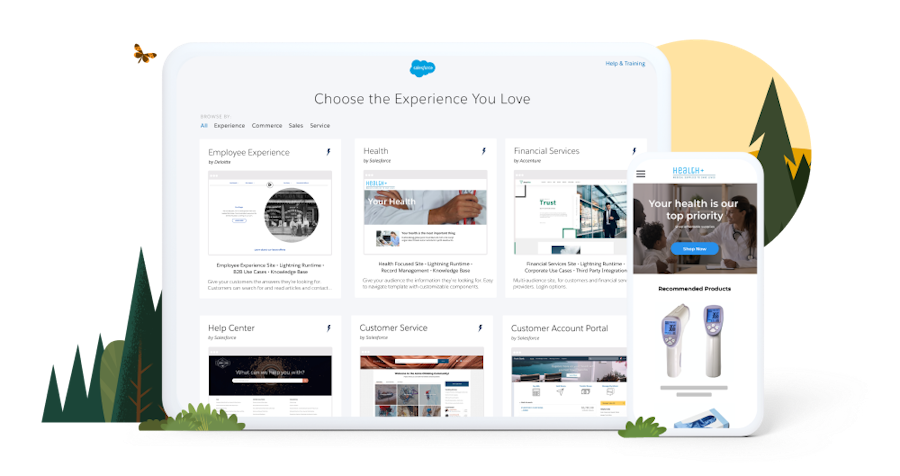
How Salesforce Experience Cloud works
Experience Cloud sits on top of the Salesforce platform and connects directly to your CRM data.
Typical implementations include:
Customer portals – Allow customers to log in and view cases, orders, or account details
Partner portals – Give partners access to leads, deal registrations, and sales resources
Knowledge centres – Provide searchable help articles and documentation
Community forums – Allow users to ask questions and collaborate with peers
Secure data access – Control which records external users can see through permissions
Because Experience Cloud is integrated with Salesforce, data updates automatically across systems, ensuring both internal teams and external users are working with the same information.
Comparisons
Experience Cloud vs Community Cloud
Community Cloud was the original name for Salesforce’s community and portal platform. The product was later renamed Experience Cloud to reflect its expanded capabilities for building digital experiences such as websites, portals, and mobile applications.
Experience Cloud vs Service Cloud
Service Cloud is used by internal customer support teams to manage cases and service processes.
Experience Cloud allows customers or partners themselves to access information and interact with those processes through portals or communities.
Experience Cloud vs Salesforce Platform
Salesforce Platform provides the underlying infrastructure and development tools for building applications.
Experience Cloud is a specific application layer designed for creating external-facing digital experiences connected to Salesforce data.
FAQs
What is Salesforce Experience Cloud used for?
Experience Cloud is commonly used to build customer support portals, partner collaboration portals, knowledge sites, and online communities connected to Salesforce data.
Is Experience Cloud the same as Community Cloud?
Yes. Community Cloud was the original product name, but Salesforce later renamed it Experience Cloud as the platform evolved to support broader digital experiences.
Who typically uses Experience Cloud?
Businesses that need to interact with customers, partners, or external stakeholders through secure online portals or communities.
Does Experience Cloud integrate with Salesforce CRM?
Yes. Experience Cloud sits directly on the Salesforce platform, meaning it can surface CRM records such as cases, accounts, and knowledge articles.
Can Experience Cloud reduce support workload?
Yes. By enabling self-service knowledge bases and community forums, many organisations reduce the number of support cases handled by internal teams.
Capabilities & More information
Capabilities of Salesforce
Common use cases include:
- Self-service portals – Allow customers to manage support interactions independently
- Partner collaboration spaces – Share deals, documents, and resources with partners
- Community forums – Enable discussions and peer-to-peer support
- Branded digital sites – Build custom websites and portals connected to CRM data
- Secure access control – Manage permissions for external users
- Knowledge sharing tools – Surface documentation and help resources
Learn more about Salesforce
Resources and further reading...