What are Salesforce Lightning Apps?
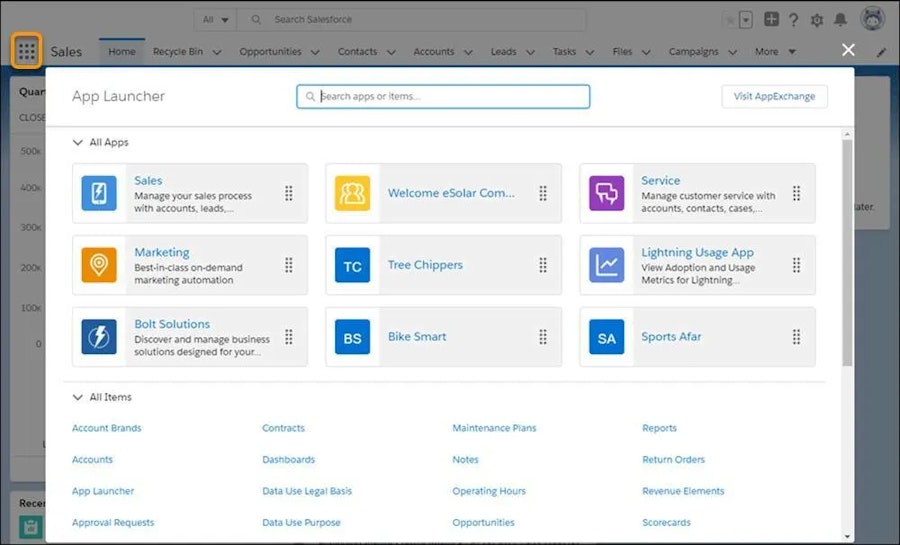
Lightning Apps are modular application experiences within the Salesforce Lightning Experience that organise navigation, objects, tabs, and tools into a single interface tailored for specific business functions or roles, such as sales, marketing, and service. Apps are visible in the App Launcher and help users access the data and functionality they need most efficiently. It’s also possible to build custom ‘Lightning’ apps designed to give users the precise tools they need.
Also known as:
• Lightning apps
• Custom Salesforce apps (in Lightning Experience)
• Lightning
Not to be confused with:
• Salesforce Lightning Experience (the interface)
• Lightning components (building blocks)
• AppExchange apps (third-party packaged apps)
Salesforce Lightning Apps in context
Salesforce Lightning Apps are part of the Lightning Experience — Salesforce’s modern interface designed to improve usability and productivity compared to the older Classic view.
In simple terms, Lightning Apps allow administrators to shape the Salesforce experience around how teams actually work. Within each app, admins can define which objects appear in the navigation, which custom tabs are available, and even apply specific branding such as colours and logos. This has many practical advantages.
Firstly, users are taken directly to the areas of Salesforce relevant to their role, simply by switching apps. Sales teams can quickly see opportunities and leads, while service teams have fast access to cases and queues. Generally, there’s less hunting through menus and fewer unnecessary tabs.
Secondly, Lightning Apps unlock functionality that isn’t available in Salesforce Classic. The Lightning framework supports modern components, utility bars, and custom pages that simply didn’t exist in the older interface.


Why Lightning Apps?
Lightning Apps help teams unlock the full potential of Salesforce by:
Streamlining navigation for different users
Reducing clutter by exposing only relevant items
Improving productivity through role-focused interfaces
Supporting customisation without code (via Lightning App Builder)
Enhancing user adoption of Salesforce tooling
Admins can choose which apps are visible to which profiles or permission sets to ensure users see only what’s relevant to their work.
How Lightning Apps work
Salesforce Lightning Apps are built and managed through the Lightning App Builder and the App Manager:
A Lightning App defines a set of navigation items (tabs) relevant to a role or workflow.
Tabs can link to objects, pages, dashboards, Visualforce, or Lightning component tabs.
Administrators assign apps to user profiles or permission sets so only appropriate users see them.
Users switch between apps using the App Launcher UI.
Custom branding (colours, logos) can reinforce a consistent user experience.
Apps are not standalone binaries; they leverage Lightning Experience frameworks to compose pages and components.
Comparisons
Lightning Apps vs Lightning Experience
Lightning Experience is the overall modern user interface for Salesforce.
Lightning Apps are navigation-centric bundles within that UI designed for specific workflows or teams.
Lightning Apps vs AppExchange apps
Lightning Apps are internal to your Salesforce org and tailored by your admins.
AppExchange apps are third-party packages installed to add functionality to Salesforce.
FAQs
Are Salesforce Lightning Apps the same as Lightning Experience?
No. Lightning Experience is the modern UI framework. Lightning Apps are specific navigational app bundles within that UI.
Can I create custom Lightning Apps?
Yes. Admins can build custom Lightning Apps using the Lightning App Builder and assign them to specific users or profiles.
Can Lightning Apps include dashboards and reports?
Yes. Tabs linked to dashboards, reports, and other pages can be included in a Lightning App.
Do Lightning Apps require code?
No, most Lightning Apps can be configured with point-and-click tools, though deeper customisation may use components.
Can I restrict access to Lightning Apps?
Yes. Access to different Lightning Apps can be controlled by profiles and permission sets.
Are Lightning Apps different from Salesforce mobile apps?
Lightning Apps can be surfaced in both desktop and Salesforce mobile app interfaces, tailored for mobile access as well.
Capabilities & More information
Capabilities of Salesforce
Common use cases include:
- Role-based navigation — Show different tabs to different users
- Custom interfaces — Add custom objects and components to an app
- Branding & UX — Apply colours and logos for recognisable apps
- App Launcher access — Centralised entry point for all apps
- Integration of tools — Include dashboards, analytics, utilities
- Responsive layout support — Works across desktop and Salesforce mobile
Learn more about Salesforce
Resources and further reading...