How to Manage Duplicates in HubSpot (& Prevent Them)

In almost every HubSpot audit we run, we uncover duplicate contacts or companies. Most of the time, teams aren’t even aware there’s an issue. The database has grown alongside new sales reps, new integrations, new forms, and somewhere along the way, a contact was created twice. Or a company record was duplicated because the domain was formatted slightly differently. Once you know duplicates exist, how do you go about managing them?

eBook cover with title How to Measure HubSpot ROI in the AI Age
Free ResourceDownload now

Duplicate records in HubSpot usually build up over time. They happen when a contact is created through a form, then later added manually by a sales rep, or an import brings in records that already exist under a slightly different email format.

The challenge with duplicates is not that HubSpot stops working, which is why teams don’t notice them. Your campaigns will still run, and workflows will still trigger. The main problem is that reporting becomes disjointed and unreliable, making it difficult to prove marketing ROI. A secondary problem is that you may hit contact tier limits earlier, creating extra costs.

Add the fact that AI depends on a healthy database to draw insights and recommendations, and frankly, HubSpot duplicates are not something you should ignore. HubSpot’s AI-powered features, from predictive scoring to content suggestions and reporting insights, rely on complete and accurate engagement history. When activity is split across multiple records, the system is working with partial information.

So if you want to manage duplicates in HubSpot properly, you need a clear understanding of how they are created, how HubSpot detects them, and what happens when you merge records. This knowledge delivers reporting accuracy and ensures AI features inside HubSpot are working from complete and reliable data.

How HubSpot detects duplicate contacts and companies

HubSpot does provide a built-in duplicate management tool for both contacts and companies.

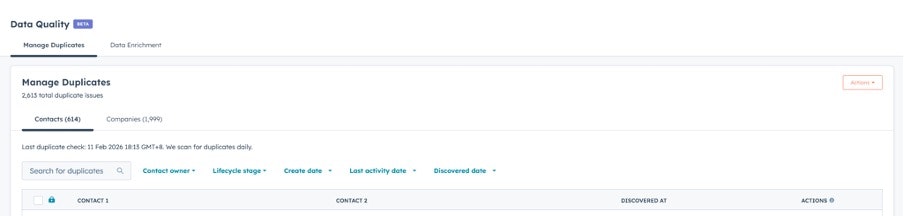
Within the Contacts and Companies tabs, you can access ‘Manage duplicates’, where HubSpot presents pairs of records it believes may represent the same entity.

Screenshot of the HubSpot Contacts section

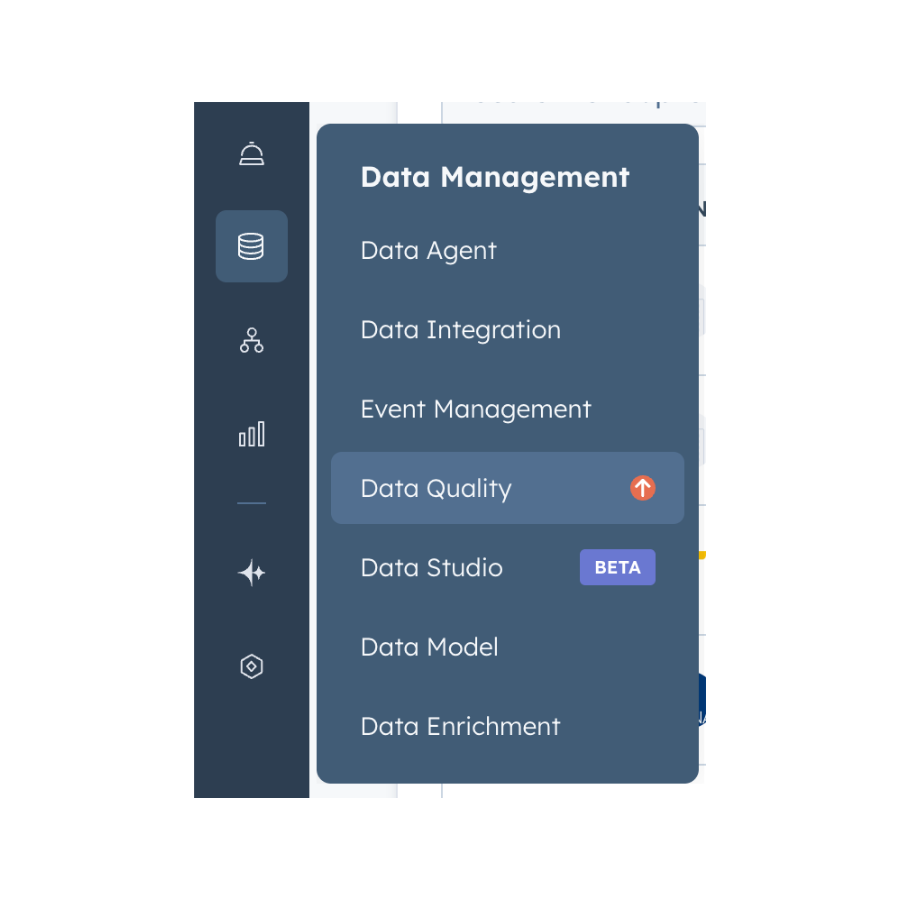
You can also go to ‘Data Management’ and then ‘Data Quality’ to see and manage duplicates. For contacts, this is primarily based on email address and similarity detection logic. For companies, the domain name is a key matching factor, alongside similar naming patterns.

Screenshot of HubSpot Data Management and Data Quality feature
Screenshot of Manage duplicates section in HubSpot

A very important note: HubSpot automatically detects suspected duplicates. It does not automatically merge them. Each pair must be reviewed and merged manually (ironically). 

But this manual review is deliberate. While automation would be faster, merging records incorrectly can cause larger issues than leaving duplicates in place. HubSpot, therefore, leaves the decision to the user.

Beyond the built-in tool, duplicates can be uncovered through filtering. For example:

  • Contacts sharing the same domain but with separate records

  • Contacts with identical phone numbers

  • Companies with similar names but slightly different domain formatting

  • Recently imported lists with unexpected volume increases

Naturally, regular filtering and review are more effective than waiting for problems to appear.

How to Measure HubSpot ROI

A guide for marketing leaders using HubSpot to prove ROI, secure budget, and run creative campaigns without the tech headaches.

  • Common challenges
  • HubSpot ROI framework
  • Five-step process
  • Implementation
  • Marketing execution
  • Campaign attribution
HubSpot ROI eBook
eBook cover with title How to Measure HubSpot ROI in the AI Age

How duplicates are created

Understanding how duplicates enter the system helps you prevent them.

Manual creation by sales reps

A sales rep may add a new contact without searching thoroughly first. If search settings are not restrictive enough, or if email addresses differ slightly, a second record can be created.

Imports

When importing lists, especially from events or third-party sources like Asana, Harvest, or Aircall, slight differences in email formatting, capitalisation, or alternative email fields can bypass standard deduplication logic.

Gmail or Outlook sync behaviour

The HubSpot Sales extension can create contacts automatically when emails are logged, depending on settings. If multiple reps are logging the same contact, or if auto-create is enabled without clear governance, duplicates can appear.

Integrations and API sync

Bidirectional sync with other systems, such as Salesforce, can create parallel records if mapping rules are inconsistent or if historical configuration changes were not documented.

All of these scenarios are the by-product of a growing system with multiple contributors. If you’ve just followed the steps above and discovered a list of duplicates, don’t stress because you’re part of the majority.

How to safely merge duplicate contacts in HubSpot

Once duplicates are identified, merging needs to be handled carefully. When you merge two records in HubSpot:

  • One becomes the primary record.

  • The other becomes secondary and is permanently deleted.

  • Timeline activity from both records is combined.

  • Deal, ticket, and company associations are preserved.

  • The primary record’s property values are retained.

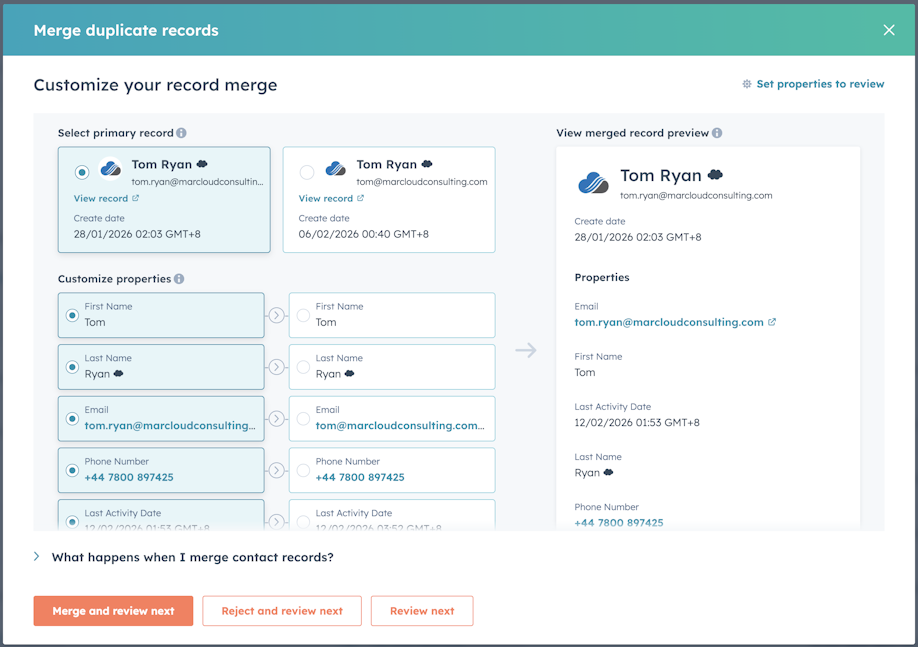
That final point is important. HubSpot does not automatically select the most complete or most recent property value. The primary record wins. If the secondary record contains more accurate lifecycle data or a critical custom property value, that information can be lost unless it is copied across before merging.

For this reason, it’s sensible to review the following before merging:

  • Lifecycle stage differences

  • Deal associations

  • Contact owner

  • Key custom properties

  • Recent activity

Choosing the correct primary record is not about which one was created first, but which one holds the most reliable core data that you can’t afford to lose.

Screenshot of record merge settings for a duplicate contact in HubSpot

Managing duplicates at scale

HubSpot does not support bulk merging of contacts or companies. Each duplicate pair must be reviewed and merged individually.

While that can feel time-consuming, it reduces the risk of incorrect merges that damage reporting further. In larger portals, you can take a structured approach by:

  • Prioritising high-value lifecycle stages such as SQL and Customer

  • Addressing recent imports first

  • Assigning responsibility for duplicate review to a specific role

  • Scheduling quarterly duplicate reviews as part of database governance

Managing duplicates at scale is less of an issue if you’re staying on top of them day-to-day.

Preventing duplicate contacts and companies

As the old saying goes, prevention is better than cure. Here are a few ways to stop duplicate contacts and companies from creeping into HubSpot in the first place:

Form configuration

  • Ensure email is required on all forms. 

  • Avoid creating alternative email fields that bypass primary email logic. 

  • Standardise field mapping across forms.

Sales governance

  • Train sales teams to search thoroughly before creating new records. 

  • Review auto-create settings in the HubSpot Sales extension and consider disabling automatic contact creation if it is generating unnecessary duplicates.

Integration review

  • Audit integration mapping periodically. 

  • Confirm that sync rules are consistent and that updates have not altered deduplication behaviour.

Workflow alerts

While workflows cannot merge duplicates, they can flag potential issues. For example, you can trigger internal notifications when multiple contacts share the same domain or phone number.

These measures do not eliminate duplicates altogether, but they will reduce the rate at which new ones are created.

What happens to key data when you merge

For clarity, the table below summarises how HubSpot handles data during a merge.

Element

What happens during merge

Timeline activity

Combined from both records

Deals and tickets

Associations preserved

Company association

Retained and consolidated

Lifecycle stage

Primary record value retained

Property values

Primary record values retained

Secondary record

Permanently deleted

A framework to manage duplicates in HubSpot

Following this basic but practical approach can help reduce and manage duplicates:

  1. Detect – Use HubSpot’s duplicate tool and custom filters regularly.

  2. Review – Check lifecycle stage, deals, and key properties before merging.

  3. Merge – Choose the most reliable record as primary and consolidate carefully.

  4. Prevent – Adjust forms, integration settings, and sales processes to reduce recurrence.

None of this requires complex automation or technical skills, but it does require consistency and the space or skill to update data collection processes, integrations, and sales alignment. You can always work with a HubSpot Partner (like MarCloud!) for database management.

Where to go from here

Managing duplicates in HubSpot is not something most teams prioritise until they hit reporting struggles. By that stage, the issue is usually a wider reflection on how the portal has evolved, with new processes layered onto old ones, integrations added, and imports run under pressure. 

Fixing your database properly requires more than merging a few contacts. It means understanding how the database is behaving and putting the right controls in place, so it stays healthy in the long-term, and you don’t have to repeat the exercise frequently.

If you suspect duplicates are affecting your reporting, marketing attribution, or AI outputs, it’s worth addressing the root cause rather than continuing to work around the symptoms. 

As an accredited HubSpot Partner, MarCloud regularly audits and restructures portals to restore data integrity and build governance. If you want clarity and confidence in your automation, we can help you get there. Just send us a message.

Tom Ryan headshot

Tom Ryan

Founder & CEO of MarCloud, Tom has been on both sides of the fence, client-side and agency, working with Salesforce platforms for the best part of a decade. He's a Salesforce Marketing Champion and certified consultant who loves to co-host webinars and pen original guides and articles. A regular contributor to online business and marketing publications, he's passionate about marketing automation and, along with the team, is rapidly making MarCloud the go-to place for Marketing Cloud and Salesforce expertise. He unapologetically uses the terms Pardot, Account Engagement and MCAE interchangeably.

More by Tom Ryan

Featured resource

eBook cover with title How to Measure HubSpot ROI in the AI Age

How to Measure HubSpot ROI

A guide for marketing leaders using HubSpot to prove ROI, secure budget, and run creative campaigns without the tech headaches.

Download now
View all resources

More recent posts

View all articles
Illustrated characters holding a MarCloud banner

Get expert Salesforce & HubSpot automation tips, straight to your inbox.

MarCloud is a team of certified Pardot, Marketing Cloud, and Salesforce specialists. We help businesses to unlock the potential of marketing automation. Join 2,000+ professionals who receive actionable insights to boost their automation performance.

Sign up to the newsletter

How to Measure HubSpot ROI

A guide for marketing leaders using HubSpot to prove ROI, secure budget, and run creative campaigns without the tech headaches.

Download now