Timesaving HubSpot Workflow Examples Every B2B Marketer Needs

If you work in B2B marketing, chances are your day rarely goes to plan. You’re building campaigns, fielding requests from sales, responding to “quick questions” from leadership, and trying to keep reporting on track, often all at once. With so many competing priorities, repetitive admin tasks end up eating into the time you’d rather spend on creative and strategic work. This is where HubSpot workflows can make a huge difference to your day.

eBook cover with title How to Measure HubSpot ROI in the AI Age
Free ResourceDownload now

Far from being just a tool for sending automated emails, HubSpot workflows are one of the most powerful ways to reduce manual effort, keep data clean, and make sure marketing and sales teams stay aligned. With the help of HubSpot’s AI assistant Breeze, creating workflows is faster and more intuitive than ever, too.

To help you reclaim precious time, here are some HubSpot workflow examples designed specifically for stretched B2B marketers. They’re practical automations you can implement to save hours each week, while still supporting attribution, ROI reporting, and lead handoff.

What are HubSpot workflows?

Workflows in HubSpot are automation rules that trigger actions when certain conditions are met. This might mean updating a contact’s property when they complete a form, creating a task for sales reps when a lead reaches MQL status, or even managing deal records as they move through the pipeline.

Think of workflows as your behind-the-scenes team. They do the repetitive data handling, notifications, and assignments that would otherwise fall to you or your colleagues. And because they run in real time, they also ensure sales reps and account managers never miss a moment to act.

Why HubSpot workflow examples matter for B2B

B2B marketers are constantly pulled in multiple directions, which makes efficiency crucial. The right workflows help by:

  • Reducing admin: Routine updates like assigning leads or setting lifecycle stages are handled automatically.

  • Improving data accuracy: Workflows can standardise messy inputs, reducing reporting errors and fixing data migration issues.

  • Speeding up lead follow-up: Sales are notified instantly when a contact is ready, closing the gap between engagement and outreach.

  • Supporting attribution: Campaign IDs and lead sources are tagged automatically, making it easier to prove ROI.

  • Freeing up time: With the manual tasks handled, you can focus on creative campaigns that drive growth.

As a HubSpot Solutions Partner, MarCloud is your expert in technical consulting. When workflows misfire, reporting doesn’t add up, or integrations aren’t doing what they should, it’s easy to get stuck. Our technical consultants step in to help you fix, optimise, and scale your HubSpot setup. Let’s talk.

How to Measure HubSpot ROI

A guide for marketing leaders using HubSpot to prove ROI, secure budget, and run creative campaigns without the tech headaches.

  • Common challenges
  • HubSpot ROI framework
  • Five-step process
  • Implementation
  • Marketing execution
  • Campaign attribution
HubSpot ROI eBook
eBook cover with title How to Measure HubSpot ROI in the AI Age

Timesaving HubSpot workflow examples

Here’s the good stuff - the reason you’re really here! Below are six workflow examples that are especially useful in a B2B context. They’re designed to tackle everyday challenges and create more space for strategic work.

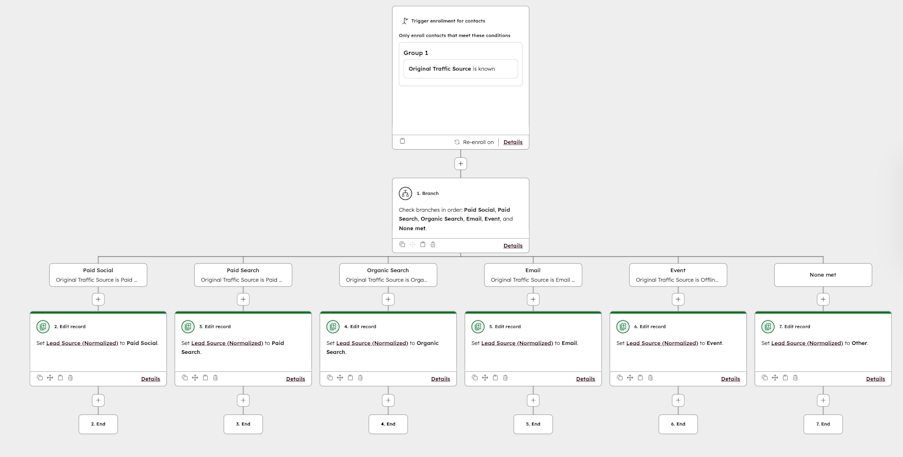
1. Lead source normalisation

Messy UTM data or free-text form entries can make reporting a nightmare. This workflow standardises the values for lead source so they’re consistent and reportable. For example, “LinkedIn Ad”, “linkedin ads”, and “LinkedIn Campaign” can all be normalised to a single “LinkedIn Paid” source.

How it helps: You spend less time cleaning spreadsheets and more time analysing performance. Accurate lead source data also means attribution reports reflect reality.

Screenshot of HubSpot workflow for lead source normalisation

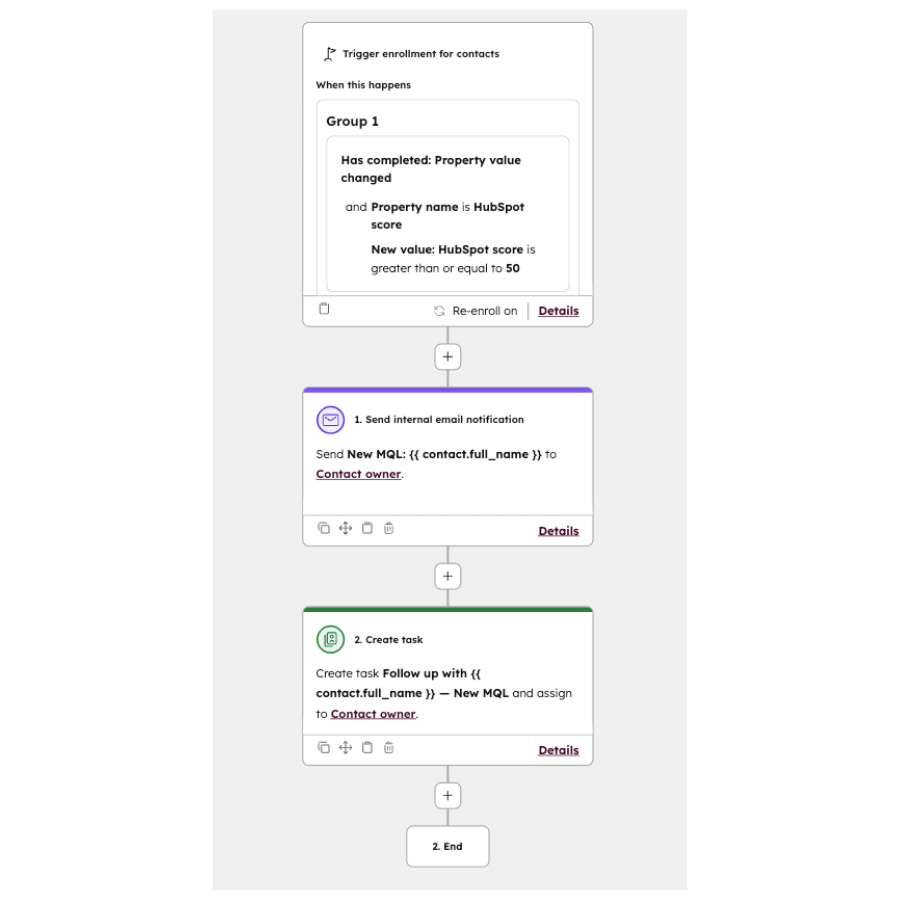
2. MQL to Sales alert

When a contact meets your MQL criteria, this workflow automatically notifies the assigned sales rep. The alert can be delivered by email, Slack, or Teams, and it can create a task in HubSpot CRM so there’s a record of the follow-up.

How it helps: Sales get notified the moment a lead is ready, instead of waiting for manual updates. That makes it easier to strike while interest is high and improves conversion rates.

Screenshot of HubSpot workflow for MQL to SQL

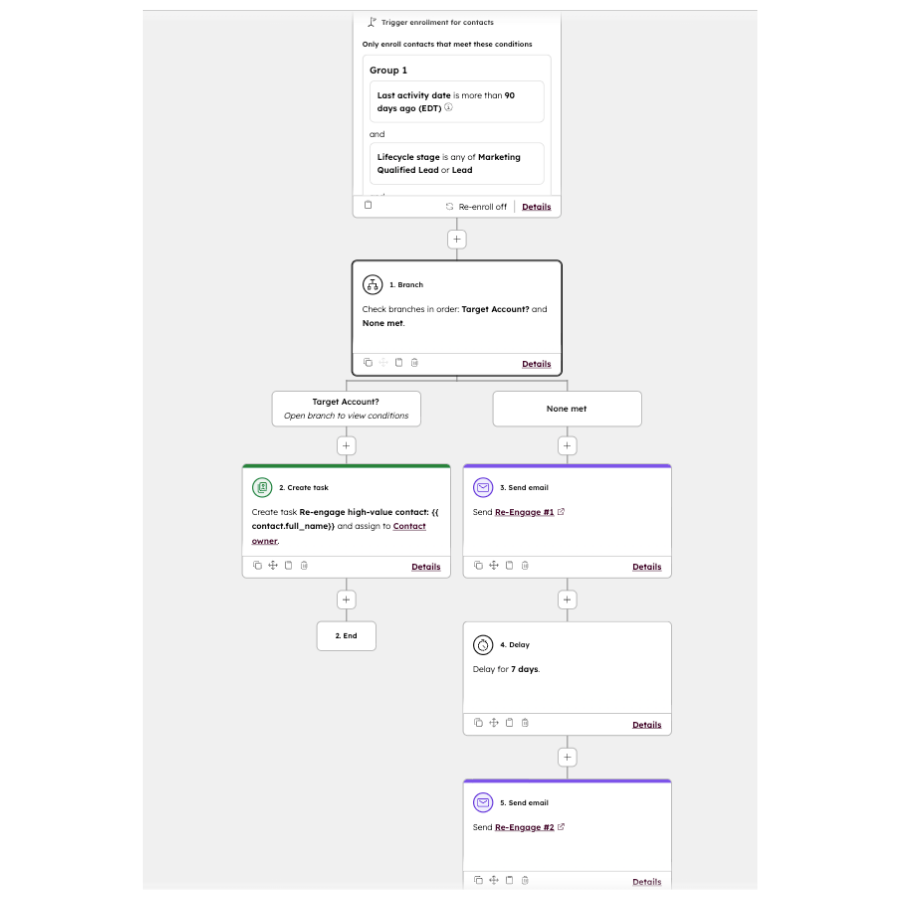
3. Re-engagement nurture

This workflow identifies leads who haven’t engaged for a set period of time, and drops them into a short re-engagement sequence. That could be a two-email series, or even a personalised outreach from the Sales Director if the account is high value.

How it helps: You keep the pipeline warm without manually building lists and chasing cold contacts. It also gives marketing a steady way to revive leads that would otherwise be forgotten.

Screenshot of HubSpot workflow for re-engagement

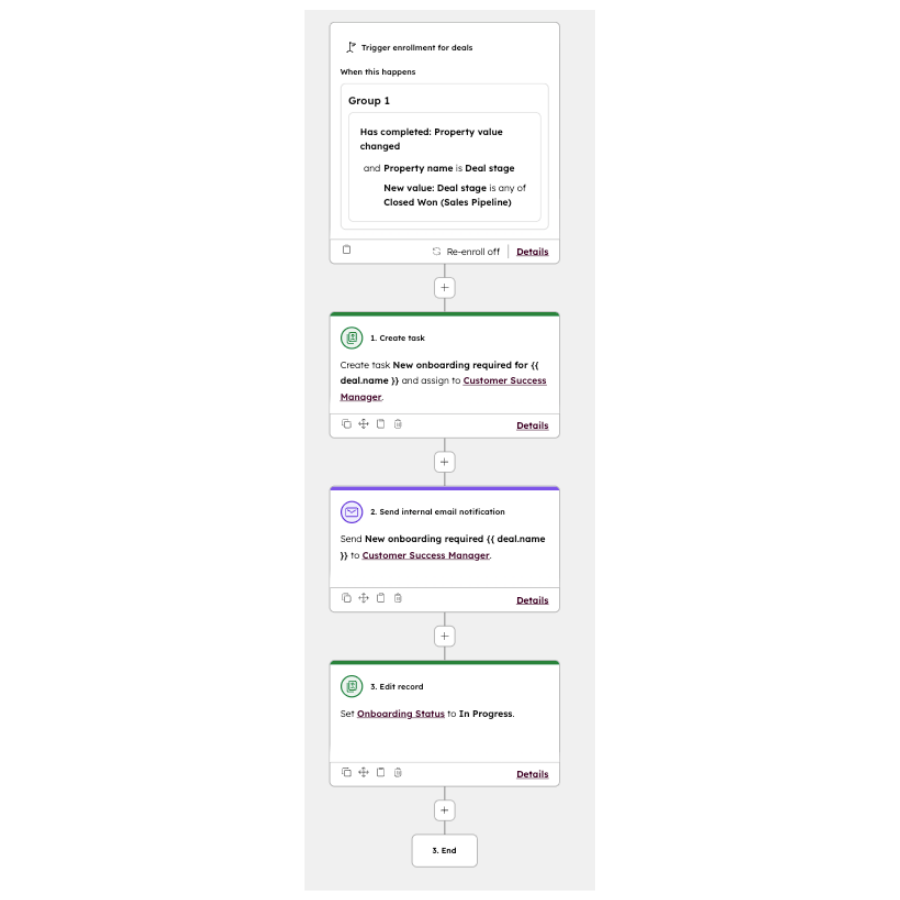
4. Deal handoff

When a deal moves to a particular stage, this workflow triggers handoff tasks for the right team. For example, when a deal is marked “Closed Won”, a task is created for the account manager to onboard the client, while customer success is notified to set up a kick-off call.

How it helps: No more missed handoffs or awkward gaps between sales and delivery teams. Everyone knows what they need to do and when they need to do it.

Screenshot of HubSpot workflow for deal handoffs

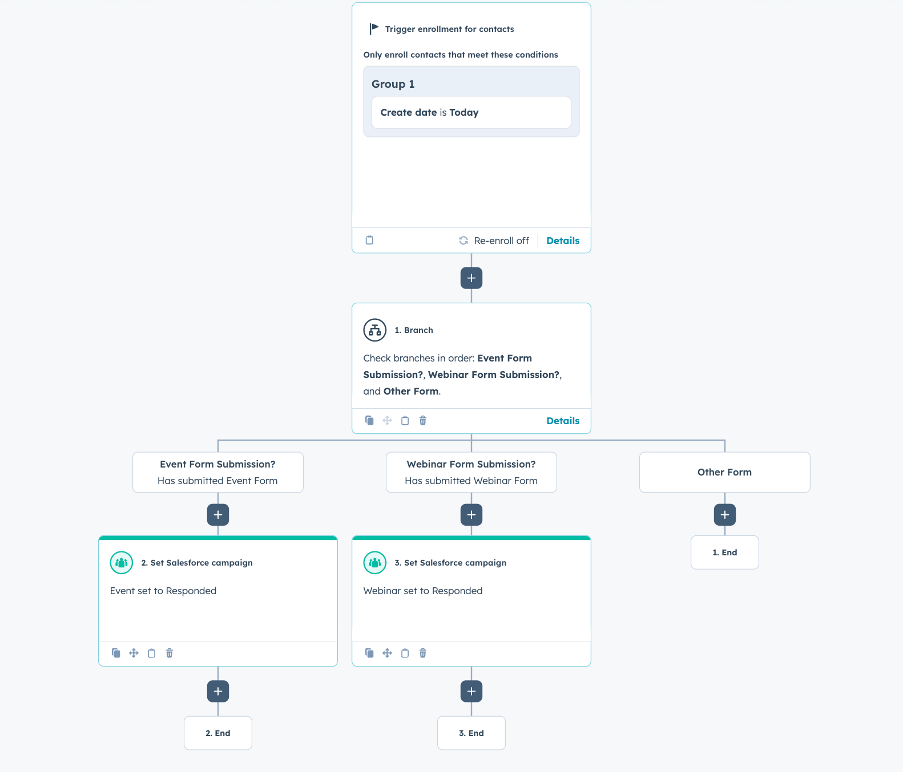
5. Campaign attribution tagging

This workflow automatically tags new contacts with the right campaign ID or lifecycle stage based on how they entered HubSpot. Leads from webinars, paid media, or events are consistently labelled at the point of entry.

How it helps: Attribution data is accurate from the start, and marketers don’t need to spend hours manually tagging records. Reporting to the C-suite on campaign performance becomes much easier.

Screenshot of HubSpot workflow for campaign attribution

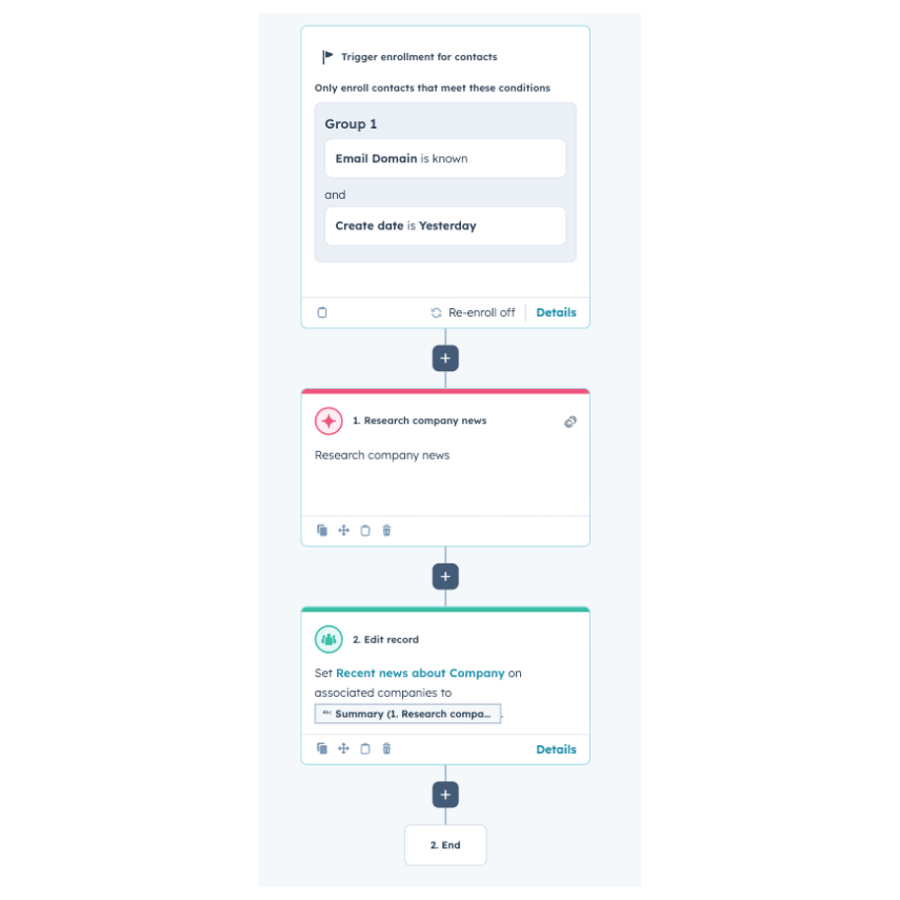
6. AI-powered research

Using HubSpot’s AI action, you can create a workflow that automatically generates a summary of the latest publicly available news about a company. When a new contact enters HubSpot (and their email domain is known), the workflow collects recent updates—such as product launches, funding announcements, or leadership changes—and stores the summary on the associated company record. This gives teams quick access to relevant information without manual research.

How it helps: Sales and marketing teams gain immediate context before outreach, account records are more informative, and you save time that would otherwise be spent searching for company updates.

Screenshot of HubSpot workflow for AI research

Building workflows efficiently (& avoiding mistakes)

While the examples above show what’s possible, the key to success is how you approach building workflows. A few principles to keep in mind:

  • Start with the goal. Always be clear on what you want the workflow to achieve before diving into the builder.

  • Test before scaling. Run new workflows with small datasets to check they behave as expected.

  • Document what you build. Keep a record of each workflow’s purpose, triggers, and actions so the wider team understands what’s automated.

  • Review regularly. Your processes will change over time. A quarterly review helps ensure workflows still reflect how marketing and sales operate.

Workflows can be creative (& fun!) too

One of the most overlooked aspects of workflows is that they can be fun to design. Beyond the “must-have” automations, you can get creative. Think nurture sequences that trigger when a customer is approaching renewal, or account-based workflows that send personalised resources when a specific decision-maker downloads key content.

When workflows handle the repetitive jobs, you’re free to focus on the campaigns that need a more human touch.

At MarCloud we work with organisations to design and implement HubSpot workflows that deliver real value - processes that genuinely save time and drive tangible business results, like ROI. If you’d like to explore how we can help, get in touch.

Tom Ryan headshot

Tom Ryan

Founder & CEO of MarCloud, Tom has been on both sides of the fence, client-side and agency, working with Salesforce platforms for the best part of a decade. He's a Salesforce Marketing Champion and certified consultant who loves to co-host webinars and pen original guides and articles. A regular contributor to online business and marketing publications, he's passionate about marketing automation and, along with the team, is rapidly making MarCloud the go-to place for Marketing Cloud and Salesforce expertise. He unapologetically uses the terms Pardot, Account Engagement and MCAE interchangeably.

More by Tom Ryan

Featured resource

eBook cover with title How to Measure HubSpot ROI in the AI Age

How to Measure HubSpot ROI

A guide for marketing leaders using HubSpot to prove ROI, secure budget, and run creative campaigns without the tech headaches.

Download now
View all resources

More recent posts

View all articles
Illustrated characters holding a MarCloud banner

Get expert Salesforce & HubSpot automation tips, straight to your inbox.

MarCloud is a team of certified Pardot, Marketing Cloud, and Salesforce specialists. We help businesses to unlock the potential of marketing automation. Join 2,000+ professionals who receive actionable insights to boost their automation performance.

Sign up to the newsletter

How to Measure HubSpot ROI

A guide for marketing leaders using HubSpot to prove ROI, secure budget, and run creative campaigns without the tech headaches.

Download now