Complete Guide to HubSpot Form Tracking for Proper Attribution

To implement HubSpot form tracking properly, you need more than a form on a page. Accurate attribution depends on UTMs, cookies, fields, lifecycle logic, and (where relevant) Google Tag Manager and cross-domain tracking. There’s no denying that HubSpot handles form creation and submission capture well out of the box, but reliable campaign-to-revenue reporting only happens after these are in place.

eBook cover with title How to Measure HubSpot ROI in the AI Age
Free ResourceDownload now

When a contact completes a HubSpot form, you can open their record and see a clear history of activity, including:

  • Which form they submitted

  • Which page they converted on

  • What they entered into each field

What HubSpot doesn’t guarantee is that every form submission is attributed back to the right campaign, channel, and revenue outcome, especially once you introduce multiple campaigns, domains, and sessions.

Form tracking and attribution are not the same thing, and HubSpot doesn’t force you to think about that difference upfront.

So let’s look at how HubSpot form tracking works, where the built-in tracking stops, and what needs to be in place if you want reliable attribution that secures future budget.

How to Measure HubSpot ROI

A guide for marketing leaders using HubSpot to prove ROI, secure budget, and run creative campaigns without the tech headaches.

  • Common challenges
  • HubSpot ROI framework
  • Five-step process
  • Implementation
  • Marketing execution
  • Campaign attribution
HubSpot ROI eBook
eBook cover with title How to Measure HubSpot ROI in the AI Age

Differences between form tracking & attribution

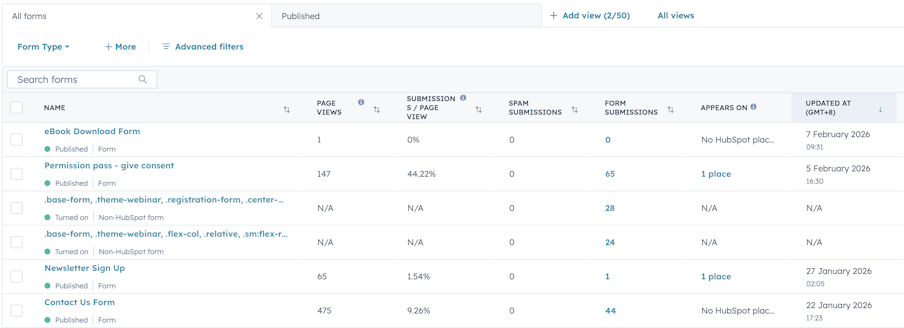
HubSpot form tracking answers a crucial question: where a conversion happened. It records the form, the page, the time, and the values submitted. For marketers, that information is easy to access, and for lead capture and management, it does the job.

Screenshot of HubSpot Forms landing page

Attribution comes into play when, instead of looking at individual conversions, you’re trying to understand patterns. Which campaigns are generating consistent marketing-qualified leads? Which channels influence revenue? Does performance support the budget you’re asking for? These are the questions marketing leaders are grappling with day-to-day. 

Marketing attribution is the practice of identifying and assigning credit to activities, channels, or touchpoints that contribute to a customer action, such as a lead conversion, opportunity creation, or revenue. 

The process involves tracking how prospects interact with marketing over time and applying a defined model (for example, first-touch, last-touch, or multi-touch attribution) to determine how value is assigned across those interactions. We need to understand what is driving outcomes so we can measure performance, justify budgets, and plan future activity.

Working with a HubSpot Partner like MarCloud can help marketers move from basic form tracking to true ROI reporting without getting caught up in technical tasks.

What HubSpot form tracking does well

Let’s be clear about this upfront: HubSpot does a solid job with the basics.

When you use native HubSpot forms, submissions are consistently associated with contact records. Field values map cleanly to properties. The form name and page URL are recorded in the contact timeline. Known visitors are tracked via cookies, assuming consent is in place.

Screenshot of Form Activities on a HubSpot contact record

If your main concern is capturing leads and understanding who submitted what, this works as expected. There’s nothing inherently unreliable about HubSpot form tracking at that level.

In fact, MarCloud usually builds on HubSpot’s native strengths rather than replacing them.

How attribution works in HubSpot

HubSpot’s attribution relies on a combination of source properties, campaign associations, lifecycle stages, and deal reporting. 

The default source properties, such as Original Source and Latest Source, are useful for understanding broad trends. They help see how traffic breaks down at a channel level, and for spotting changes over time.

What they don’t do is explain campaign-level performance or buying journeys. That’s why many teams lean on UTMs alongside HubSpot’s native source data, particularly when they need to justify spend or explain performance outside the marketing team.

HubSpot doesn’t impose a single attribution model. It gives you the tools, but it doesn’t decide how they should be used together. If that structure hasn’t been thought through, the data will still exist, but it won’t always tell a clear attribution story.

This is typically where MarCloud helps join the dots between HubSpot’s tools, so source data, campaigns, and lifecycle stages are aligned.

Using UTMs with HubSpot forms

UTMs are still one of the best ways to understand how someone arrived at a site and what prompted them to take action. Even with HubSpot’s built-in source tracking, they’re useful when you need to talk about performance at a campaign level.

HubSpot will automatically track traffic source information for contacts and, in some cases, capture the campaign name from a utm_campaign parameter in its source drill-down fields. For many teams, that’s enough to understand high-level trends.

Where UTMs are useful is when teams want more insight and control. For example, when you need to report on specific campaign parameters, use them in workflows, or sync them cleanly into another system, like Salesforce CRM. In those cases, UTMs can be stored as dedicated contact properties rather than relying solely on HubSpot’s traffic source fields.

A word of warning: problems can arise when UTMs are captured without a clear plan for how they’ll be used. If there’s no agreed-upon approach to reporting or overwrite rules, UTM values can quickly become unruly or misleading over time.

The role of hidden form fields

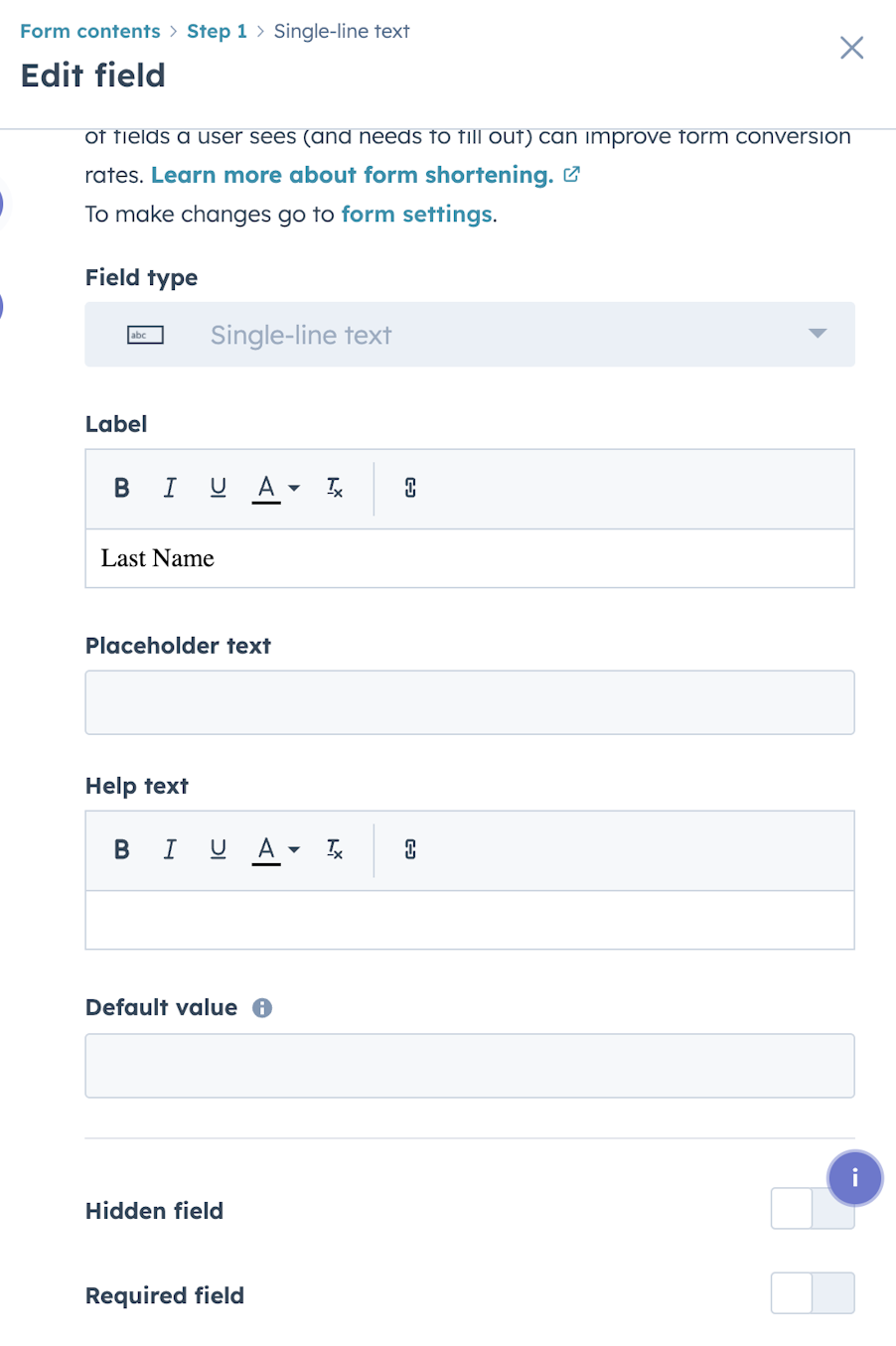
Hidden form fields are one way teams choose to store UTM parameters and other contextual values as contact properties in HubSpot. They allow information that already exists in the URL, such as campaign parameters, to be saved at the point a form is submitted without the prospect needing to see or interact with it.

Screenshot of HubSpot form hidden field setting

When planned properly, hidden fields integrate cleanly with contact records and can support more consistent reporting, segmentation, or CRM sync. They don’t change the user experience, and they don’t replace HubSpot’s native source tracking. They simply provide additional context that some teams find useful later on.

It’s important to be clear about what hidden fields do and don’t do. They capture values that are present at the time the form is submitted. They don’t automatically carry UTMs across pages, and they won’t recover campaign data that’s already been lost earlier in the session. Because of that, they’re most effective when used as part of a wider tracking approach.

Hidden fields are something MarCloud implements selectively, only when they support real reporting or CRM requirements.

HubSpot form types

Not all HubSpot forms behave the same way from an attribution point of view. Embedded forms are straightforward. They sit on a specific page, inherit that page’s context, and tend to align with a single campaign. For campaign landing pages, they’re easiest to report on.

Pop-up and slide-in forms can convert well, but because they can appear across many pages, they can end up taking credit for conversions influenced elsewhere. This doesn’t mean they shouldn’t be used, just that they need to be chosen with caution.

Similarly, custom-coded forms using HubSpot’s Forms API offer flexibility, but they remove some of the built-in guardrails. Attribution quality will depend entirely on how they’re implemented and tested, and issues are easier to introduce without noticing.

MarCloud often reviews form types as part of HubSpot audits, helping teams balance conversion performance with clean attribution.

Cross-domain tracking

Cross-domain journeys are more complex, and usually, the place attribution breaks down. Sometimes forms submit, contacts get created, and teams can still see conversion pages in HubSpot, but when you try pulling performance over time, the reports don’t make sense.

This tends to happen when a prospect moves between domains. You might run content on your main site, host webinars or event pages on a subdomain, and send people to a separate domain for booking, calculators, client portals, or application forms. From the prospect’s point of view, it’s one journey. From a tracking point of view, it’s several separate sessions unless cross-domain tracking is set up properly.

When cross-domain tracking isn’t configured, the handover between domains breaks the link back to the original session. You might start seeing things like:

  • A paid campaign is clearly driving contacts, but conversions are showing as “Direct”

  • A contact’s “latest” source is changing in a way that doesn’t match what happened

  • Landing pages are performing well, but forms are underperforming in reports

  • Deals that you know were influenced by campaigns, but the attribution trail looks short or incomplete

What’s happening is that the visit is being treated as a new session on the second domain. The original context is lost, which means HubSpot’s source tracking and any campaign-level reporting have less to work with. The form isn’t the cause of that. It just happens to be where the conversion becomes visible, so it gets the blame.

HubSpot does support cross-domain tracking, but it needs to be set up. You need to ensure:

  • The HubSpot tracking code is present on every relevant domain

  • All domains are configured so HubSpot can recognise them

If you’re also using GA4, you’ll want to align cross-domain settings there, or else you end up with two different versions of the truth depending on which platform you’re looking at.

Some “cross-domain” problems are really “subdomain” problems. Some are caused by consent banners that stop cookies from carrying across, or by pages that load inside iframes or third-party tools where HubSpot tracking can’t behave normally. 

If your conversion path crosses domains, treat tracking as part of the form rollout, not something to sort later. When MarCloud does HubSpot implementations, this is one of those areas we’ll check early, because once set up wrong (or not at all!), it becomes much harder to untangle what’s happening behind the scenes.

How to Measure HubSpot ROI

A guide for marketing leaders using HubSpot to prove ROI, secure budget, and run creative campaigns without the tech headaches.

  • Common challenges
  • HubSpot ROI framework
  • Five-step process
  • Implementation
  • Marketing execution
  • Campaign attribution
HubSpot ROI eBook
eBook cover with title How to Measure HubSpot ROI in the AI Age

Connecting form tracking to revenue

The main reason for tracking forms is to show and explain marketing-sourced or influenced revenue. It’s about tying activities to the end business goal.

Achieving this comes down to lifecycle stages. A form should move a contact into the right stage based on what that form actually represents. A newsletter signup, a content download, and a demo request are very different signals, but they’re often treated the same.

In a nutshell, forms and lifecycle logic need to be aligned. Forms should be designed with a clear view of what stage they represent, and UTMs or campaign context captured at that point need to marry up, all the way through to deal creation. 

HubSpot form tracking & attribution checklist

If you want HubSpot form tracking to support reliable attribution and revenue reporting, these are the key things to have in place. You don’t need all of them on day one, but you do need to be clear about which ones matter for your business.

1. Be clear on what you’re using forms to prove

Before creating your forms and tracking elements, be clear on the outcome:

  • Are you trying to prove lead volume, pipeline contribution, or closed revenue?

  • Do you need campaign-level insight, or is channel-level reporting enough?

  • Will this data be used outside HubSpot (for example, in Salesforce)?

2. Know what HubSpot tracks automatically (and what it doesn’t)

HubSpot will:

  • Track form submissions against contact records

  • Record the form and page where the conversion happened

  • Populate default source properties (Original / Latest Source)

HubSpot will not:

  • Decide how attribution should work for your business

  • Preserve campaign context unless you plan for it

  • Automatically align forms, lifecycle stages, and revenue reporting

3. Decide how to use UTMs

If you’re going to use UTMs, be intentional with them:

  • Decide whether you need campaign-level detail or just high-level trends

  • Agree on which parameters matter and how they’ll be reported on

  • Decide whether you need first-touch, last-touch, or both

4. Use hidden fields only where they add value

Hidden form fields are optional, and they’re useful when you need:

  • UTMs stored as dedicated contact properties

  • Data available for workflows, segmentation, or CRM sync

  • More control than HubSpot’s traffic source fields allow

They’re not a fix for:

  • Missing UTMs earlier in the journey

  • Broken session tracking

  • Unclear attribution strategy

Use them deliberately, or not at all.

5. Choose form types with attribution in mind

Different form types behave differently in reports:

  • Embedded forms are usually the cleanest for campaign attribution

  • Pop-up and slide-in forms need care, as they can blur campaign credit

  • Custom-coded forms require proper implementation and testing

6. Treat cross-domain tracking as part of form setup

If a user can land on one domain and convert on another, then cross-domain tracking should be reviewed before forms go live.

At a minimum, check:

  • HubSpot tracking code is present on all relevant domains

  • Domains are configured to be recognised

  • GA4 cross-domain settings are aligned, if applicable

7. Align forms with lifecycle stages

Every form should represent a clear level of intent.

Ask:

  • What lifecycle stage should this form move someone into?

  • Is that stage change happening automatically and consistently?

  • Does that reflect how buying decisions actually happen in your business?

If lifecycle progression is inconsistent, revenue attribution will be too.

8. Assign form to campaign

Ensure the form is associated with the correct marketing campaign, enabling you to compare the success of the form against other asset types and the overall success of the campaign.

Screenshot of 'Add to marketing campaign' setting in Hubspot form

9. Don’t set & forget

Build in light housekeeping for your forms (and HubSpot in general!).

  • Retire unused forms

  • Review lifecycle rules as strategy changes

  • Sense-check reports against real-world results

Area

What to check

Why it matters

Where MarCloud helps

Form tracking basics

Forms correctly tied to contacts and pages

Ensures lead capture works reliably

Form audits and cleanup

Attribution definition

Clear agreement on what attribution needs to prove

Prevents conflicting reports later

Attribution framework design

Source properties

Original / Latest Source understood and used correctly

Avoids misreading HubSpot data

Reporting and training

UTMs

Clear plan for when and how UTMs are used

Keeps campaign reporting usable

UTM strategy and setup

Hidden fields

Only used where they add real value

Avoids unnecessary complexity

Controlled implementation

Form types

Form choice matches campaign intent

Prevents skewed attribution

Form audit

Cross-domain tracking

Tracking consistent across domains

Stops “Direct” inflation

Technical HubSpot setup/development

Lifecycle stages

Forms map to meaningful lifecycle changes

Preserves marketing influence

Lifecycle design and workflows

Deal reporting

Deal data inherits the contact context

Enables revenue attribution

HubSpot–CRM alignment

Ongoing governance

Regular reviews and cleanup

Prevents attribution drift

Ongoing HubSpot support

Next steps

HubSpot form tracking should always be treated as part of a wider attribution system. Forms, UTMs, lifecycle stages, campaigns, and deal reporting all need to line up if ROI reporting is going to be clear and reliable. The good news is, once all the pieces are in place, marketing teams can explain performance with confidence.

MarCloud works with marketing teams using HubSpot to help make form tracking, attribution, and reporting reliable without adding unnecessary complexity. This includes everything from reviewing existing forms, setting up UTMs and lifecycle logic properly, to handling cross-domain and development.

If you want a second set of eyes on your HubSpot setup, or you’re planning new forms and want to get it right from the start, get in touch.

Tom Ryan headshot

Tom Ryan

Founder & CEO of MarCloud, Tom has been on both sides of the fence, client-side and agency, working with Salesforce platforms for the best part of a decade. He's a Salesforce Marketing Champion and certified consultant who loves to co-host webinars and pen original guides and articles. A regular contributor to online business and marketing publications, he's passionate about marketing automation and, along with the team, is rapidly making MarCloud the go-to place for Marketing Cloud and Salesforce expertise. He unapologetically uses the terms Pardot, Account Engagement and MCAE interchangeably.

More by Tom Ryan

Featured resource

eBook cover with title How to Measure HubSpot ROI in the AI Age

How to Measure HubSpot ROI

A guide for marketing leaders using HubSpot to prove ROI, secure budget, and run creative campaigns without the tech headaches.

Download now
View all resources

More recent posts

View all articles
Illustrated characters holding a MarCloud banner

Get expert Salesforce & HubSpot automation tips, straight to your inbox.

MarCloud is a team of certified Pardot, Marketing Cloud, and Salesforce specialists. We help businesses to unlock the potential of marketing automation. Join 2,000+ professionals who receive actionable insights to boost their automation performance.

Sign up to the newsletter

How to Measure HubSpot ROI

A guide for marketing leaders using HubSpot to prove ROI, secure budget, and run creative campaigns without the tech headaches.

Download now